Rating 4.6 out of 5 stars with 4565 reviews
4.6- Sound Quality (3075)
- Comfort (843)
- Battery Life (672)
- Price (166)
- Bass (150)
- Volume (24)
Customer Images
The vast majority of our reviews come from verified purchases. Reviews from customers may include My Best Buy members, employees, and Tech Insider Network members (as tagged). Select reviewers may receive discounted products, promotional considerations or entries into drawings for honest, helpful reviews.
- Rated 5 out of 5 stars
Best Noise Cancelling Headphones for the Money
Overall, these headphones have more than met my expectations. I was looking for headphones that were comfortable, reproduced a good range of audio (classical, country, R&B, movie audio and talk), had good noise cancelling features and where not going to cost more than $250. Comfort - the heaphones are comfortable to wear, even for those of us who wear glasses. The headphones feel snug but are not overly tight. After some use they do feel warm and I would attribute that to the padding not being made of leather. In have begun looking for leather replacement pads. Sound - the sound is great! Treble, bass and miss come through clearly. The headphones come with a great app that allows you to adjust the EQ and offers several virtual surround sound settings too. You can adjust the output to your desired listening and musical genre. Noise Cancelling - this was one of the main features I was looking for. I am not disappointed. They are not as good as Bose but these were purchased new for’$99 so this makes them an amazing value. The noise cancelling feature (NC) has three modes that are automatically chosen. When you turn on the headphones they analyze the ambient noise and choose the best setting. To adjust it later hold the NC button down and it will give a few quick beeps and then turn down the audio for 3 seconds and analyze then adjust. I took the headphones into a loud server room, adjusted the NC and was surprised at how well it worked! I could hear my music and it drowned out the loud fans and AC noise! I was really pleased. Cost - well as I already mentioned, these were picked up on sale for $99. I find that hard to beat. Pros - amazing battery life, can be used wired if the battery dies, excellent sound while on calls, great price (if on sale), great sound, comfy and the noise cancelling feature works well, easy setup via NFC My Cons - no case. I really wish they came with a case, lack of leather ear pads, a lot of plastic - hoping they will hold up. They do feel solid though
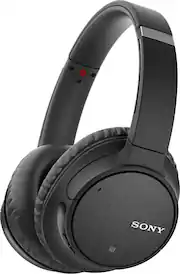
This review is from Sony - WH-CH700N Wireless Noise Cancelling Over-the-Ear Headphones - Gray
Posted by XOSherlock
- Rated 5 out of 5 stars
Phenomenal
I spent a ton of time going back and forth between big name brand and newer model headphones. I needed a general purpose over the ear headset for video editing, podcast production, and just general music listening. I’ve always really enjoyed Sony’s consistency when it comes to their audio equipment and took a chance on the much lesser costing headset. I couldn’t help but smile when I turned these on for the first time and messed with the custom sound board in the app that syncs with the headphones. Absolutely incredible. Crisp clear mids and highs, with the ability to get that soggy bottom bass if you really want it (not my type). Even with hip hop and rap beats and heavy 808 kicks, these things just come through so clean and the clarity on audio/voice files is stellar. Couldn’t be more pleased. Noise cancelling isn’t mind blowing, but when you have music/audio being played, it definitely does its part. Would buy again and again.
This review is from Sony - WH-CH700N Wireless Noise Cancelling Over-the-Ear Headphones - Gray
Posted by CA22
- Rated 4 out of 5 stars
Good sound and Value
I bought these headphones for my father to replace the older pair of sennheiser headphones he was using. The challenge was trying to find headphones that we're easy to use, comfortable, & with the range needed to be used by a person with poor hearing. These are fairly user friendly, and easy to set up, at least for use. The noise cancellation isn't as quite good as some of the top end sets, but it does work. The sound balance is very good, with plenty of volume & frequency range. Overall I am happy with this product, some areas aren't the absolute best, but it seems like Sony made the right trade off on where to spend & what could be compromised without changing the quality too much overall. I would buy these again without regret.••• Now I would like to thank the representatives at the Grand Forks ND Best Buy for how they handled a price discrepancy during the purchase. The displayed price tag was $100 less than what rang up at the till. The manager went to the isle, confirmed the displayed price, which turned out to be a tag left up from the Black Friday sale the week before. They honored the sale price with out any hassles. I was floored, that kind of integrity and customer service is so uncommon these days that I was expecting an I'm sorry sir but that sale is over and there's nothing I can do... all in all I would say it's a good product, and amazing customer service!!!
This review is from Sony - WH-CH700N Wireless Noise Cancelling Over-the-Ear Headphones - Gray
Posted by Drue
- Rated 5 out of 5 stars
great battery life and best sound
I love the fact that these Sony headphones fit over my ears and make it very comfortable when wearing them for a long time. The battery life last several hours of non-stop listening and the sound quality is great!
Posted by Hops
- Rated 4 out of 5 stars
Comfort over my ears but sound carries...
Although I am happy with my purchase, I am disappointed that people can hear my music while I am jamming out working out or something. The battery is extremely long and the headphones are light compared to my other Sony ones I have. It's just my music being heard bothers me a tad. Good pickup still!
Posted by FunkyBlueRooster