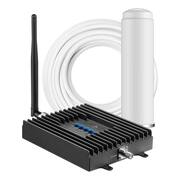
Enhance the signal strength of your phone with this Surecall Fusion4Home cellular booster. Made for homes of up to 2,000 square feet, this booster fortifies text, talk and 4G LTE signals and helps increase call clarity. Suitable for indoor use, this Surecall Fusion4Home cellular booster is contained in a durable metal shell and includes equipment to improve even marginal signals.
Q: Does this work with any cell phone carrier?
A: I believe it is supposed to be compatible with most carriers. Our carrier is Verizon and we live out in the country. Prior to getting this signal booster, our reception was not good and would have dropped calls. I would have to go a window on the west side of the house to make sure my call was not dropped. Now I can go anywhere in my house and have good reception and haven't had a dropped call since.
Q: What is the difference between "whip" and "Yagi" with Sure Call Fusion4Home
A: Hi Ward, the terms are describing the antenna types provided in the booster kit. The "whip" is the inside stick antenna that connects to the amplifier for distribution inside your home/cabin/office. Its a omni-directional antenna. The "yagi" is the outside antenna. This is a directional antenna (my preference). You need to invest some to determine which way to aim this antenna... but it will pay back in more in-building coverage and faster data.
A: We also use a hotspot. It helped alot with the data and calls. That's how I am able to answer this question online, without having to stand outside
A: Hello Grog3, For best system performance you want the Yagi antenna mounted high and aimed "towards the cellular tower" and "away" from your building! If the carrier cellular tower is north of your building you want the Yagi on the north side of your building roof aiming north. If the TV tower is on the south side of your building and you mount the Yagi aiming north over your building... the software in the booster may automatically reduce your system gain (performance). Regarding the conduit... for our most remote customers we often recommend upgrading the RG-6 cable to RF-11. This thicker RG-11 cable is still only 3/8".
Q: Will this work inside metal building? Also does it work with Verizon?
A: YES ! I have attached a link to a customer testimonial about this exact situation. https://blog.surecall.com/verizon-signal-booster-improves-cell-service/
A: Our house is 2600 sq ft, 2 story and it covers all of it.
Q: Does this unit come with an electrical power cord or does it only run on batteries?
A: Comes with an AC adapter
Customers commend the Fusion4Home Yagi/Whip for its ability to significantly improve signal strength and ease of installation. However, some customers have noted that the installation can be a bit challenging and may require some technical skills to locate the antenna in the optimal position.
The vast majority of our reviews come from verified purchases. Reviews from customers may include My Best Buy members, employees, and Tech Insider Network members (as tagged). Select reviewers may receive discounted products, promotional considerations or entries into drawings for honest, helpful reviews.

Enhance the signal strength of your phone with this Surecall Fusion4Home cellular booster. Made for homes of up to 2,000 square feet, this booster fortifies text, talk and 4G LTE signals and helps increase call clarity. Suitable for indoor use, this Surecall Fusion4Home cellular booster is contained in a durable metal shell and includes equipment to improve even marginal signals.

Do you experience slow internet speeds, dropped calls, and the inability to send and receive texts while you’re on the road? With the weBoost Drive Reach OTR, you can improve your cell signal, wherever work (or play) takes you. Designed to enhance signal coverage for trucks and OTRs, especially in remote areas. The weBoost Drive Reach OTR uses the latest technology to pick up an existing cell signal, route it the booster, then broadcast that amplified signal into your truck’s cab. To install the Drive Reach OTR, first select where to mount the outside antenna. This is the most important step as it determines the performance of your booster. Check that the antenna is at least 12 inches from all other antennas and openings to avoid interference. The antenna can be secured using the included 3-way mount on a rack or mirror arm. Use the modular mast extensions to ensure the right height for your antenna, from 7.5 to 40 inches. Once the outside antenna is installed, run the coax cable behind the weather stripping of an opening into your cab. Next, mount the inside antenna by using the adhesive strips to attach it to the dash or a seat. We recommend keeping the inside antenna at least 12 inches away from where you’ll most often use your phone. Then run the coax cable to the booster. Plugin both the outside and inside cables. Now, plug in the power cord to the booster. Finally, plug the power adapter into your vehicle’s power supply and turn on the booster. When the green light is on, it’s working. All coax cable needed for installation is provided. Stay connected, wherever work or play takes you, with the weBoost Drive Reach OTR Cellular Signal Booster!

Do you experience slow internet speeds, dropped calls, poor call quality, or the inability to send and receive texts while you’re at home? With the weBoost Home MultiRoom Cellular Signal Booster, you can improve your cell signal where it matters most. The weBoost Home MultiRoom cell signal booster boosts cellular networks speeds for up to three large rooms (up to 5,000 sq. ft. depending on outside signal strength). The Home MultiRoom features an exclusive, Inside Antenna—featuring a built-in kickstand and stylish fabric cover while also providing best-in-class performance. Wall-mount installation is effortless with the included 3M Command strips. The proprietary Outside Antenna offers a tool-free, finger-tightened precision mount. Users will experience faster data speeds, better voice quality, fewer dropped calls, and superior streaming capability. Home MultiRoom works with all US carriers—including Verizon, AT&T, T-Mobile, and more. For anyone experiencing connectivity issues when using their phones, tablets, or devices within specific areas of their home (up to 5,000 sq. ft.). Stay connected, where it matters most, with the weBoost Home MultiRoom.

Count on stronger 4G LTE data reception with this SureCall Flare 3.0 cellular signal booster kit. It supports all U.S. cell service carriers and optimizes mobile data signal strength in a 3000 sq. ft. remote home or building. Install the high-gain Yagi antenna of this SureCall Flare 3.0 cellular signal booster kit via its mounting hardware and 50-foot RG-6 cable.
| Pros for SureCall - Fusion4Home Omni/Whip - Black | |||
|---|---|---|---|
| Signal Strength, Ease of use | Signal Strength, Installation, Performance | Signal Strength, Ease of use, Call Quality, Coverage, Overall Performance | Signal Strength, Ease of use |
| Cons for SureCall - Fusion4Home Omni/Whip - Black | |||
| Installation, Price, Performance | There were no cons for this product— | Installation, Price, Heat Dissipation | There were no cons for this product— |