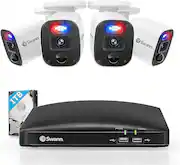
Rating 4.4 out of 5 stars with 54 reviews
4.4- Video Quality (29)
- Night Vision (8)
- Overall Performance (8)
- Motion Detection (4)
- Storage (3)
- Ease of use (3)
- Installation (3)
- Software (3)
Customer Images
The vast majority of our reviews come from verified purchases. Reviews from customers may include My Best Buy members, employees, and Tech Insider Network members (as tagged). Select reviewers may receive discounted products, promotional considerations or entries into drawings for honest, helpful reviews.
- Rated 5 out of 5 stars
Nice set of security cameras.
Video and audio quality are both good. Not hard to set up. Does everything that i needed them to do. Works well when no lights are on also
Posted by DavidM
- Rated 5 out of 5 stars
Great Camera.
These cameras are great. Great picture quality and the price is amazing!
Posted by Good
- Rated 5 out of 5 stars
Great video quality, simple operating system
Hardware - 1 x DVR unit with 1TB storage. This is a LOT of storage, especially at the 1080p resolution. This is helpful because you don’t have to subscribe to some monthly/annual plan to be able to access recordings from a cloud service since these videos are recorded locally onto your device! - 8 x 1080p cameras equipped with audio recording, microphones, heat sensing capabilities (to differentiate between, for example, your neighbor vs. a plant swaying in the wind), spot lights, flashing red/blue lights. Running cables is not ideal but it’s the only way to really ensure proper connection to the DVR unit and proper recording. Wifi-based cameras suffer from needing to be recharged, sacrificing video quality to maintain battery life, on-off issues for battery preservation, and reliance on internet being always available. - Cables to connect cameras to the DVR unit, HDMI cable to connect unit to a TV/monitor, wired mouse to control the main system, power cables. - NOT INCLUDED: a monitor/TV. I have mine set up with a 36” 4K computer monitor, which is plenty sufficient. The image quality on a 4K monitor is not grainy and provides sufficient resolution from the 1080p cameras. Set-Up - Overall set up is very intuitive; however, running the wires to the main DVR unit throughout the house will take time/effort. - I would highly recommending going through and making sure all the cameras are functioning (audio/video/microphone) before running cables throughout the house. I spent a few hours going through each camera and making sure that they all worked appropriately so that I don’t waste time doing it after it’s been installed. All components worked appropriately. - Ethernet – I would recommend placing the main unit by your router to give the unit access to the internet for system updates and to provide streaming capabilities to your mobile device. - The kit comes with all the screws necessary for mounting the cameras; though, depending on the location, you may require additional hardware to properly mount it. Software - The operating system is very straight forward- initial set up of the system requires you to set a password and email (primarily for resetting the password if you’re locked out and for alerts). I believe the system requires a GMAIL or OUTLOOK email account. - The Startup Wizard guide walks you through setting the language, password/email, time zones, date formats, video formats/resolution, time formats, naming the DVR system, etc. - Swann Enforcer has dedicated YouTube videos to help walk you through the set up process, which I would highly recommend going through as you may need to make some adjustments to your email settings to receive the appropriate alerts. - Make sure you download the Swann security app for your mobile device. - You can set zones with each camera to set regions that the camera is viewing that would trigger alerts. As mentioned earlier the cameras are equipped with heat sensing technology to differentiate humans/animals and inanimate objects so you aren’t being bombarded with alerts. - I would recommend spending time fine-tuning your notifications and zones to make the most of this system. Otherwise, you’ll be receiving constant notifications for nonessential alerts and essentially training yourself to dismiss them. Overall - Given that you have access to local storage, 8 high definition cameras, and no need for a subscription, this is a GREAT system at a very reasonable cost. The system reliability and access to customer support is incredibly valuable as well.
Posted by David
- Rated 3 out of 5 stars
Good cameras, convoluted software, no Wi-Fi.
***TLDR:*** A quality DIY security solution with a couple deal breakers. ***STANDOUT FEATURES:*** The included cameras are durable and provide a clear image. A 4K user interface (when connected to a 4K screen) was an un-advertised surprise. Camera view appears more like 120° than 85°. Score. ***DEAL BREAKERS:*** 1.) Motion detection for human movement is not adequate. 2.) WiFi does not exist on this model. 3.) Software isn't intuitive for the average user. ***SETUP:*** Physical Setup is fairly simple. 1.) Place the recording box next to a monitor (a cheap TV will do) and an outlet with space for two 12V adapters (or an extension cord with splitter, as the adapters are only 4 feet long). 2.) Plug camera cables in to their extension cables (for data and power). 3.) Mount cameras where you want to record (using 3 screws) and loosen adjustment screws (to be able to rotate and pivot each one). Once you have the camera pointed in the proper place, tighten the screws. You can eyeball this, as the field of view of each camera is wide. 4.) Route the cabling wherever you will. The extension attachments size mean at least a 5/8" hole is necessary (if routing through a wall or conduit. 5.) Attach extension cabling and power to DVR, HDMI to TV, power splitter to second adapter (takes the single 12V and gives you 4 outputs for each of the cameras), and splitter to the extension cabling. 6.) Plug in the supplied mouse to the front USB ports (or a wireless one if you have a computer mouse laying around like I did). ***SOFTWARE:*** The software seems like a relic from the past in a day where smartphones have come to dominate our tech. The system isn't entirely intuitive and setup was only half done by the end of their "wizard". I had to go searching through the menus and the manual to try finding anything I particularly cared about, and I didn't find what I was looking for, as the features didn't exist. To be specific, you cannot set a detection area for automatic event recording. Further, you cannot keep a camera zoomed in to try helping the software notice movement where you care about it. Buttons exist for zoom, but these particular cameras don't zoom. The feature should still work using digital zoom (but it doesn't). Modifying camera settings is also wonky, like they put a mouse interface over top of an old regular-remote interface. ***MOTION DETECTION:*** The motion detection is inadequate. I've attached a couple photos to show my wife arriving home and motion detection failing to activate. If their touted feature of "heat detection" were legitimate, I don't see how this could have happened. It's 30° outside. My wife isn't made of ice (unless I have done something wrong). Detection only works consistently with a car driving by. Our car's lock lights (once parked) didn't activate it. For this reason, I will have to set this channel (my primary camera of interest) to continuously record. ***RECORDING OPTIONS:*** Video quality options can be set for those who know what they're doing, but it'll look like a foreign language to many. Of concern is the default setting to record in h.265 - a non-commonly supported codec (read: you may have issues using your recordings if you ever need to transfer them to another device/computer). This should be streamlined (with the _option_ to go advanced). Descriptions should also pop-up to help the average user understand what they're changing. ***PLAYBACK:*** The primary playback screen is adequate once you figure out how to navigate events, but the screens that follow don't seem to work properly. Selecting the camera channel I would like to see events for, I could see no events. As for use on that first screen, there are buttons clipping, slowing, going frame by frame, fast-forwarding and rewinding. You can also tag clips. ***SMART APP:*** Without a Wi-Fi radio in the device, I won't be connecting to the app, as I have a cellular hotspot for home internet, so I have no Ethernet to connect to. Even if I did, the app requires registration with a whole lot of personal identifying information (name, address, email, etc). Much bigger companies with lots more cyber security money have been hacked. No thanks. ***CONCLUSION:*** If they can update their firmware and software to allow zoomed recording and motion sensitivity settings, this will be a decent unit. If they can streamline their setup and feature selection to give basic users a non-frustrating, non-confusing experience, this will be a fine unit. Lack of wifi can't be fixed with a firmware, though.
Posted by Highly Excellent
- Rated 4 out of 5 stars
A Cost-effective Deterrent
Let me start by saying that I have a very diverse background of installing residential/commercial security and video systems. So when I ended up getting this Swann Enforcer, I was excited to give it a try. It is a wired system that uses BNC's to secure video, and pigtail power connectors, combined into one wire for each cam. The wire included isn't special, it's very low grade, but that's ok, it gets the job done and works well if going to be ran through soffit and attic spaces, as it should. Though, I'm not a fan of them only offering 60' wires in this package, that's insufficient for any larger home, I would prefer at least a couple 100' in the package. I also wouldn't use it for long-run exterior wiring needs without covering it from the elements, of which you'd want to do anyways for security purposes from being cut. In today's world, prevalent with NVRs and WiFi related cams, everyone is trying to go wireless. Personally, I detest that for this purpose, mainly because relying on your router or a proprietary hub that is prone to interference, etc, isn't as secure as having a closed circuit system like this that supplies power and records locally. Add a small power backup, and you're covered, even when the lights go out. As for the quality of this system's cams, which claim 1080p, and it's 8ch DVR/NVR, it's as to be expected for the price...meaning plastic and cheap feeling. The DVR feels decently put together and secure enough, with a small form factor, so it will be easy to hide in a closet, basement ceiling, or otherwise. It supports HDMI out, which is nice given today's current standards, and even says it will switch it's resolution to 4k if you have a display that supports it, which most of us do nowadays. There's also a VGA out for analog monitor connection. It should be noted, this does not support wifi, so a hardwired Ethernet connection will be needed for network capabilities, such as remote viewing on phone or PC. On the DVR, which I highly recommend setting up first and then running your cams so you can use your phone to adjust them and see how they look on your phone while doing so, there are a fair amount of options. Though, it is definitely limited and setup for residential use, which I can appreciate, as it helps simplify it for those who aren't professionals or installing these regularly. The initial setup is extremely simple, and connecting it to the internet and then subsequently on the app is very easy and it walks you through the process. In the system, you can set per channel motion detection zones, so you can preclud a street if you don't want notifications each time a car goes by. You can add privacy zones, set schedules to record motion only or continuous, as well as a few other features relating to the camera recording quality, fps, dither time, and adjusting hue/saturation/brightness on each channel. Now, on to the camera quality. Well, it claims 1080p, which it looks like it gives you, but the quality is only so-so. Pictures frequently look washed out and lack any real detail, likely due to a poor aperture and lens combo, this is again, a low priced, all-in-one solution, so you won't see the best quality in these, but they get the job done with decent detail. You will NOT, be reading license plates or seeing fine detail if the target object is more than 30' from the cam, so this is overall a poor system choice if you plan on utilizing it for long views that require such detail. The cams themselves are simple enough, a few screws hold it together for "turret" style movements with teeth and grooves to hold it where you want it once placed. These are indeed bullet cams, so have a 3 holed base ring that can be undone and attached to whatever surface you plan to mount it to. The overall viewing angles are poor imo. It leaves much to be desired and doesn't cover as large of a swath as other systems and cameras that you might pay a bit more for. Though, I do enjoy the lighting feature, that is very intuitive and purposeful as an automatic deterrent. Meaning, you can set it so when movement is detected in the cameras range, it can turn on a built-in light that is quite bright to act as a flood light and illuminate the area. I appreciate they allow you to set a schedule for this operation as well. I should also note night vision is not bad. And there is, of course, the enforcer moniker, which means the flashing red/blue lights. You can set this similar to the flood light option, to go off if it detects movement in a certain range at a certain time. Not extremely useful in my situation, but it could be for others. The mobile app use of this system is very basic, moreso than I would prefer, as you can't set many settings through it, but it has been very good for push notifications on movement, as well as quickly and easily getting to saved recordings, as well as live. The initial phone setup is pretty easy as well, as used to not be the case just a few short years ago, so I'm pleased the companies have been listening to their customers and their requests for easier remote viewing ability. Though, it should be noted, without going down a rabbit hole, that using P2P does open you up more for hacking and exposure. Meaning it's all routed through Swann servers to tie your device ID and the IP it's on to easily accommodate for those who don't know how or who don't want to set static IPs and forward ports manually. You do have the option here though, if you want to do that. Overall, this setup, for the cost, is all inclusive, is easy to setup, and works great as a deterrent and for basic viewing needs and oversight of a property. It isn't vandal-proof, so the cams will be easy to break, but you get what you pay for in most cases, this being no exception. I would even venture to say you get a great value for the multitude of options. Only time will tell how long these cams last, as they tend to wear down over time, especially if exposed to the elements in any way, so we'll see how longevity works out.
Posted by Adam