Rating 4.4 out of 5 stars with 26 reviews
4.4- Ease of use (3)
- Joystick (3)
- Throttle (3)
Customer Images
The vast majority of our reviews come from verified purchases. Reviews from customers may include My Best Buy members, employees, and Tech Insider Network members (as tagged). Select reviewers may receive discounted products, promotional considerations or entries into drawings for honest, helpful reviews.
- Rated 4 out of 5 stars
Not so sturdy
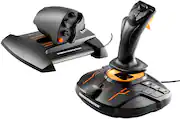
The only 2 reason im giving this hotas a 4 star and not a 5 is… the throttle feels very plasticy if you know what i mean, and it doesn’t move as smooth as i was led to believe. And then there’s some videos showing how to take it apart and putting different springs and using different grease to make it last and feel smoother but by the time you do all that you can just get a better throttle. All in all i would recommend this for a first time user but save up some $ for a new throttle down the road.
Posted by TheHenry220
- Rated 4 out of 5 stars
Fantastic mid end HOTAS!
Going from a HOTAS X to this truly is day and night, possibly one of the best throttles without having to spend $200+ on a throttle alone, stick feels great as well, and has a great amount of buttons for anyone using VR.
Posted by Sawyer
- Rated 5 out of 5 stars
Buy it for the throttle and save on the joystick
I bought this to use to fly jets in MSFS 2020 and it works well. Setup is automatic in MSFS but you will need to understand how to use the control option settings in MSFS at some point. For example, the TWCS throttle and the throttle on the joystick can interfere with each other, so I find it best to remove the throttle setting for the joystick. The T.A.R.G.E.T. software is not necessary to understand or even use unless you are deep into gaming. I don't plan to pursue that at all but it's there if you want to. I was using the Logitech Extreme 3D joystick to fly before and wanted a better throttle. With this bundle, getting the throttle along with the joystick is only slightly more expensive than getting just the throttle alone, so I opted for the joystick combo. To make things even simpler in MSFS, I basically turned off all the assorted buttons on the throttle to avoid conflicts and only re-added button 1 to activate afterburners in MSFS F-18 jet. As I get more familiar with the settings, I might add some buttons back. Otherwise, I remapped flaps, parking brake, trim, and int/ext view to the left buttons on the joystick base because I use the stick right-handed and don't want to remove my hand from the joystick to change settings while flying or reach around with my left hand. I set the landing gear and spoilers to the right/left buttons on the top of the stick respectively, similiar to the setup I used on the Logitech settings. Overall, I don't have any issuesto report but can't comment on the long term durability since I have only been using it now for a week or so. Since I also use the Thrustmaster rudder pedals, I wish the twist on the joystick could be prevented, but that is only possible on the Airbus version. Lastly, I did loosen the slide of the throttle a little by adjusting the tension screw to make it work more smoothly. As I recall, you need to put the throttle in the full power position to see the screw from the underside. That was a bit confusing in the instructions. The nice thing about this setup and MSFS is that you can reset everything on the throttle/joystick to default settings if you mess things up too much. I mostly fly using VR goggles, so it will take some time to remember the button assignments and find them by feel, but I am happy with the setup and the flying experience in VR is simply amazing.
Posted by MikeyLikesIt
- Rated 4 out of 5 stars
Smooth joystick with a nice feel
This is a nice joystick/hotas combo with a smooth feel. It works well with the IL-2 Battle of Stalingrad Series and with DCS World. It has the Target mapping software which is quite unintuitive and will take some time to learn. (I intend to simplify the DCS aircraft to make them easier to fly when using VR). Other wise I would give it 5 stars. Earlier, I purchase the Logitech X52 and returned it for a refund, because the Saitek mapping software is no longer available.
Posted by MMNak
- Rated 5 out of 5 stars
Amazing starting set
Really nice throttle from the cheaper options, and a just as good joystick. Would recommend for players that want to get into flight sims or any game that uses gamepads
Posted by Valentino