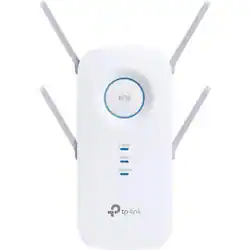
TP-Link - AC2600 Wi-Fi Range Extender - White
- Key Specs
- Wi-Fi Speed: 800 gigabits per second (The maximum rate at which data is transferred between a network device and wireless router.)
- Wireless Standard: AC, N (The wireless networking protocol used by the device. Each iteration of the protocol is based on the 802.11 standard developed by the Institute of Electrical and Electronics Engineers (IEEE) Standards Association. Denoted by letters following 802.11 (802.11a, 802.11ac, etc.), each version, published in alphabetical order, encompasses all previous versions.)
- Wi-Fi Range: 14000 square feet (The device will provide a Wi-Fi connection to this approximate area.)
- Form Factor: Plug-in (The size, arrangement, and physical configuration of the product.)
- Band Technology: Dual (Refers to the number of frequency bands used to wirelessly transmit an internet signal. For example, dual-band devices may use one 2.4 and one 5 GHz band, while tri-band devices may use one 2.4 and two 5 GHz bands. Multiple bands also provide more flexibility for designating connected devices to specific band use.)
- Frequency Band: 2.4 GHz, 5.0 GHz (Bands may be grouped into categories such as low- and high-band VHF (Very High Frequency), low- and high-band UHF (Ultra High Frequency), or certain frequency channels (measured in MHz or GHz). Generally, higher frequencies transmit information faster but have shorter range than lower frequencies.)
- Antenna Type: External
- Number of Antennas: 4
- Number of LAN Ports: 1 (Number of devices able to be connected to the Local Area Network (LAN). LAN ports allow wired connections to other networking devices (wireless access points, range extenders, etc.) in order to share the internet connection received through a WAN port.)
- Number of PoE (Power over Ethernet) Ports: 1 (Allow connection of a single cable that provides both data connection and electrical power (Power over Ethernet).)
- Wireless Networking Standard: Wi-Fi 5 (The wireless networking standard used by the device. Each iteration of the standard developed by the Wi-Fi Alliance corresponds to an existing IEEE 802.11 protocol; for example, standard 802.11ac (or AC) is termed Wi-Fi 5. Refers specifically to the standard the device is designed to use, but ultimately determines product interoperability and backward compatibility including previous versions.)
- General
- Brand: TP-Link
- Model Number: RE650
- Product Name: AC2600 Wi-Fi Range Extender
- Color: White
- Network
- Wi-Fi Range: 14000 square feet (The device will provide a Wi-Fi connection to this approximate area.)
- Attached Antenna: true
- Maximum Frequency: 5 gigahertz (The highest signal frequency that the device is able to amplify or transmit. Generally, the higher the frequency, the more data that can be transmitted and the more likely the signal is attenuated (weakened over distance/passing through buildings).)
- Maximum Coverage Area: 14000 square feet
- Wireless Networking Standard: Wi-Fi 5 (The wireless networking standard used by the device. Each iteration of the standard developed by the Wi-Fi Alliance corresponds to an existing IEEE 802.11 protocol; for example, standard 802.11ac (or AC) is termed Wi-Fi 5. Refers specifically to the standard the device is designed to use, but ultimately determines product interoperability and backward compatibility including previous versions.)
- Features
- App Compatible: true (The product can be connected to a program or software application on a mobile device, which then receives collected data from the product.)
- App Name: Tether
- Compatibility
- System Requirements: Microsoft Windows 98SE/NT/2000/XP/Vista/7/8/10, Mac OS, NetWare, UNIX, Linux (The software that a product must have for it to be able to integrate with another product.)
- Security
- Security Features: 64/128-bit WEP, WPA/WPA2, WPA/WPA-PSK2
- Dimensions
- Product Height: 1.6 inches (The out of box height of the item. Height is measured as the vertical distance from the bottom of the item to the top as it would be primarily used or placed.)
- Product Length: 3.4 inches (The out of box length of the item. Length is measured as the longest dimension of the item.)
- Product Width: 6.4 inches (The out of box width of the item. Width is measured as the horizontal distance from one side of the item to the other as it would be primarily used or placed.)
- Product Weight: 1 pounds (The out of box weight of the item.)
- Other
- UPC: 845973095857
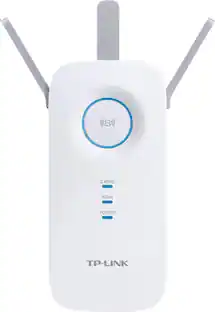
Gain more network coverage with this TP-LINK Wi-Fi range extender. Its four antennas provide signals for up to an additional 14,000 sq. ft., and it transfers information to multiple devices simultaneously for improved performance. This TP-LINK Wi-Fi range extender includes a Gigabit Ethernet port to provide faster wired connections to TVs, computers and gaming devices.
- Ultimate compatibility: Extend the range of any Wi-Fi router or wireless access point.
- Superior extended range: The four fixed external antennas extend Wi-Fi coverage by up to 14,000 sq. ft.
- Ultimate wireless speed: Offers combined wireless speeds of up to 800Mbps (over 2.4GHz) and 1733Mbps (over 5GHz). This provides the performance necessary to support your most demanding online applications, including 4K streaming and gaming.
- Beamforming technology: Sends a targeted Wi-Fi signal to individual devices for stronger connections.
- More connections for everyone: The MU-MIMO technology allows you to serve up to four devices at once, reducing wait time and greatly increasing Wi-Fi throughput for every device.
- High-speed gigabit wired connection: Lets you connect a wired device, such as a game console or smart TV to create a fast, reliable wired connection.
- Find the best spot with Intelligent Signal Indicator: Helps you quickly find the best location to install the unit.
- Fast encryption: Features one-touch WPA wireless security encryption with the WPS button.
- Built-in access point mode: Simply plug an Ethernet cable into its Ethernet port and easily turn your wired internet connection into a 4x4 MU-MIMO dual-band wireless access point.
- Easy monitoring and control: TP-Link Tether is an intuitive app that allows users to conveniently monitor the state of their range extender, controlling its functions and altering its settings from any compatible mobile device.
- Online upgrade: Keeps you informed of the latest firmware and allows for online updating on the Web user interface.
Whats Included
- TP-LINK AC2600 Wi-Fi Range Extender
- Quick Installation Guide
Product Manuals
A: It depends on the construction of your house Concrete and metal will make it more difficult. I will say that this is the best unit for extending WiFi that I have ever purchased. And I have purchased many.
Q: Can you use the existing name and password as my existing router
A: Absolutely! During setup, you will be given the option to "copy" or "clone" your router's existing WiFi name and password for a unified WiFi extension experience. We recommend using our intuitive TP-Link Tether on your smartphone. Regards, TP-Link Support
Q: Does this replace the router from my cable company
A: No, it does extend the range of your current router though!
A: That distance is quite significant, especially with brick obstruction in between. Please note this WiFi extender is intended to expand WiFi coverage within a home. For WiFi extenders to operate optimally, they should be installed in an area where your router's WiFi signal is sufficiently strong, yet far enough from the router to extend its range. If you are attempting to achieve long distance, point-to-point connectivity, we suggest considering our outdoor CPE solutions instead.
A: Yes, you can use multiple WiFi extenders within the same network.
A: Yes, the extender is universally compatible with WiFi routers. The extender's ability to expand your existing connection depends on your router's existing signal strength. We always recommend installing the extender in a position within your home where the router's WiFi signal is sufficiently strong; yet far enough from the router to effectively extend its range.
A: Show as the WIFI you currently have.
A: The roaming behavior of each WiFi client (i.e. phone, laptop, etc.) is the responsibility of each WiFi client. WiFi roaming is purely a client (smartphone, TV, computer, tablet, etc.) decision. The wireless client is responsible for deciding it needs to roam, and then detecting, evaluating, and roaming to an alternative WiFi source nearby. The efficiency of each WiFi device's roaming will vary depending on the capabilities of each WiFi device. For the most seamless WiFi experience, we suggest considering one of our Deco Mesh WiFi options.
People also viewed
Today's top picks
 Black Friday in July Deal$749.99The price was $1,199.99
 Black Friday in July Deal$199.99The price was $399.99
 Black Friday in July Deal$69.99The price was $129.99
 $249.99The price was $399.99
 Black Friday in July Deal$199.99The price was $249.99
 Black Friday in July Deal$199.00The price was $419.00
 Black Friday in July Deal$169.99The price was $299.99
 Black Friday in July Deal$499.99The price was $999.99