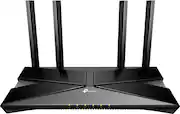
Upgrade to Wi-Fi 6 router and reach speeds of up to 3 Gbps for a buffer-free 4K/HD streaming and gaming experience. Use the 2.5 Gigabit port to create fast, reliable wired connection that can take full advantage of internet plans up to 2.5 Gbps.
Q: Can I control this router with my voice?
A: Yes, you can pair the router with Amazon Alexa or Google Assistant to control your network with voice commands.
Q: How many antennas does the Archer AX3000 Pro router have?
A: The Archer AX3000 Pro router comes equipped with four high-gain antennas for expanded Wi-Fi coverage.
Q: Does this router come with any security features?
A: Yes, it features TP-Link HomeShield, which includes IoT protection, cyber threat prevention, robust parental controls, and comprehensive reports.
Q: Does this router support wired connections?
A: Yes, you can create high-performance wired connections using the 1× 2.5 Gbps WAN/LAN port and 1x 3.0 USB port.
Q: How do I set up the Archer AX3000 Pro router?
A: You can easily set up the router in minutes using the TP-Link Tether App.
Q: What is the maximum Wi-Fi speed this router can provide?
A: This router can provide speeds up to 3 Gbps (2402 Mbps on the 5 GHz band and 574 Mbps on the 2.4 GHz band).
Q: Hello.....is there a significant difference between the AX55 and the AX55 Pro?
A: The key difference between the routers is the speed supported by the WAN Port. On the normal (non-Pro) AX3000 model, it supports up to 1 Gbps (1000 Mbps) Ethernet connectivity. On the Pro model, it supports up to 2.5 Gbps (2500 Mbps).
A: Hi! Both 2.4 GHz and 5 GHz bands are simultaneously broadcast and available for your devices. If you have bulbs that only support 2.4 GHz, then by default, they will only see and connect to the router's 2.4 GHz network.

Upgrade to Wi-Fi 6 router and reach speeds of up to 3 Gbps for a buffer-free 4K/HD streaming and gaming experience. Use the 2.5 Gigabit port to create fast, reliable wired connection that can take full advantage of internet plans up to 2.5 Gbps.

Embrace lightning-fast 7.8 Gbps speeds and experience 6GHz band with Archer AXE7800 Tri-Band WiFi 6E router. With eight WiFi streams combined with three separate bands, the Archer AXE95 achieves unbeatable performance to boost capacity and reduces congestion for smoother 8K streaming and AR/VR intensive gaming. Premium 2.5 Gbps and 1 Gbps WAN/LAN ports support flexibility for the peak performance, transmitting maximum fiber internet speeds to fill every corner of your house. Protect your IoT devices with TP-Link HomeShield.

Leverage the power of Wi-Fi 7 for speeds up to 3.6 Gbps at 1.2x faster than Wi-Fi 6. The Nighthawk RS100 Wi-Fi 7 Dual-band Router provides up to 2,000 sq. ft. Wi-Fi coverage and capacity for up to 50 devices. Experience stunning streaming, video conferencing and reliably connect smart home devices. NETGEAR Armor protects your family’s Wi-Fi by creating an automatic shield for all connected devices.

The NETGEAR 4-Stream AX1800 Wi-Fi 6 Router provides reliable Wi-Fi 6 for high capacity with consistent and powerful signal strength to all your connected devices. With speeds up to 1.8 Gbps, this router is recommended for a small to medium home, up to 1,500 sq. ft., with up to 20 connected devices. Powerful dual-core 880 MHz processor ensures superior performance for concurrent real-time applications such as multimedia streaming, web surfing and audio/video chats. With NETGEAR Armor, you get peace of mind Internet security.
| Pros for TP-Link - Archer AX3000 Pro Dual-Band Wi-Fi 6 Router - Black | |||
|---|---|---|---|
| Cons for TP-Link - Archer AX3000 Pro Dual-Band Wi-Fi 6 Router - Black | |||
| There were no cons for this product— |
Customers express satisfaction with the Archer AX3000 Pro Dual-Band Wi-Fi 6 Router's ease of use, performance, and range, frequently citing its simple setup and strong signal. Many appreciate the improved coverage and connection speeds, resulting in a better overall experience. While some users reported occasional lag or buffering, these issues were not widely reported. A small number of users expressed concerns about the router's security.
The vast majority of our reviews come from verified purchases. Reviews from customers may include My Best Buy members, employees, and Tech Insider Network members (as tagged). Select reviewers may receive discounted products, promotional considerations or entries into drawings for honest, helpful reviews.
We were having continuing problems with programs locking up or having long term buffering. The cable company gave us a new modem but the problem continued. We decided to try a new router. After some research this seemed like the best one and the best value. Wow, did it make a difference. Not one lock up, buffer, or slow down since we installed it, which, as a matter of fact was quite simple. It also notifies of each new device added to the network. Excellent product. Very fair price.
Posted by RichardS
This one really improved my home internet connectivity a lot better . Especially when if you are using spectrum own wifi router switching to this will make you experience the consistent speed and bandwidth. Another thing I would like to point out is ease of setup, I could set it up in 5 minutes, I never setup a tplink router before . This was pretty easy and startup guide help you a lot !
Posted by
I’ve been using this router for a few weeks and I’m very impressed. The setup was quick and easy, and the connection has been stable with fast speeds throughout the house. Streaming, gaming, and video calls all work smoothly. The design is sleek and fits well in my home office. Definitely worth the price!
Posted by JerS
