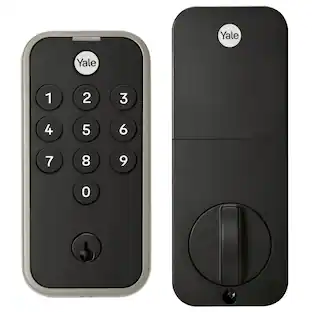
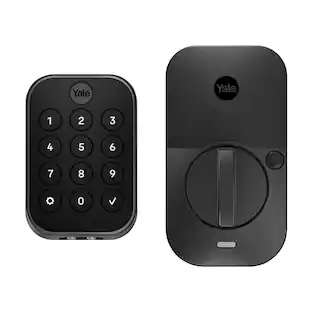
Yale - Assure Lock 2 - Smart Lock Keyless Wi-Fi Deadbolt with Touchscreen Keypad Access - Black Suede
- Key Specs
- Color Finish: Black
- Lock Type: Deadbolt
- Lock/Unlock Mechanism: App, Touchscreen, Voice assistant (There are several technologies used by smart locks to manage access, such as biometrics, Bluetooth, or NFC. Some locks allow codes to be entered via a keypad or touchscreen; digital keys can often be sent to multiple authorized devices or temporarily shared with guests.)
- Power Source: Battery-powered
- Installation Type: Replacement
- Wireless Connectivity: Bluetooth, Wi-Fi (The manner in which a device sends data to another device over a short distance without the use of wires or cables.)
- General
- Brand: Yale
- Model Number: YRD450-WF1-BSP
- Product Name: Assure Lock 2 - Smart Lock Keyless Wi-Fi Deadbolt with Touchscreen Keypad Access
- Color: Black Suede
- Color Finish: Black
- Features
- Finish: Black
- Lock Type: Deadbolt
- Lock/Unlock Mechanism: App, Touchscreen, Voice assistant (There are several technologies used by smart locks to manage access, such as biometrics, Bluetooth, or NFC. Some locks allow codes to be entered via a keypad or touchscreen; digital keys can often be sent to multiple authorized devices or temporarily shared with guests.)
- Auto Unlock: true (Locks with this feature automatically unlock when certain conditions are met, such as coming within range of a home wireless network or when activated via a mobile app.)
- Unlock Notifications: true
- Shareable Keys: true (This feature allows a single key to be shared with multiple users or authorized devices.)
- Number of Key Fobs Included: 0
- Number of Keypad Codes Supported: 250 (Multiple keypad codes can be programmed to allow temporary access for guests, deliveries, and more while keeping primary codes secure.)
- Remote Monitoring Capabilities: true (Monitor)
- Power
- Power Source: Battery-powered
- Rechargeable Battery: false
- Battery Size: AA (The battery size required for operation.)
- Number of Batteries Required: 4
- Batteries Included: true (Indicates whether the product comes with the required batteries for its operation.)
- Low-Battery Indicator: true
- Compatibility
- Installation Type: Replacement
- App Compatible: true (The product can be connected to a program or software application on a mobile device, which then receives collected data from the product.)
- Wireless Connectivity: Bluetooth, Wi-Fi (The manner in which a device sends data to another device over a short distance without the use of wires or cables.)
- Network Connectivity: None (The manner in which a device sends data to another device over a long distance using a cellular network.)
- Operating System Compatibility: Apple iOS, Android
- Works With: Amazon Alexa, Google Assistant, Siri, Apple HomeKit (Compatible with or able to be connected to other smart devices or applications.)
- Voice Assistant Built-in: No, No (A digital assistant built into the device that uses voice commands to answer questions and control smart devices.)
- Performance
- Minimum Operating Temperature: -22.0 degrees fahrenheit (The lowest recommended ambient (surrounding) temperature in which the product can ideally operate stated by the manufacturer. Generally long-term exposure of the product to temperatures less than the minimum can result in ineffective operation.)
- Maximum Operating Temperature: 140 degrees fahrenheit (The highest recommended ambient (surrounding) temperature in which the product can ideally operate stated by the manufacturer. Generally long-term exposure of the product to temperatures more than the maximum can result in ineffective operation.)
- Other
- UPC: 810230911140
You've got enough on your plate, let Yale get the door with the Yale Assure Lock 2. With multiple ways to unlock, the ability to easily share and track entry codes and advanced Auto-Lock with DoorSense, this Wi-Fi smart lock gives you one less thing to worry about. With built-in Wi-Fi, you can easily check in on home, from wherever you are.
- Key-free access, your way: Use the Yale Access app to lock or unlock from anywhere, or unlock with your phone or smart watch, touchscreen keypad, or optional Auto-Unlock
- Don’t worry, it’s locked: Make sure your door is locked when you want it to be with Auto-Lock
- Not home? Use the app: Lock/unlock, send entry codes & more from anywhere using the Yale Access App
- Know who's home: Easily check who got home, and when, in the app
- Featuring Auto-Unlock (optional): Let Yale get the door for you as you get home, with optional Auto-Unlock
- Emergency unlock feature: If the battery dies, you can use a 9V battery to charge the keypad.
Whats Included
- Yale Assure Lock 2, Yale Wi-Fi Smart Module, Yale DoorSense, Deadbolt, Strike Plate, Mounting Hardware, Installation Manual
Q: What type of battery does the smart lock use?
A: This smart lock uses four AA batteries.
Q: What is the minimum operating temperature for the smart lock?
A: The minimum operating temperature for the smart lock is -22 degrees Fahrenheit.
Q: Can the smart lock be unlocked remotely?
A: The smart lock has remote monitoring capabilities.
Q: Does the smart lock have a low-battery indicator?
A: This smart lock has a low-battery indicator.
Q: How many keypad codes can the smart lock support?
A: The lock can support up to 250 keypad codes.
Q: Is the smart lock compatible with Amazon Alexa?
A: This smart lock is compatible with Amazon Alexa.
A: Yes it does show up in the Google home app. Google will also lock and unlock your door if asked. But for Google to unlock your door it will ask for your lock code. It will not automatically unlock it for safety reasons.
Q: Does this work with myQ app?
A: I do not believe it does. It works with the August app, and integrates with other smart-home devices but I haven't seen an integration with MyQ.
People also viewed
 $219.99The price was $249.99
 $329.99The price was $399.99
 Clearance$199.99The price was $249.99
 $249.99The price was $299.99
Today's top picks
 Black Friday in July Deal$134.99The price was $209.99
- $329.99The price was $399.99
 $129.99The price was $169.99