Rating 4.6 out of 5 stars with 7684 reviews
4.6- Charging Speed (2933)
- Ease of use (1627)
- Size (379)
- Design (259)
- Price (234)
- USB (96)
- Connection (35)
Customer Images
The vast majority of our reviews come from verified purchases. Reviews from customers may include My Best Buy members, employees, and Tech Insider Network members (as tagged). Select reviewers may receive discounted products, promotional considerations or entries into drawings for honest, helpful reviews.
- Rated 5 out of 5 stars
Great charger
Easy to use. Fully charges remote every time. Controller attaches easily.
Posted by coreytaylor8
- Rated 5 out of 5 stars
A Life Changer!
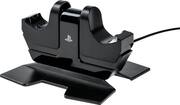
It's not as convenient as it could be simply because you cannot charge and use the controller at the same time like you can with a charging cable. If you have 2 controllers though, that shouldn't be an issue at all! I leave one controller on the charging station at all times (there's an intermediate 'setting' on the dock which lets you set the controller within the docking cradle, but not set it far enough down to initiate charging) while I use the other controller. With the amount of life that one controller gives, I can fully charge the other controller a few times over and just switch them out when the one I'm using gets low! It's a basic thin, plastic base which feels cheap-ish, but that's negligible to the amount of use you get out of it! It prevents you from having to plug your wireless controller in to charge. It gets rid of the unsightly/annoying cord draped over your lap. It looks sleek while also being useful! How-to: Set your Ps4 controller into one of the cradles. Push the controller down into the cradle until you hear/feel a solid 'click'. If you do it right, the controller's light bar will start pulsing a dim yellow/orange to let you know it's charging. When charging is complete, the light bar will no longer pulse. To release: Push down on the controller again and you will hear/feel another click and will be able to lift the controller out of the station. Pros: Controller light bar will pulse a gentle yellow/orange while charging to let you know it's working Can hold a controller without having to charge it (see above notes) Looks good next to the Ps4! Charges your controller within an hour or two and lets you get back to gaming quick! There's a slight divot in each cradle that has an indication as to where the 'PS' button will go to make lining up easy Has a notch on the bottom for the cord so it sits evenly on the table Cons: Relatively cheap material Doesn't have an extra 'hook' for headphone storage
Posted by JakefromStateFarm
- Rated 5 out of 5 stars
Great charger, great price
Got the item on sale when I was in-store and it's pretty decent. Keeps our controllers charged and also gives us a spot to put the controllers somewhere out of the way since once they're done charging the power shuts off and they just stay on the holders until we use them.
Posted by aeggo11
- Rated 5 out of 5 stars
When it is not charging, it makes a great stand
When it is not charging the controller, it makes a great place to put your controller when you are not using it. All you have to do is push down on controller it will change the controller. When the light is off on the controller, it is charged. Worth it!
Posted by DaveS
- Rated 5 out of 5 stars
Always bet on officially licensed Sony Products
Got the PS4 charging stand on Black Friday for less than half of the regular retail price. It does exactly what I need it to do and takes up minimal space on my small end table, alll while being aesthetically pleasing to boot. Docking the controllers is a little confusing at first but all you have to is push them down until it clicks. The controller lights up to let you know it's charging. Push down again to have the controller pop up and you're ready to game.
Posted by TechGuru