Rating 3.5 out of 5 stars with 156 reviews
3.5- Ease of use (17)
- GPS (17)
- Sound Quality (9)
- Traffic Updates (3)
- Connectivity (18)
- Navigation (9)
- Screen Size (8)
- Battery Life (3)
- Power Source (3)
Customer Images
The vast majority of our reviews come from verified purchases. Reviews from customers may include My Best Buy members, employees, and Tech Insider Network members (as tagged). Select reviewers may receive discounted products, promotional considerations or entries into drawings for honest, helpful reviews.
- Rated 1 out of 5 stars
Works well until iOS 11.2
Got this product since we have a lot of Alexa enabled devices and it just made sense to get one for use in my car. Set up was easy enough and it basically worked with most skills you’ve enabled on your Alexa app. The display while small is bright enough even with my car’s sunroof open. Once paired with your car’s audio via Bluetooth the direction is gives are very clear. The display just helps you not look at your phone and just glance to see if you have turns coming. Playing music was easy too and even with loud music, when you say Alexa it lowers the volume and waits for your command. All is well and good last week until Apple released iOS 11.2 update. Now even with full bars on my iphone the Garmin displays poor internet connection and disconnects it’s BT connection. I’m made a call to Garmin and they said a fix is on the way in a few days. I’m going to check this Friday and see if there have a fix. So today Dec 5, I have a useless Garmin in my car. I cannot recommend this product until they issue a fix on why iOS 11.2 bricked the product. If a zero rating is possible right now that’s how I would rate the Garmin Speak. Once Garmin issues the fix I’ll put a new rating on this product.
Posted by APCHouston
- Rated 3 out of 5 stars
Works really well.
Enjoyed have Alexa in the car so much I ended going back and buy one more. I only have two complaints. One, Alexa’s voice is to soft. If I turn up the volume to hear Alexa, then the music will be too loud when she stops talking. Two, Alexa stops functioning if cel reception is poor.
Posted by Mijenx
- Rated 3 out of 5 stars
Great idea but has its shortcomings
I installed in 2 vehicles and used on a couple road trips. Loved the navigation arrows with voiced lane guidance and light function to signify when to turn. I used Alexa to tap into my playlist and some Q&A just for the heck of it which worked out pretty well. I do recommend installing the APP before trying to install the speak unit. Installation in my older model car with Auxiliary connect function well. What I did not like is the many wires, well power and Aux cable which junked up my center console along with taking up the only power source I had. I could no longer charge my phone while using the Garmin speak unless I purchased an adapter with dual or multiple power ports. Installing in my 2017, well I really did not need as I have GPS and app functions tied in from my Iphone but tried to install via Bluetooth which did not work out for some reason so I had to fall back to the Aux cable/port connection. The upside is that the newer automobiles have multiple power source. Pros: • Small • Clear sound • Visual clarity • Responsive • Alexa on the move where ever you go • Alexa recognizes voice commands better than Siri Cons: • Price • Needs Smartphone/app to communicate and operate • Easy to install with Axe input, possible problem with Bluetooth connect • Needs constant power source • Single mount, single use mount pads • Power cable needs to be tucked in and hidden in the panels and ceiling cover • Not needed if you have a good provider and smart phone. I liked the concept but for the cost I would not recommend purchasing, if you have a good smart phone and or GPS installed in your car as it will cover all the functions the Garmin Speak unit provides.
Posted by TechNerd
- Rated 4 out of 5 stars
A little rough, but so much promise!
I have wanted an Amazon Echo in my car since I got my first Echo in early 2015. That said, I resisted buying this device because of the obvious limitations. I hate exposed wires, and I wasn't sure I wanted to always leave my stereo on Bluetooth. I have an Echo Dot attached to a stereo at home and anytime I'm using another input I can't use the Dot. First the positives. The cable was pretty easy to tuck around the trim in my car and it's unnoticeable. After the first software update, it seems to be better at responding. Also, and this didn't seem clear in any review I'd read, but when using the Other/Bluetooth setting for audio, the sound comes from the phone, not the Speak. The Speak is more of a remote control for what's going on with the phone. This is significant because I can use either the car's Bluetooth connection or the iPod connection, which also charges the phone and is a more stable and higher quality feed, for audio. Plus, it provides track data to the radio through either connection. It is annoying to have to open the Speak app pretty much each time I get in the car in order to play music through Alexa. This is only required for playing music through an Alexa compatible source. Even without opening the app, Alexa will respond to queries, and if you try to play music, Alexa will instruct you to open the app. This may be an iOS limitation that prevents one app from taking over controls from another app without user input. I haven't said much about navigation. I didn't buy it for navigation, but I am using it, and look forward to my next road trip. My car has built in navigation, but it's cumbersome. I plan to use them in tandem, so I can see the roads on the built in system and get up to date, live traffic updates on the Speak. I think they'll be a nice combination. Plus, it's so easy to request it to navigate home, that I do it on every trip now just to get the ETA and warnings about any traffic issues. Spotify is noticeably missing still, but it's supposed to come in a future update. I think this device has a great deal of promise. It puts my favorite voice assistant in my favorite car.
Posted by Jdnlex
- Rated 3 out of 5 stars
Buy for ALEXA, Pass for Navigation as of 11/22/17
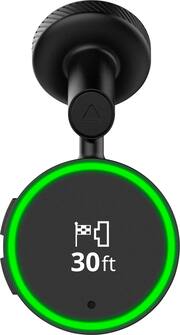
The Garmin Speak is only as good as Garmin's Navigation maps, your cell signal strength, and the interface provided. I am a huge fan of Waze and I don't think Garmin is as accurate and up to date navigation/routing-wise. To be frank, this device isn't easy to use as a GPS using only voice, but as an "echo" device this excels. You have to go to unsaved addresses using the Garmin Speak app by keying in the street address then pressing go. It has potential, but I am unsure of how quickly Garmin developers will do their part improving this device. It lacks the ability to save places aside from the 3 locations provided: Home, Work, and School. Let's dive deeper into this thing. I will review this in two separate aspects: as an Alexa device and as a navigation device. -=Setup=- If you already have an Amazon account, this will be easy to setup. You need to download the Garmin Speak app and Garmin skill to link it to your account. I was up and running in under 5 minutes. There was an update to the device immediately after linking it to my phone so I am sure this addressed some of the other concerns listed in prior reviews. You can use the provided USB cigarette lighter cord, or you can use a USB port to power this device (which I tried and it worked). The next step is to stick it to the windshield and you are done. -=Alexa Capabilities=- First, this uses the Bluetooth you established in your car or the AUX port to tap into your car speakers. There is a bit of delay (maybe 1-2 secs) before you can hear the Garmin speak in your car if you aren't already connected and listening to something. This is normal. If you like Alexa, you will like this in your car. You get all the functionality you're used to at home minus the "drop in" feature and calling using Alexa. The Alexa portion is fast and provides things like your to do list, calendar, and shopping list while you are on the road with a simple command. You have access to your home automation you have setup which is a huge plus. I can unlock my front door while it's raining so I can reduce time getting wet. I can turn on lights and turn them off with the same commands I use at home on my devices. Have you ever thought, "did I forget to lock the front door?" Using your command (if available with your lock skill), you can ask Alexa and then lock it if necessary. This whole thing works using your data through a Bluetooth connection between the Alexa app and the Garmin Speak app. This is where it can be spotty of you do not have more than 3 bars of signal. -=GPS Capabilities=- I must say I am disappointed with the entire experience as a GPS. You cannot simply say "Alexa, ask Garmin for directions to and a street address". You will be required to type it into your phone and send it to the Garmin Speak. What is the point of having a voice assistant if you still have to use your device to enter an address? Very disappointed. The GPS signal is spotty and relies heavily on your cell signal strength. If you go under 3 bars… you get the lost connection red ring of death until you get better signal. -||What I love||- + Battery Saver - I love not having to have my cell phone sucking up battery with the screen on for directions. This uses its own power source and uses Bluetooth transitions which saves your phone. + HUD Display - You can put this literally ANYWHERE you want as long as your USB cord can reach. It provides clear instructions including lane guidance and a green ring to get your attention when a turn is coming up. + Alexa - I just love Alexa and having it with me on the go is a major plus. It makes any car smart. I am a sales person who travels and I like hearing my agenda and to do list while my eyes are on the road. + Home Automation Access - You get access to your home automation through your Alexa skills you have setup. -||What I Would Change||- - Garmin Speak app - I won't be too hard on this, but the app is SOOOOOOO BASIC. There isn't much you can do with it. It doesn't integrate with Alexa and you have to remember the correct syntax to get it to work. Using "Alexa, enable Garmin" seems to help with voice directions since it prompts you for where you want to go. - Audio Routing - I wish Garmin would separate the directions from the Alexa/Media setting. I would rather have my Garmin Speak give directions and use my Bluetooth in my vehicle for Alexa functions and media. - No Turning off Guidance - This is a simple fix, make an option for those who do not want to hear voice guidance. There is visual feedback so audio isn't always required for every user. Not providing that simple customizable option shows a lack of planning on Garmin's part. - No Location Saving - Garmin allows you to save a Home, Work, and School address that is all! Are you telling me you don't have the option to save a place on your regular GPS units? Poor planning and execution again! - Lack of Additional Mounts - Are you telling me you thing someone will buy one of these for each car they have? Do they do that for the REGULAR GPS units you sell? You provide a removable mount and an option to mount it somewhere else. You include a simple piece of iron to mount, why not provide another so we have options? - Connectivity Issues - There must be a way to not rely on a cell phones signal strength for GPS positioning. You are using Bluetooth from the phone for everything including data transmission, there has to be another way for GPS position information. - Uses Cell Data - Unlike a regular GPS unit, this uses data from your cell phone plan. If you are one of those who do NOT have unlimited data like I do, this may not be for you. -=The Verdict=- With all the negatives here, why will I keep it? I believe this product will be better with time since it is Garmin's first attempt at Alexa in a car. Most of my complaints are with the software. Software can easily be updated and so can the Garmin skill. There will be bugs, and if you are an early tech adopter you know this. Short and sweet, buy if you want Alexa on the road with you… wait if you need a GPS unit or just buy a standard GPS device.
Posted by nkpstudios