Rating 4.2 out of 5 stars with 113 reviews
4.2- Sound Quality (73)
- Comfort (38)
- Bass (5)
- Bluetooth (4)
- Compatibility (4)
- Volume (16)
- Price (4)
- App (3)
- Weight (3)
Customer Images
The vast majority of our reviews come from verified purchases. Reviews from customers may include My Best Buy members, employees, and Tech Insider Network members (as tagged). Select reviewers may receive discounted products, promotional considerations or entries into drawings for honest, helpful reviews.
- Rated 4 out of 5 stars
Actually, Pretty Good
Pricey bit of hardware for comfort, clear talking and listening. If you can muster the cash it’s a good grab for those critical games or when you want to be immersed into the environment of it all. I’ve owned Turtle Beach before and was expecting upgrades and similar quality. These did not disappoint in these regards. You need the App, connected to the internet and check for any updates. It’s not so plug and play as one would think, but once you get through a basic setup and test session, everything becomes clear to any newb to the headset. The Android app is relatively basic and as expected with sliders, buttons, profiles an automatic grab for firmware if there is any. There are standard profiles and option to add custom profiles that you can be given a name. You can mix mic and game levels for dedicated line-out of on the amp. Everything is through the app and the control amp is just volume and Bluetooth pairing button. The Bluetooth is handy for taking calls or messages that you may not normally hear while gaming with a dedicated headset. Call quality is good and it is a nice bonus to using the APP/being connected via Bluetooth. I play COD regularly with a group of buddies and the quality in chat clarity was noticeable better than my prior headset. I used bass profile which bumps up the bass which is great when I unleash firebombs or something. I haven't noticed anything in the super hearing profile. And as far as surround sound, I can tell there are some sounds that seem to come from behind, but not regularly. For this I know the coding has to be there in the game and mileage is going to vary for the game itself and any specific maps for multiplayer. So don’t expect you’re going to have this amazing surround sound experience by just plugging it in. It needs the code and settings to be aligned for those affects to come into play. Comfort for my chubby man-head was good, though a little sweaty for longer play. That is what it is for over the ear headphones. Headphone fatigue will set in after a couple hours and that should be a sign of enough gaming for the day, anyhow. Some people can wear headphones all day and it doesn’t bother them. So the fit and feel is going to be specific for the individual. It is apparent that they put emphasis on the design trying to keep it light and adjustable. I do like that you can turn the speakers to lay the unit flat and the standard adjustment in the length when pulled out or pushed in. The top head rest cushion is needed and offers the stability and balance for fit. Not a fan of the plastic side pieces that snap out for upgrading to a custom side plate. Just added weight and no function in my book, but hey – whatever works for some people - Not for me. Sound – though good, it is not high-end audiophile quality. Don’t get me wrong, they sound great, but nothing that just absolutely blows you away. But these are a gaming chat headset and not dedicated music headset. They are clear and offer a decent amount of bass, but nothing so earth shattering. Most of the time the volume is near max. It doesn’t go that loud and it is probably a good thing. Again, it’s an improvement from what I was using and it is now go-to setup for online chat/gaming. If you are into gaming with a headset it will be worth checking out, trying the fit at the store and seeing if they are for you. Solid build for the mic, mixing and quality of sound is there. This will get you through long gaming periods comfortably and improve your chat quality. Further, for someone who is a twitch streamer or needs to record a line out session of their game/chat... I would not recommend this to someone who is looking for a dedicated music listening headset. This is for gaming and chat.
Posted by UncleRico
- Rated 4 out of 5 stars
Great Gaming Headset by TB
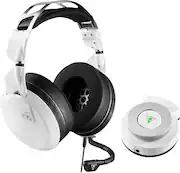
Turtle Beach - Elite Pro 2 Wired Gaming Headset with Elite SuperAmp Bluetooth Audio Controller for Xbox One --------------------------------------------------------------------------------------------------------------------- *****Review***** --------------------------------------------------------------------------------------------------------------------- Professional gamer? Harcore gamer? If you answered yes then the Turtle Beach Elite Pro 2 gaming headset is for you. My first impressions of the headset is that Turtle Beach has done an excellent job on the packaging and presentation of the headset. On to the design and build quality of the Turtle Beach Elite Pro 2 Wired Gaming Headset. Turtle Beach has decided to be a bit more “subtle” when it comes to their design. I like the fact that the headset itself has been stripped of all buttons and knobs. Instead, you’ll find the volume control knob on the SuperAmp. Speaking of the SuperAmp, you can also control all your output through your phone (Turtle Beach Audio Hub). This is due to the fact that the SuperAmp is supported by Bluetooth. I like the magnetic mechanism that Turtle Beach went with for the ear cups. Turtle Beach made it so that it’s extremely easy to pull off if that is your intention yet sturdy enough so that it doesn’t come off easily by mistake. The ear cups also have some really nice cushion as they are memory foam infused with cooling gel for those long hard gaming sessions. When it comes to comfortability, I have to say that the Turtle Beach Elite Pro 2 is just perfect. I love the ProSpecs Glasses Relief System that Turtle Beach is marketing. I wear glasses and I must say, I had NO issues at all with discomfort with the headset squeezing the side of my ears and head. The only issue I have when it comes to memory foam cushions is that they don’t provide full noise cancellation. But it’s sort of a thing you have to give up in order to have high comfortability which in my books it's fine. Now onto the performance… I am honestly thoroughly impressed. The Turtle Beach Elite Pro 2 is equipped with 50mm drivers. If you’re the type of individual that likes “lifelike/full” sounds, you will not be disappointed with the Elite Pro 2. If you’re the type of hardcore/professional gamer that needs DTS Headphone:X 7.1 surround sound to hear where the gunfire or footsteps are coming from, you’re covered with the Elite Pro 2. What this all basically means is you have full sound through the mid and high ranges. The low range provides just enough “oomph” without actually rattling your brain. Don’t forget that a lot of settings can be fine-tuned in the Turtle Beach Audio Hub. The microphone itself does what it’s supposed to do. The microphone picks up clear audio that you are trying to output to your teammates and it does a pretty decent job with not picking up your surrounding sounds. The problem I found with performance is in regards to the mic and only the mic. Although the mic projects my voice clear, my experience seemed a bit “muted” if you get what I mean. During my gaming session, my teammates were telling me that my mic made my voice project “small”. So although my voice was clear, it wasn’t always necessarily loud enough. Overall, I have to say that I am quite impressed with the Turtle Beach Elite Pro 2 Wired Gaming Headset. I didn’t encounter any discomfort during my long gaming sessions. Audio was always on point and excellent so I don’t have any complaints there. My only complaint I had is with the microphone itself. If your a hardcore or professional gamer that loves comfort and beautiful audio while staying tapped in to your phone, I’d highly recommend the Turtle Beach - Elite Pro 2 Wired Gaming Headset with Elite SuperAmp Bluetooth Audio Controller. --------------------------------------------------------------------------------------------------------------------- *****Quick Features & Specs***** --------------------------------------------------------------------------------------------------------------------- Elite Pro 2 gaming headset connected to Elite SuperAmp, a Bluetooth-enabled, app-controlled, audio-enhancing, amplified Windows Sonic surround sound-supporting gaming controller, offers a competitive advantage to dominate your games Its sleek metal headband with a suspended pad and swappable memory foam ear cushions ensure unmatched comfort Turtle Beach's unique ProSpecs™ comfort-driven design removes pressure on your glasses while you play Aerofit™ ear cushion's material technologies combine to keep your ears comfortable and cool while also blocking out external noise and improving bass response Large, powerful 50mm over-the-ear Nanoclear™ speakers deliver Turtle Beach's signature e-sports audio tuning The TruSpeak™ technology ensures your voice is always heard loud and clear with Turtle Beach's professional-quality microphone Connect to the Turtle Beach Audio Hub app from your mobile device to unleash the full power of Elite SuperAmp™, and additionally stream music or take calls while gaming Customize the way your game sounds with four audio presets, including Bass Boost Dynamic Chat Boost™ automatically boosts incoming chat volume over game audio so you hear your teammates clearly Easily connect to broadcast your gameplay and chat streams in real time --------------------------------------------------------------------------------------------------------------------- *****What's in the box***** --------------------------------------------------------------------------------------------------------------------- Turtle Beach Elite Pro 2 Wired Gaming Headset with Elite SuperAmp Bluetooth Audio Controller for Xbox One Headset audio cable Mini-USB power cable Turtle Beach sticker Quick start guide
Posted by MarkusKong
- Rated 4 out of 5 stars
Feel like an Elite
The Elite Pro 2’s are the newest high end offering for Xbox and Windows 10 from Turtle Beach. In all my years of console gaming I have never had a pair of Turtle Beach’s. I had plenty of friends with TB’s through the Xbox 360 days, but I was content with my wireless chat headset at the time. Fast forward to now, and I have a variety of headsets to choose from when gaming. It seems fitting to try out the newest headset from the company that more or less started the high end console headset market. First Up – Build Quality Build quality, I have to admit, is excellent. These are by far the sturdiest feeling headsets I have picked up. Even beyond the metal frame of my HyperX Alpha’s. The fit and finish of parts is excellent. The plastic used above the earcup pivot is fairly substantial, and it had me think it was powder-coated metal (like the part below the pivot). The suspension band setup is well made. The top arch is all metal, and the elastic band is fully hidden under the pad. The earcups feature magnetic pads for quick swaps/cleaning – a feature that until now I didn’t know I needed. The earcups also have magnetic cover plates that can be swapped out for different designs or removed altogether. Side note – I wish they would have made the texture of the covers match the rest of the headset (covers are gloss vs matte textured of the headset). The connect points for the mic and cable are under the right ear and pop in with a satisfying click. The mic boom is pretty robust. The wires are housed in a flexible metal sleeve that is then surrounded by a flexible plastic casing. It holds its shape well and the flat profile of the mic receiver is nicer than the puff ball. There are no volume or controls on the headset or cable, but the cord does have a mic mute slider integrated. My cord clocks in at about 80,” so a little over 6.5ft. All of this leads down to the included SuperAmp. The SuperAmp is powered via USB on either your Xbox or PC. The included USB cable is 10ft long. Between the mic cord and the USB cord you can sit 16ft back from your XB1 if you can handle a stretched cord. I sit about 10ft from my XB1, so it reaches just fine. The SuperAmp itself is a pretty nifty little puck that I will get into later. Build-wise its also well made and easy to interface with. I only have one real issue with the build/design of this headset. Trying to use the headset without the SuperAmp caused some issues. When I plugged the cord straight into my XB1 controller (or the chatpad), I seemed to get some popping/feedback if the cord rotated, and other times the sound would turn static for no apparent reason. I don’t get this at all with the SuperAmp. Next Up – Features The Elite Pro 2 has several novel features. The earcups are one. As I mentioned they are magnetic, so they are easy to service/swap out. They also have a glasses relief feature that pulls the pad in to allow for more comfortable fit for those wearing glasses – myself included. They are made with leatherette sidewalls for better noise isolation, and athletic mesh fabric for the contact surface. They also have cooling gel, so along with the mesh they will help keep your ears from roasting will the leatherette blocks the outside world. The SuperAmp itself. I have seen a lot of review websites comparing the Pro TAC (which could come bundled with the original Elite Pro) to the new SuperAmp. The reviews haven’t been kind to the SuperAmp when those two were compared head to head. I have no experience with the TAC, so I can’t make that comparison. I do have this to say, the OG Elite Pro + Pro TAC bundle started over a hundred dollars more than this Elite Pro 2 + SuperAmp bundle. The price point gap makes the comparison difficult before you even listen to the sound difference or compare features. For me the SuperAmp is pretty good bit of hardware. The volume dial is smooth and easy to adjust. The LED light alerts you to status changes – i.e. if your mic isn’t plugged in, or its muted. Little things. The companion app is fairly robust. It has tons of features and settings to adjust your chat/gameplay mixer, adjust the EQ, save presets, setup mic monitoring, etc. There are also the streamer focused features. The SuperAmp has a dedicated output for your audio streams. There is also of full suite of settings focused on streaming within the app. I have never streamed anything in my life, so I haven’t tried this out. The app also has a toggle for switch the headset between XB1 and PC mode. My only gripe with the Super Amp is the app. For whatever reason you can adjust all the things you want in the app except the volume. For that you must adjust it on the puck. SuperAmp Bluetooth is awesome. Pairing your phone with the Amp allows you to seamlessly answer your phone during gameplay, or be able to hear notifications come in. When a call comes in, answer it on your phone (you know, swipe to answer or whatever), and then your game mic automatically cuts over to the phone, and your conversation is overlaid on top of your game audio like a game chat. Pretty slick to be honest. The only gripe with this feature is not having a button or something on the headset to answer or ignore the call – instead you have to look for your phone and pull your attention. Not a big deal for me, but I can see others not liking that. Third Up – Comfort I found the Elite Pro 2’s to be fairly comfortable. The earpads were plush, and the glasses relief added a little extra comfort. I have thicker framed glasses that don’t flex much, so the relief actually made for a little better earcup fit/seal than I usually get. The construction of the earpads kept my ears from getting too toasty (leatherette sides for isolation but fabric mesh for the surface). The suspension headband on the other hand left me wanting for more padding. I could start to feel the weight of the headset after about an 1.5-2 hours. Kind of disappointing to be honest, they really just need a bit more padding since the band is plenty wide enough. All those robust and sturdy features add enough weight to make the headset need just a little more padding to keep up. I might try to add a little extra padding myself because I think that would clear things up, and these would be super comfortable to wear for long sessions. Last Up – Sound The Elite Pro 2’s feature 50mm neodymium drivers with a 12HZ-20kHz frequency range. A little lower range than your standard headset (20Hz is usually the bottom). This should keep anything real low and loud form distorting/clipping. I fiddled with the EQ’s in the app to adjust my sound. I made a couple of presets for music and games. I tend to like my music a little heavier on the bass and treble, so I adjusted the boosted bass/treble preset to suite my needs. Overall my music sounded great. The bass was DEEP and punchy with enough rumble to boot. I am pretty happy with these for listening to music while I work. For games I kicked the bass down so I could hear some critical noises a bit better. I tried out the Super Human Hearing feature tonight for the first time. I can certainly see (or hear) the usefulness of this feature. It amplifies the frequencies that footsteps would make while also flattening out the other game sounds. This made it easier to identify where shots came from. However, I don’t play competitively, so I prefer to have my games sound…fuller. If I’m in a tight match or want to get serious, I can see using this feature. Overall, the sound reproduction with these is very good. The drivers definitely keep up, and are more than cable of pushing the highs and lows. Like most mics, I had no issue hear. Through monitoring I can tell how much the mic is picking up, and it seems to due a good job of isolating background noise. If had dozens of phone calls using the headset, and never had a complaint or anyone say I sounded different/weird. Other thoughts The features and construction of this headset really do present a pretty solid value. Right now I have a couple high end headsets that are strictly limited to my PC. They just don’t work with my XB1 which is disappointing. To be able to use these on both is great, and certainly an added bonus for me. There’s one design feature I want to mention. The inside of the speaker looks like a graphics card blower-style fan. For whatever reason I think that’s a cool design, and I’m glad they made it like that. Conclusion Turtle Beach’s newest high end headset delivers a good value proposition to those playing XB1 and PC. You can seamlessly switch from one to the other and maintain a great sound experience across both platforms. The small details and construction of this headset are well executed and produce a robust headset design. The sound quality of the neodymium drivers accompanied by the EQ’s of the SuperAmp deliver a solid aural experience that I was happy to experience. My only negative is pointed towards comfort. The headband is just a letdown. The earcups are excellent, the fit is great, but the headband just comes up short. For this price bracket you should be able to leave these things on all day without feeling any discomfort. The sound, features, and build quality of this headset warrant a 5 star rating, but that comfort is enough for me to knock a star off.
Posted by DaveW
- Rated 4 out of 5 stars
Great Gaming Headset
I have used a few Turtle Beach gaming headsets over the years and this one ranks as the best by far. Pros: - My first concern with a wired headset is always cord length. This was not an issue as I could easily sit in my recliner and game about 10-12 feet away from my entertainment center. - I tested the headset out with Far Cry 5 on my Xbox One X. The sound was incredible. I could hear every sound around me and the direction it was coming from. - The mic monitor works great. You can see how you sound to make sure your voice is coming through clearly for other people in multi-player and you aren't breathing heavy into the mic. - While I dislike having to install yet another app on my phone (see below), the features it provides are really nice. You can choose from audio presets depending on the type of game you are playing (racing, FPS, etc). You can also design your own presets. - Comfort level was decent, but not the best I've experienced. - While these are not designed for noise-canceling, they do a really good job of keeping ambient noise out so you are not disturbed during your gaming sessions. Cons: - While it has nice features, I really dislike installing additional apps on my phone. I would prefer to have a small attachment to my controller that would allow me to adjust game/chat volume instead of having to pick up my phone. - This is the heaviest headset I have used for gaming. I imagine marathon gaming sessions will start to cause my neck to ache. Fortunately, with two kids, I don't get more than a couple hours at a time to play. This headset should definitely be considered by any gamer looking for an upgrade on an older model. You will certainly be impressed by the sound quality and features.
Posted by jsisko76
- Rated 4 out of 5 stars
Superior listening experience on a premium speaker
At Christmas, I was gifted the game Red Dead Redemption 2. I’ve been playing it religiously since then and exclusively using the audio directly from the TV’s speakers. It’s been an enjoyable playing experience since I felt like I didn’t really need a premium set of headphones like I do with an FPS game. With an FPS, the gaming dynamic is so much different and your strategy is largely based off of the placement of other players — premium sound that takes you into the game is practically essential in order to succeed with those types of games. When playing through story mode of RDR2, I felt like the TV speakers would be sufficient. Towards the end of the game, I started using the Turtle Beach Elite Pro 2 Wired Gaming Headset and it totally changed the gaming experience. I’m going to breakdown my test of this particular set of headphones into three categories — comfort, set-up, and sound quality. I feel like with headphones — especially gaming headphones — those are the biggest areas to look at. SET UP I have a set of wireless headphones. They work through a receiver dock that connects via wires (optical audio and USB) to the Xbox. I typically prefer wireless headphones because I don’t like having a cable draped across the room while I play. I feel like it limits my movement. That said, I have had my share of issues with how wireless headsets connect/disconnect at times. So, using a wired set of headphones was a bit refreshing — except for the set up. Out of the box, you will have the headphones, the hub, a Mini USB cable, a 3.5mm audio cable, and the detachable microphone. The microphone snaps into one of the 3.5mm ports on the left ear piece while the audio cable goes into the other. The audio cable then plugs into the output port on the front of the hub with the headphone icon stamped above it. This was a little confusing to me because on the back of the hub next to the Mini USB port, you’ll also find another 3.5mm port labeled “Out”. At first glance, I would assume that was the port you should take the audio out from to the headphones, but that isn’t the case here. That port is designated for stream-out for recording streaming audio on your PC. You will also want to make sure that the end of the cable that plugs into the headphones makes the inline controller (for muting the microphone) is nearest to the headphones. Next, you will want to plug the Mini USB cable into one of the USB ports on the Xbox for power and connection to the gaming system. Here is an issue I have with the design. I was really surprised to find that the power/connection to the Xbox was run by a Mini USB cable — a method that is largely outdated. I even consider Micro USB to be somewhat outdated since USB-C started hitting the scene. Once you have the cables plugged in, you’re ready to fire up the Xbox. You will need to go into the audio settings of the system and select Windows Sonic for Headphones under Headset format and set the Party Chat Output to Headset. There is a companion app for this headphone system that is available on both Android and iOS. I downloaded it for iOS. The hub has a Bluetooth multifunction button on the side that you will want to press in order to pair it to your mobile device. This app allows you to activate special functions on the headphones like Superhuman Hearing, Chat Boost, and Game Presets. You can also control the mix between game sounds and your chat audio. There are three profiles that you can set up in the app and then control it all from your phone. This was actually a really refreshing option since it allows you to control the features of the headphones separate from the gaming system. I was in the middle of my game and just tapped on the screen of the phone to activate Superhuman Hearing and the setting switched without interrupting the game. I think I prefer this method of accessing features to just having controls on the headphones themselves. COMFORT I listen to music almost constantly while I’m working. There is probably a good 6-8 hour period in the evenings when I’ve got some sort of headphone on. My preference is for over-the-ear and as such, I’ve really taken a liking to the way the Turtle Beach Elite Pro 2’s feel. They are surprisingly lightweight and the padding on the earpieces keep the ears feeling nice and cool — no matter how long you play. The padding is soft and they just fit really nicely on the ears. I didn’t ever feel like they were too tight or not providing a solid seal around my ears. I played RDR2 for about 2 hours using these headphones and was very comfortable the entire time. I also plugged them directly into a mobile phone and listened to music for another 2 hours or so while I was working and was still very happy with the comfort level they provided. I actually switched back and forth between a set of wireless over-the-ear headphones and the Turtle Beach headphones and found that the Turtle Beach ones were much better. SOUND QUALITY While I was playing RDR2, I was really impressed with the quality of the sound I was getting. It was much easier to interpret the game action through the headphones and I was hearing more nuances that I wasn’t able to hear through the TV speakers alone. As crisp and clean as the sounds were through the headphones, I really didn’t notice how incredible the headphones were until I streamed some videos and music from a mobile device and laptop. At first, I connected the headphones to a mobile phone. I played several clips from movies on Netflix and was in awe of how good the audio was. Sometimes I will just listen to audio from a movie or a TV show that I’m familiar with in place of music while I work. Because of this, I’m very ‘in tune’ with many of my favorite movies. Using the Turtle Beach headphones to watch some of these films made it a whole new experience. With Guardians of the Galaxy 2, I was able to hear raspiness in Baby Groot’s voice that I never heard before and the individual flutter of a fly’s wings before Groot tried to eat it. I also pulled up Raiders of the Lost Ark — a movie I’ve probably seen hundreds of times since I was a kid — and watched the first 10 minutes of the film. There were a lot of sound effects I’d never heard before and the music track took on a whole new life -- and I’ve heard that music performed live by an orchestra. After revising some of my old favorite movies, I switched over to my laptop and listened to some specific music tracks (Circle of Life from The Lion King and Why So Serious? from The Dark Knight) and I was amazed at the amount of life those tracks had just by listening to them through the Turtle Beach headphones. The Elite Pro 2 headphones have the best sound quality of any other headphones I own. Using them to watch those video clips and listen to music made it like experiencing them for the first time again. CONCLUSION Despite the somewhat messy set up the Elite Pro 2 Wired Gaming headset, I can highly recommend them based on the sound quality alone. They are incredibly comfortable and even though they aren’t noice cancelling, the headphones will still block out a lot of ambient sound based on how well they cover a person’s ears. I believe these are a worthwhile investment if you enjoy high-quality audio.
Posted by nickcal