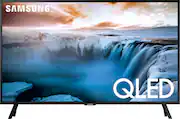
Rating 4.6 out of 5 stars with 1197 reviews
4.6- Picture Quality (722)
- Ease of use (148)
- TV Size (108)
- Size (32)
- Setup (31)
- Remote Control (47)
- Price (42)
- Viewing Angle (8)
- HDR (7)
- Refresh Rate (6)
Customer Images
The vast majority of our reviews come from verified purchases. Reviews from customers may include My Best Buy members, employees, and Tech Insider Network members (as tagged). Select reviewers may receive discounted products, promotional considerations or entries into drawings for honest, helpful reviews.
- Rated 4 out of 5 stars
Excellent for reading and typing
I was in the market for a computer monitor but wanted something with quantum dots, so I figured I'd give this a try. RTINGS craps on VA panels for use as a computer screen but it's honestly fine. It has the same viewing angles as the 43" LG "nanocell" "IPS" monitor I tried before this one, honestly. I'd say you'll notice if you're looking for it, but straight-on viewing is beautiful. My eyes are honestly relieved after switching to this. I can only give 4 stars becaue Samsung has locked down so much of this TV's capabilities. Most of the options to adjust the picture characteristics are greyed-out, and there is no dedicated settings button on the remote. Fortunately, setting the Picture Mode to "Dynamic" really does the trick and was all I had to do to make it look great. Initially, however, color is only YCbCr420 (Chroma 4:2:0). That setting is fine for most viewing, but this is a quantum-dot TV. You bought it for how much color it can produce. To fix this, be sure to use a quality HDMI cable, then navigate in the settings to General, External Device Manager, and switch on "Input Signal Plus " for you whatever source you chose on your TV. This will allow you to set the color space to YCbCr444 (Chroma 4:4:4) at 4K 60fps in your NVIDIA or AMD graphics settings, so the full 0-255 color range will be available. As I won't primarily be using this for content consumption, I don't really care, but turning on HDR in Windows made everything sort of grey, so I switched it back off. Honestly, colors are brilliant without it, so whatever. As I will be primarily using this to read webpages and write, having a uniform backlight was important to me, and this has it. There is a small amount of darkening noticable at the very bottom corners of my screen, but it's unnoticable where I look 99.5% of the time. If you don't have your Windows Task Bar set to "automatically hide" like I do, you likely won't even be able to notice. As a student, I got this monitor with a $100 off student discount deal. $399 is still expensive for a 32" TV, but its a bargain when you consider the contrast ratio, excellent grey uniformity, sharpness, pixel density and built-in speakers. It even has VESA mounting holes if the included feet don't do it for you. Included is an up-close photo of some typing to give you an idea of how clearly each pixel shows. Phone cameras can't very well handle solid white from a screen so that part is wholly inaccurate (it looks to the eye to be solid, smooth, clear white), but the stark contrast between the dark text and the rest of the page is true to life. Sound can be adjusted with the built in equalizer and is adequate for casual use (online school in my case), though lacking in highs and too boomy in the "lows" (what little of them these small speakers can produce that is). CONCLUSION: If what you need is a reading/writing/general use screen, this is excellent. Stop looking. Thank you. You're welcome.
Posted by lukemanius
- Rated 5 out of 5 stars
Great, for me!
I purchased this as replacement for an older, 27-inch, 1080 computer monitor. I am considered a monocular person and do have some pretty serious challenges w/my vision. This Samsung does very well, for me as a monitor. Obviously, I use it for streaming as a T. V. Beautiful color/picture. Setup was easy as I've dealt w/Samsung previously. I have no issues w/viewing angles, etc. The 4K is stunning! Included picture which may not display this well.
Posted by Samsunged
- Rated 5 out of 5 stars
Perfect for Me!
We have Spectrum at home and recently found out Samsung TVs have the Spectrum app already installed. I happened to come across this Samsung 4K UHD Smart TV at the local Best Buy and brought it with me. Couldn’t be happier with my purchase! At 32” it fits my bedroom old TV cabinet perfectly! Classic wood cabinet housing a top-of-the line smart TV. Can’t beat that.
Posted by Great
- Rated 4 out of 5 stars
New 32” QLED SAMSUNG 4K UHD for bedroom
Overall, I love my new Smart TV. The picture is crisp and everything appears as if it’s almost popping out of the screen. Very easy to operate. Decent size for a bedroom tv. Only time I notice a little glitch like appearance when the camera does a slow panning or following of an actor during some scenes but that’s because of the 60hz refresh rate. It’s barely noticeable so I can manage. That’s the reason for the 4 stars instead of 5. Love the UHD and 4K QLED. would definitely recommend
Posted by Md82
- Rated 3 out of 5 stars
Expenaive TV which can be a decent monitor.
I was very excited to a 32inch 4k TV but slightly disappointed. Decent monitor that can double as a TV then definitely this is worth considering. Top not interms of smart tv features. Sound is good too for a 32inch. If your primary goal is color accurate vibrant monitor then look elsewhere. I don't like dark rooms and after I changed the set up to have the window in the back, the reflection is very noticeable for light bouncing off the wall (you can see in pic attached how bad it is against IPS). I have heard that in some expensive models they have some anti reflective option, well this TV is expensive for a 32inch. I don't feel the HDR too here. I played with the settings and can't get it right. It is more of a TV than a monitor and $500 for a 32inch TV is overpriced. In summary, if you need a monitor & don't care about accurate colors, refletive screen and want to have the functionality of a TV then pretty much this is the only option. I would return this to get an actual monitor.
Posted by SkyDive