Rating 4.7 out of 5 stars with 142 reviews
4.7- Keyboard Quality (49)
- RGB Lighting (29)
- Key Feel (24)
- Lighting (22)
- Software (13)
Customer Images
The vast majority of our reviews come from verified purchases. Reviews from customers may include My Best Buy members, employees, and Tech Insider Network members (as tagged). Select reviewers may receive discounted products, promotional considerations or entries into drawings for honest, helpful reviews.
- Rated 5 out of 5 stars
Color me impressed…!!!
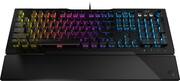
============================= >>>>> Bottom Line Up front: <<<<< ============================= I’m definitely not new to world of gaming keyboards – let alone the world of “everyday” keyboards to say the least. I pretty much rely on keyboard to make my living. After using the Roccat Vulcan 121 AIMO keyboard as my daily driver for a week now, it has left me with a new found respect for Roccat products. It really has me wondering why I haven’t given one of their products a solid run a good long while now. Roccat may not be as “synonymous” as some other companies that may come to mind when you think the word “keyboard” – however they deserve honest consideration alongside the more “commonly known” brands … especially after my time with the Vulcan 121 AIMO at home. The Vulcan 121 has enough RGB to give you the holiday “feel” year-round if that your deal, and thanks to its minimalist keycap and overall design – you can still pull off of an ”all business” approach if that is more your style. This is all made possible through highly customizable feature sets that you tune to your liking through the Roccat Swam software, but I must admit… the Swarm software could definitely use some more work to make it “easier to use” and “prettier” to look at – especially compared to the competition in the market at this price – but not in anyway that seriously hurt the functionality or appeal of this great keyboard. =============================================== >>>>> Detailed Observations after a regular usage: <<<<< =============================================== Over the past week I used the Vulcan 121 AIMO to help tackle my daily development and debugging work in the daytime hours, alongside my FPS and space shooter addictions in the darkness of night. Needless to say, the Vulcan handled all of that with ease and often times had me forgetting I wasn’t gaming on my normal $200 gaming dedicated keyboard that it was replacing. That is saying a lot, in my book - since I am always trying to find “the one” keyboard that can handle both business and pleasure sides of my daily routines – I end up trying/going through A LOT of them. To be honest, I was pretty happy with my previous one I was using (rhymes with shmorsh-mair) … up until now. Roccat isn’t exactly new to the gaming keyboard and peripherals scene, and they have even sponsored some pretty popular E-Sports players and gaming tournaments from time to time – in case you didn’t already know. So, they definitely no a thing or two about what gamers are looking for and want in a product. I’ve personally known some good friends to have purchased and owned some of their products over the years and all of them were regularly happy with whatever Roccat product they were using. As I said before, I never really gave them a chance until now. Traditionally, I have always preferred “mechanical” Cherry MX “Brown” switches - primarily for their increased actuation pressure/weight which helped me to reduce errors and balance speed and accuracy for my typing style. While those MX Browns were better for typing in use, they weren’t necessarily the “best” when playing games. I have always been a little leery of “custom” or “in-house” key switches – particularly ones that were not “mechanical” – but let me tell you how impressed I am with the Vulcan’s “Titan” linear switch…I caused me to reverse what I previously though a “linear speed” speed switch should “feel” like. The closest mainstream switch I could compare the “Titan speed” switches in this Vulcan 121 AIMO - is to the Cherry MX “Reds” – both in actuation pressure and overall “speed feel” as I went about my daily duties in my documents/terminal screens. I think a portion of that can be attributed to the “curved” or angled keycaps of the key design, in addition to the accuracy of the Titan switches registering the inputs as well. Having owned/still own several Cherry MX Red keyboards, I never preferred that particular switch because I often found myself “double tapping” a key or making more errors in my typing that I would like. It was one of the reasons I opted to settle on a Cherry MX Brown switch-based keyboard in the first place – HOWEVER - when I compare this Vulcan 121 AIMO with the “Titan Speed” switches in this model to my older keyboard - I was pleasantly surprised at how different they felt to me. With the Vulcan, I still find myself typing around 65 words per minute AND maintain my typing accuracy at the same time. I felt that I was getting amore “responsive” feeling back compared to the Cherry MX Browns. I suppose that is in part to the mechanical versus linear switch differences of the two, however the fact that the “Titan Speed” switches can provide me with the similar benefits of the Cherry MX Browns while simultaneously offering similar key stroke accuracy and improved perceived speed – I’ll take it. Maybe its just my previous experience with other linear switches, but the “Titan Speeds” seemed to be a little on the noisier side than I would have though, however they are nowhere near as loud as my previous keyboard with the MX Cherry browns. Arguably the most important part of this review is the Food Processor’s actual performance. I started with a nice homemade salsa recipe to see how the “multi-use blade” would handle the mix of whole Roma tomatoes, red onions, and garlic cloves along with soft leafy cilantro and canned jalapeno peppers. Sadly, it didn’t turn out as well as I’d hoped – I wound up basically liquefying the first batch as I was adjusting to the learning curve/speed/sharpness of the multi-purpose blade. I’ll chalk that up to mastering the digital pulse button on the Ascent 3500 in addition to underestimating the cutting/chopping power of it (especially compared to my old inferior/dull unit). Fortunately, armed with that knowledge I expertly was able to produce the creamiest guacamole I have ever made at home thanks to this attachment! Personally, I think If you’re a hardcore MOBA player, or like having 25+ customizable macro/FX keys on your deck – you may find the Vulcan 121 AIMO a little lacking. It does cover the bases with its dedicated media/lighting keys in the upper right-hand corner, and by adding a “Game Mode” hot key functionality with the INS/HOME/PG UP/PG DOWN/DEL/END keys - however I wouldn’t exactly say its class leading or revolutionary in any way. As I just stated, its not the most elegant solution, but it works for the most part. Personally, I don’t use macros much so it’s not an issue for me and I appreciate the slimmed down/no nonsense approach to styling that comes as a result of the Vulcan not having a million and one extra keys that I don’t regularly use. ========================= >>>>> Closing thoughts: <<<<< ========================= All in all, I was really impressed with the Vulcan 121 keyboard. Roccat’s “Titan Speed” switches really changed my perception of linear switches, and they have been delivering reliable and smooth key actuation flawlessly for a week now in everything that I do. The Vulcan 121 does so many things right, it’s hard to find faults unless I find my self knit-picking things. From its aluminum clad keyboard deck, customizable polling intervals, thoughtfully designed “magnetic” wrist rest (other competitors should take a note here), to its outstanding lighting effects, … it just works. I love products that “just work”. If I had to say there was one particular area for improvement it would be Roccat’s Swarm software…it lacks the polish and user friendliness of the other players software/UIs, but Swarm gets the job done. However, when so many other aspects of the Vulcan 121 AIMO are executed so well, Swarm quickly becomes the most glaring area in need of improvement in my eyes. It wouldn’t hurt to add an extra media key or two to the Vulcan’s deck or maybe a little beefier keyboard deck support mechanism – but overall, I wouldn’t gig the keyboard it. It’s lack of dedicated macro keys may be deal killer for some, but if you’re like me and don’t NEED them, you won’t be disappointed. I’ll defiantly be on the lookout for more Roccat products from this point on, and I think if you’re in the market for a new board that can handle both business and please – the Roccat Vulcan 121 AIMO should be in/on the top of your list.
Posted by Solrak
- Rated 5 out of 5 stars
Love it
I saved $80 when I bought this and didn’t buy the original keyboard I went in for. All the same features for less. Great response and feel. RGB lighting synced from the first time I plugged it in, even without the Roccat software. Great board, great price! Happy customer.
Posted by Mhallmon
- Rated 5 out of 5 stars
Quiet Keyboard
I am not a Keyboard aficionado with that said it is the best keyboard I have personally ever owned. My daughter kept complaining about our old keyboard being loud and this resolved it. The keys have great resistance and feel good. Will buy again.
Posted by HiTekGuru
- Rated 5 out of 5 stars
Sweet Keyboard
I needed a keyboard to use at night and it turned out the board is the best i'd ever seen and it's worth every dollar.
Posted by Groc21
- Rated 5 out of 5 stars
it’s beautiful!
Roccat Vulcan 121 Aimo is prob the most beautiful RGB mechanical keyboard i’ve ever had! Pros - Vulcan 121 is one beautiful keyboard, the key caps are super tin, the main body of each key are clear that helps the RGB lights shines - 2 legs at the back that can be switch to give yourself some elevation - Vulcan 121 comes with thin plastic arm rest that is magnetize that blends the look for the keyboard - Swarm software is amazing, you’ll have the ability to customize your RGB lighting, you can even set individual key to create something or original - ok the top right section you have your own media keys that can be use to adjust the volume of audios and by pressing the FX button it can be use for RBG lighting - have the ability to turn game mode on through the keyboard without using the software - the keys are comfortable people says they’re equivalent to MX Browns , I have logitech that have Cherry switches, and Vulcan is a little loader than my logitech keyboard when it comes to pressing the keys - going back to RGB having the AIMO technology on the software make this keyboard stand out to have one of the best looking lighting i’ve ever seen, the rgb reacts to your presses and i’ve tested this feature and it does work, the best part of having a roccat Cons - the caps are thin to where i’ve had some situations that I couldn’t tell if i’m pressing the right letter an issue i’ve never had on regular key caps - not a fan of not having the name “Caps” “Shift” “Control” on the keyboard, instead they gave you symbols that I don’t quite like - the thin hand rest was kinda useless I still prefer something with more thickness like what Razer or what logitech offer - the keyboard caps looks cheap and there’s no extra caps inside the packaging as well I’m enjoying this keyboard a lot the looks of rgb is amazing, way better than logitech, having a media control is something that I wish all keyboard should support, it’s a must! I would say buy this keyboard and you will not be disappointed
Posted by Naztynestor