Rating 4.5 out of 5 stars with 101 reviews
4.5- Sound Quality (77)
- Size (22)
- Bass (11)
- Bluetooth (10)
- Design (9)
- Portability (9)
Customer Images
The vast majority of our reviews come from verified purchases. Reviews from customers may include My Best Buy members, employees, and Tech Insider Network members (as tagged). Select reviewers may receive discounted products, promotional considerations or entries into drawings for honest, helpful reviews.
- Rated 4 out of 5 stars
Above its size
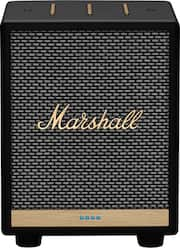
About the size of an alarm clock (5" x 5" x 7" tall), this speaker is unrepentantly designed in the very retro classic style of Marshall concert speakers, although the case is entirely plastic. Sound: Pleasantly, this sounds very good for its size. It's good enough to fill a small room and it does not distort at max volume. On top of the speaker, it has volume, bass and treble controls. If using the 'Marshall Voice' app, it has a five-band eq with presets (Rock, spoken, pop, flat, and of course, custom). Changing bass, treble or volume on the speaker simultaneously reflects on the app. Other physical controls: On the back of the speaker, there is a very discreet Bluetooth pairing button. The front has the after mentioned vol, bass and treble, and also a small play/pause at the left and a mic attention (turns on Alexa without the wake word) / privacy. At the front bottom of the speaker, on the copper-painted bar, there are four LEDs that change sequence and colors based on activity (Alexa colors, changing audio controls, etc.). Normally there are no lights on the speaker, except for Alexa notices or if the mic is off. The power cable is a 110v to C7 plug on the speaker, removable. It does not have an external adapter. Also it does not have a battery. It requires to be plugged in. Note that it also works with 240v, if traveling. Audio sources: - Note that it does not have an Aux In nor a headphones output. This speaker is really meant to be used either with Alexa voice or from a phone - Airplay 2: Works really well from Apple devices (iPhone, iPad, macOS, AppleTV) and other airplay devices. For example from the iPhone, I can start playing on the phone, and then send the audio to this speaker and simultaneously to other Airplay2 speakers in the house, or AppleTVs. It works well with other brands also, and without delay. Volume can be controlled individually for each speaker and the whole group. - Spotify Connect: From the Spotify app on a phone, at the bottom left, select this speaker and Spotify can stream directly to the speaker, using the app as a remote, but the app or phone are no longer needed while it continues playing. It does not require a subscription. - Amazon Music: Besides Alexa, the Amazon music app on a phone can play directly to the speaker. - Bluetooth: The speaker supports Bluetooth 5.0, which provides better range and it's better on the phone's battery, but it could only connect using the SBC Bluetooth codec. It didn't support aptX on an Android 10 phone. It sounds fine regardless and volume can be controlled from the phone's volume controls, from the speaker or the Marshall Voice app. Initial setup: Initial setup requires the Marshall Voice app from either Apple or Google app stores. The pairing process from an iPhone was flawless: It first detected the speaker via Bluetooth, found the WiFi network and asked for the Wi-Fi password. It did not require messing around with WiFi settings on the phone like other devices I used. Then it found a firmware upgrade for the speakers that took a couple minutes. Worked just fine. Alexa setup is optional. It's simple and it also requires one to have the Alexa app on the phone to finish the process. Note that this speaker supports both 2.4 Ghz and 5 Ghz Wi-Fi, which It's great and not usual. Amazon Alexa: This is an 'Alexa enabled' devices. Just like any other non-amazon Alexa devices I use, there are some things it cannot do. For example, communications like calling someone through Alexa des not work. Also Apple Music through Alexa does not work either. The Apple Music skill is very restricted, and I have similar issues with other Alexa speakers. These are really Alexa limitations, but keep it in mind. Pairing this speaker with other Alexa devices in music groups is supported, although it did not work in my case. The speaker shows as available to add in Alexa groups but ultimately fails for me. It might be a temporary issue. Plus: - Great, powerful sound, with deep but not overpowering bass. Clear Mids and Highs. It's really a step above most speakers of this size. - Well executed Alexa integration. - Airplay2 worked flawlessly in a household with a mesh Wi-Fi and multiple speakers and Apple devices. - Spotify Connect works out of the box. - Integrated power, Class-D amplifier. - Phone app is simple and intuitive, and not required besides setup. It shows the name of the song that’s playing (Even for Bluetooth, if the phone provides it), source service and cover-art (if available). Cons: - Does not support Chromecast Audio. A separate version of this speaker replaces Amazon/Alexa for Google Assistant/Chromecast. - Bluetooth does not support aptX codecs for Android. Other considerations: - I find the styling too forced. It's all plastic while evoking the classic Marshall styling. The long bar controls on the top are a bit much, and the copper bar at the bottom of the grille is really painted plastic. - That said, it's very well constructed, with solid rubber feet (Which is good because it puts out a lot of sound). The enclosure does not produce vibration sounds. It's thick and solid. Who makes this: - Marshall branded products are produced by a Swedish company, Zounds Industries, that also produces Urbanears headphones.
Posted by emiliosic
- Rated 5 out of 5 stars
Great design, sound and Alexa!!!!
The design is classic and superior. Great sound quality packed into a small unit. The Alexa feature is the icing on the cake!!! It would be great if it were cordless however, still worth every penny.
Posted by Marshall
- Rated 5 out of 5 stars
Awesome
Sounds is perfect for its size. Materials are not cheap looking.
Posted by RomeoL
- Rated 4 out of 5 stars
Size is deceiving for the output
We wanted a better Alexa enabled speaker, as we already have a bunch of Echo Dots around the house but never splurged on a higher end model. I’m a little familiar with Marshall Equipment as I have their Major III headset and really like them, so when I saw they had the new Uxbridge smart speaker coming out we figured on giving it a try. Unboxing and first looks: The speaker arrived in protected in a nice display box along with a power cord and quick start guide. It’s actually smaller than I thought it would be but it’s surprisingly heavy and built very sturdy. It looks like all the other Marshall speakers I’ve seen on display at the stores, and has the familiar cloth speaker grille with the Marshall logo on it, and looks really nice, sort of like the old school amps they make. The top has three strips for controlling volume, bass and treble, they look like Frets on a guitar. There are also two buttons, one on each side that control “Play/Pause” and “Mute”. On the back there’s the power connector and a Bluetooth pairing button, “it’s almost hidden”. There’s no power brick, the amp is built into the enclosure and you don’t have to worry about that laying around on the floor or try to find a place to hide it. Using: When I set up the speaker I installed the “Marshall Voice” app and followed the instruction on setting it up within the app. Since the speaker does have built in WiFi you have to connect to its built in WiFi first through your phone and then set up access for it to connect to your network. After that was completed I immediately received a message stating that there was an updated firmware available and it needed to be installed before proceeding. The update was simple, and completed quickly without a hitch. Within the app you can control a built in equalizer and there’s a good selection of pre-set configurations if you don’t feel like messing around with the controls yourself. “Remember there are also controls on top of the device to adjust Bass/Treble so you don’t absolutely have to have the app to adjust those settings, just the app gives you finer control over those. Now after using the Alexa app on my phone to connect to our Amazon / Alexa account we were off to give it a try. We had a delivery earlier in the day and I hadn’t erased the notification from the Spots and noticed that there are four very small LEDs on the front that flash in correspondence with the Alexa alerts, “they light up for volume levels also”. We started sampling some music through Amazon and were very impressed by the sound quality of this little speaker. It actually got plenty loud and had great bass to it. My wife was very impressed with how well this sounded over the Dots, the sound was better than some of my other Bluetooth portable speakers by a good bit. I have hearing problems and some speakers just don’t sound good or put out clean enough sound for me to be able to hear them very well. This Uxbridge speaker blew them all away for sound quality. I can hear everything from across the room “which none of the others have been able to do so far”, “they sound good, but I have to be pretty close”, but this one was just amazing. Impressions: We’ve been using this for a few days now and we are still enjoying just how well this sounds and music just sounds great. It’s loud enough to fill our fairly large living/dining area and it just doesn’t take up much space at all. We’ve had no problem connecting it to her Note 10, My S20, and our Galaxy Tab S. It even connected to an old Asus tablet I have “using that to stream some music from my NAS”. She likes using Spotify and hasn’t had any issues with it either. We are definitely listening to more music through this over our Dots. I have found a couple things though, one, there are no audio in/out ports, it would be nice to have them so you can connect a device directly to it and not have to rely solely on a wireless connection. Next, I paired this up with our TV through Bluetooth. I have other portable speakers / headphones I do this with also so I can have a speaker close to me due to my hearing problems. While I had no problem getting this to connect there’s a terrible where the audio does not match up well at all with video on the screen, “it’s like watching those old martial arts movies that have been voiced over”. I have multiple Bluetooth transmitters for the TV and although they all connect without a problem I cannot get the audio to sync with the video. I’m hoping a firmware update in the future will help this issue. Otherwise for listening to music or using Alexa this device works great and for audio alone it’s outstanding for its size. If you are looking for a great sounding device, and mainly play audio through Amazon, Spotify, or through your phone/tablet, I think you’ll be pleased with this one. If you want to use it as an auxiliary speaker for your TV then you may have to wait till they get the synching problem resolved. I’ll keep messing around with it and see if I can get it to work as this speaker sounds so good I really want this to work also.
Posted by SteveC
- Rated 5 out of 5 stars
Powerful, crisp, and clear sound little fella
-- Summary -- First time ever owning a Marshall speaker, I have only seen or noticed them at small concerts, parties, but in their bigger versions. The Marshall UXBridge is a small yet powerful device with a very crisp and clear sound, even at maximum volume. - Favorable: very small, extremely powerful for its size with an outstanding crisp and clear, surrounding-like sound (even at max volume). - Not-favorable: It is power-wired, so you need to have access to a nearby AC power outlet. I’d guess a rechargeable battery one wouldn’t be such powerful nor small and much heavier, so it is a compromise. In addition, it feels like its design was intended for it to not be portable. -- Basic Setup -- First, locate a place (bookcase, desk, etc.) near an outlet or bring an extension cord, or bring an extension cord to where the speaker will be placed. Next proceed to unpack it, connect the power cable, and plug it in. Before even trying Alexa or the smart phone app. I decided to go with Bluetooth from my phone and laptop. Connecting to different devices just requires pressing the “Bluetooth button” on the rear side of the speaker and voila. Sound quality was amazing. -- Wireless configuration and connectivity -- Unfortunately, the only way to configure the device for network Wi-fi connectivity is through the Marshal Voice App, which is only available for iPhone and Android. iPhone’s Marshall voice app rating is less than 2 (albeit a small number of reviews), fortunately it worked fine with no issues configuring the speaker. Bluetooth sound is good enough, but after configuring the network access, I tried Spotify Connect, what an experience, sound is just amazing. I am more than happy with this device. Even one speaker would be enough for a big room party. The next step was enabling Alexa. To configure Alexa, of course you need to have an Amazon account, and you need to register the device (which are things I don’t like, but those are the constraints on having these devices, they don’t come standalone). My family was impressed by how well the Speaker picked our voices, but we were a little scared though, even in our broken English, it was able to recognize our commands. I am thinking about removing Alexa altogether, and just keep the Bluetooth and Spotify Connect. -- Sound -- I usually prefer stereo sound, I like the fact that different instruments can be heard coming from different areas; however, this device made me forget about that requirement, and although not portrayed as such, the sound feels like surrounding. I am gladly surprised that at maximum volume, the sound is crisp and clear. In other similar size speakers or even the bigger ones, you can clearly notice a background or vibrating noise coming out of the speaker, when stressed. I am finishing writing this review while playing Vivaldi on this speaker, what a pleasure it feels. -- Other notes -- - There is no Aux input, so no wired sound connection. I understand why, it is a smart speaker that is supposed to be connected wirelessly to some other intelligent device or service. - (not tested) Apple Airplay 2: Although we have iPhone devices, we did not even think about setting Airplay 2. - (not tested) Multi speakers: one of the attributes advertised is how well it would work combined with other UXBridge speakers. I haven’t tested this, I’d image one specific scenario to have such configuration would be in an office environment, where the same music/announcements are played on all speakers. For home use, I am not sure how well this configuration would be, well except if it is configured for some full-blast party.
Posted by Goncho