Rating 4.7 out of 5 stars with 3291 reviews
4.7- Picture Quality (2254)
- Color (330)
- Ease of use (235)
- HDR (173)
- Price (68)
- Remote Control (71)
- Viewing Angle (19)
- Motion Blur (18)
- Operating System (17)
- Input Lag (15)
Customer Images
The vast majority of our reviews come from verified purchases. Reviews from customers may include My Best Buy members, employees, and Tech Insider Network members (as tagged). Select reviewers may receive discounted products, promotional considerations or entries into drawings for honest, helpful reviews.
- Rated 5 out of 5 stars
The BEST TV I’ve Ever Had…PERIOD
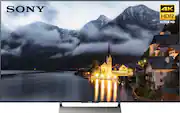
To start off, I’m not going to beat around the bush. The 55” Sony XBR55X900E is, quite simply, the best TV I’ve ever had. All I can say is, read on………. UNBOXING: There’s really not much to say here. The packaging by Sony typical for large flat-screen (and even Samsung’s curved-screen) TVs. Open the top of box to access the “quick set-up & install guide”, then remove the 4 plastic clips along the bottom of the box (there’s 2 on each side), and finally slide the upper box piece off of the lower piece. SETUP: Setup is almost as simple as unboxing. Start by putting the 3-piece stand together using the 4 small screws (it’s so simple, you shouldn’t even need to look at the directions), and flip the stand to its upright position. Next, slide the TV down onto the stand, and secure the TV to the stand using the 4 large screws. Once the TV is in position (TV stand, wall-mounted, etc), plug in the power cord, & connect the HDMI cables (like most people, if you’re using a home theater receiver for switching, you’ll only be using one HDMI cable between the receiver & TV). While you can connect the TV to the internet via your choice of either Ethernet cable or Wi-Fi, I always recommend a physical (ie. Ethernet cable) connection, for more reliability AND security. Besides, connecting the TV to the internet is required for all “smart” functionality, as well as for the TV’s firmware updates, and updates/installation of Smart apps. OVERALL IMPRESSIONS: The initial image quality was quite good. To put it another way, where color, contrast, & brightness are concerned, it was somewhat close to that of my (professionally calibrated) 55” Samsung UN55H8000 (2014 model). Even so, I decided to adjust the settings to improve the image even further. This was both a great idea…and an idiotic one. While I was quite familiar with the settings menu of the Samsung (which, if I’m correct, runs a version of Samsung’s own Tizen OS), the Sony, which runs Android, has a menu (and, by “menu”, I’m only referring to the picture adjustment menu, as the rest of the menu is even more extensive) that could be considered requiring someone with a science degree. To put it another way, the settings are extremely extensive (for color, alone, there are over 30 settings). The “bad” of this is that the settings menu could lead someone to the ‘nut house’…but the “good” is that it allows extremely fine control over image quality, and, to me, that’s more important. For the following testing/comparing, no professional analyzing equipment was used…everything is based on my non-professional eye. Once I had everything dialed in (or, should I say, as dialed in as I’m going to get without professional calibration), I finally got to comparing the Sony against my 4-year old Samsung. Before I continue, I’ll mention the other equipment being used for testing/comparing: Sony STR-DN1080 Home Theater Receiver, and Sony UBP-X800 4K Ultra HD Blu-ray Player. To compare “new” against “old”, I played several scenes from various Blu-ray movies (The Fifth Element, Life of Pi, Deadpool, & The Revenant, all of which (see below) I also have the 4K UHD versions). I ran these first tests/comparisons simultaneously through both TVs, by connecting the receiver’s HDMI output to a 2-way HDMI splitter. The results were virtually equal, with the exception that the blacks truly looked black. Colors, contrast, and brightness on the Sony were all quite good (again, the Sony is new & uncalibrated, and the Samsung is professionally calibrated), essentially equal to the Samsung. Next, I disconnected the TVs from the splitter, connected the Sony directly to the receiver’s HDMI output, enabled the 4K UHD player’s 4K “upscaling”, and repeated the same scenes. While contrast & brightness appeared identical, color was slightly lessened (possibly due to the “up-conversion” process)…but image quality appeared to have slightly improved. Again, these were all viewed using the Blu-ray…not 4K UHD Blu-ray…so I didn’t expect image quality to equal that of an actual 4K UHD disc. After viewing my selected scenes using Blu-ray discs, it was time using the 4K UHD discs…and talk about the “WOW” factor. “The Fifth Element”, being the oldest of the four movies, had the least improvement, as film grain (remember, it was shot using 35mm film) was more noticeable. This isn’t necessarily a bad thing…having been shot on film, I considered the additional grain a good thing. With HDR, the colors were vibrant, and “popped” off the screen. With “Life of Pi” had similar. The early India-based scenes were better, but it was the water-based scenes that the movie is known for that really stood out. They just didn’t just “pop” off the screen…they were the most vibrant, most incredible, images I’ve ever seen on a TV. Next up was “Deadpool”. While the Blu-ray already presented mostly accurate colors, brightness, contrast, and detail, the 4K UHD version presented everything as the director & studio intended. Last came “The Revenant”…and, talk about a surprise. On the Blu-ray, the sky looked mostly ‘washed out’, and the massive number of trees (I can’t recall ever having seen so many trees in a single movie) looked “ok”. However, once I watched the same scenes using the 4K UHD disc for, I finally understood what 4K & HDR was all about. Let’s just say that, when it comes to 4K TVs with HDR, The Revenant showcases what this technology is all about. With that said, I can’t wait for Apocalypse Now (preferably the Redux Edition) to be remastered, and released on 4K UHD (again, preferably with HDR). When that happens, 4K TVs w/ HDR will have a new “showcase” movie. THE GOOD: 4K resolution HDR Great initial color, brightness & contrast settings Android OS Voice-control remote Built-in Google Assistant Extensive number of available apps Access to the Google Play store Very good-sounding built-in speakers Can control other devices, including those from other manufacturers THE BAD: NONE THE UGLY: If I couldn’t come up with any “Bad”, how can there be any “Ugly”??? FINAL VERDICT: From the review’s title, alone, you should have gotten the immediate impression that this is an incredible TV. Heck, you didn’t even need to read the review, as the title said it all. Sure, there are better TV’s…Sony has several above this model, including an OLED model…but they all cost more (considerably more in several cases). Sony places the X900E as a “top-tier mid-range model”, and its price reflects that. but, when one considers the image quality, features, functions, etc, I’d be more likely to consider it a “bottom-tier high-end model”. It’s an incredible TV, and one that Sony, and retailers, could have easily placed a higher price on. On a 1-10 scale, I’d give this TV an 11.
Posted by Panther6834
- Rated 5 out of 5 stars
Absolutely awesome tv
This is my first smart tv, and it is the best tv I have ever purchased! This thing can do anything!! And I love the fact that it's android. It has every app you would ever need. From netflix to youtube, amazon prime to hulu it has everything!! I couldn't ask for anything better!! When it comes to picture quality I still WOW everytime I turn the tv on. The colors are amazing!! I am definitely not disappointed with this tv and have nothing bad at all to say about it. I LOVE this tv, and highly recommend it!! I also have it paired with the Sony HT-5 sound bar and SRSZR5 wireless surround speakers for the best sound as well as the sony UBP-X800 blu ray player for the best quality possible.
Posted by Mustang2005
- Rated 5 out of 5 stars
This TV is INCREDIBLE ! Sony XBR55X900E
I have always been a Sony buyer, I truly believe they make the Best Tv's. I read all about all the different major brand 4k UHD TV's and Ended up buying this Firstly because it is a Sony, secondly it had more inputs and the best features. I has a remote control that You can talk into and it does as You say..Like volume up or down, go to netflix, open pandora radio.. it is sooooo Kewl. And the Picture is well let's just say Breath Taking, so clear so definedl, so intense. The built in down and forward firing speakers provide reall impressive sound and the volume goes really loud without distortion. Tons of inputs even an old video input for like say a camcorder or older wee.Too many features to list and all easily accessable. The wifi is superb and fast, Buy this TV and You will be Totally Satisfied.
Posted by sean
- Rated 5 out of 5 stars
Working as intended.
This was a purchase I went in almost completely blind on and have no regrets. We knew we needed a new tv for the house and went in to check out the deals for the super bowl planning to get a 4k Samsung tv of some size. We had settled on one prior to asking a few questions about how these tvs work and why ones are better than others. We explained the tv was mainly used to play games on with movies and shows a secondary. The Best Buy rep pointed us at that one and explained that it had a better refresh rate to prevent screen tearing, and that it had better contrast to spot things against shadows. We decided to think about it and were going to go back to the Samsung tv we had set out eyes on initially when a Sony rep told us about a few other feature, such as being able to connect with the Playstation 4 and other sony devices in more direct ways that the other televisions as well as re-iterating the shadows. The tv was demoing GT Sport from a PS4 pro. At that point we were sold. We purchased the TV and a PS4 Pro that day and have enjoyed many hours of gaming that looked gorgeous in the passing month. There has also been no shortage of amazing detail in 4k movies either, so it definitely can fit your needs if that is your primary use.
Posted by UserNumberP90
- Rated 5 out of 5 stars
Best LED Sony ever!
Huge huge Sony fan! This tv puts out one of the best pictures I’ve ever seen! 4K with HDR is brilliant!
Posted by Crazywayne311