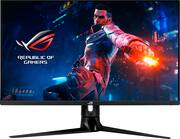
Rating 2.6 out of 5 stars with 33 reviews
2.6- Hdr (3)
- Bright (2)
- Gaming (2)
- Hdmi 2.1 (2)
- Refresh rate (2)
- Quality control issues (3)
- Boot loop (1)
- Bricked screen (1)
- Defective product (1)
- Dust between layers (1)
Customer Images
The vast majority of our reviews come from verified purchases. Reviews from customers may include My Best Buy members, employees, and Tech Insider Network members (as tagged). Select reviewers may receive discounted products, promotional considerations or entries into drawings for honest, helpful reviews.
- Rated 5 out of 5 stars
Amazing monitor!
Too many people are hating on this monitor in the reviews. Do yourself a favor and get this monitor if you're looking for a high-end monitor and if you have the money. This monitor is amazing for both gaming and editing. I have been playing BF2042 on PC at 144Hz and Ratchet and Clank Drift Apart on PS5 at 120Hz. I had no idea how much I was missing out not having HDMI 2.1. Originally I was looking for the LG 27GP950-B but was never able to get it, so got PG32UQ instead. A bit more in price but definitely worth the buy!
Posted by Jtellez
- Rated 1 out of 5 stars
Issue months after purchasing
Its been 3 months and goes black and then white image with colored edges appears really weird and bad quality for a $100 monitor.
Posted by Manny415thesco
- Rated 1 out of 5 stars
Do not Buy.
I cant express how disappointed I am with this monitor. On paper it seems to fit a perfect segment of price, specs and performance but it does not deliver as promised. This is my second monitor that has failed. The first would randomly black in and out constantly. This was with new cables using display port 1.4 on a new evga 3080. The second monitor has done the same. In addition I discovered that it is not possible to display 4k 120 at 4:4:4 or 4:2:2 (even with DCP compression on) on the Xbox series X as the monitor will get stuck in a boot loop. Even after all of that I was still hoping that a firmware update would fix the problems but this morning I came down to a totally bricked screen. It will not power on, at all. Here is the kicker, when I tried to contact ASUS chat they outright refuse to connect and instead sends me back to the retailer. Which leaves me no recourse but to return it and start over.
Posted by Disappointed
- Rated 2 out of 5 stars
3 days in, stuck pixels
I have been waiting so long for this monitor and I'm quite displeased with it. Colors are bright and vibrant out of the box. Size is perfect. That's about it. It's a huge pain to plug in cables in the back of the monitor when it's set in place already - the lip for the recessed cable area is too close to the plugs, so thicker cables are a bear to bend into place. It's large and unwieldy to move around with limited space to easily access the back. The DisplayPort cable that came with the monitor was DOA. Tried it with my work laptop's dock: no signal. Other port: no signal. Plugged it into my 2080Ti on my desktop: no signal. Other port: no signal. Swapped cables and it worked fine on all ports. Speaking of ports, as soon as you turn the monitor off, they're all powered down, too, so your PC doesn't detect a monitor at all. Normally not a problem, but I like to use Steam Remote Play from time to time and, ooh boy, did it not like not having a monitor detected. So much flickering and stutter. Unplayable. As I was working on trying to keep the ports powered with the monitor off, I found multiple options greyed out in the OSD. Some would turn back on by disabling other settings, but things like DDC/DI I could not get into no matter what I changed. And then I saw the stuck pixels. Now, I've had this monitor for three days already and have been using it for work and games since. No issues. Suddenly, a stuck red pixel near the center of the screen. Ran one of those online pixel fixers (the multi-color high frequency flicker things) for an hour. The red is still there, and now a green has shown up about an inch away from it where the fixer wasn't even covering. I own multiple ASUS monitors -PG348Q, PG349Q, and a PG248Q and have no issues with those at all. ASUS mobo, GPU, AIO cooler, no problems. Three days and two stuck pixels, I'm kind of concerned how many more will show up over the next week, the next month.
Posted by Travis
- Rated 1 out of 5 stars
Terrible quality, stuck pixels, dust particles
It was 5th monitor I went through. I think I'm done with ASUS. Imagine buying 1000$ monitor that is guaranteed to have issues. Three monitors had stuck red pixel in center area, one of the monitors also refused to update to v024. Just restarts on each attempt. Two monitors had 2-3 particles of dust or whatever between the screen and outer layer. I'm not even talking about backlight bleeding or anything. Asus Support is useless - their online automated chat system has no straightforward way to reach monitor department. Panel lottery is a thing, but with this monitor it is just a defective products ride.
Posted by Vlad