Rating 4.3 out of 5 stars with 56 reviews
4.3- Speed (16)
- Ease of use (8)
- Performance (7)
- Security (7)
- Router Performance (5)
- Range (4)
Customer Images
The vast majority of our reviews come from verified purchases. Reviews from customers may include My Best Buy members, employees, and Tech Insider Network members (as tagged). Select reviewers may receive discounted products, promotional considerations or entries into drawings for honest, helpful reviews.
- Rated 5 out of 5 stars
Incredible router and highly recommend.
Needed to upgrade my older router Asus Ax11000 since I recently upgraded my internet speed to 2.5gbs. I needed at least 2 2.5gbs port. My first purchase was the Asus AX11000 pro. Although I was able to get 2.5gbs on ethernet, I was limited to those speeds on 1 pc without a network switch. Wifi coverage was slightly better than previous Asus router. Exchanged the AX11000 pro for the TPLink BE15000. At the time, both rputers were on sale for $350. TPLink BE15000 was a huge improvement overall. Much broader wifi range with faster speeds. My home is 4000 sq feet and there isn't a dead spot inside the home with the router upstairs in a linen closest. Able to run my ring cameras outside the home without connection issues. Wifi signal reaches my backyard and driveway with decent signal and speeds. Previous router did not. 4x 2.5gbs connections with a 10gb wan. Able to get full 2.5gb speeds to multiple gaming pcs in my home. Ring camera and alarm are on its private loT network band. Gaming feels much more crisp and getting slightly lower ping on game servers. Many different options to configure and very simple setup with Tether app on mobile device. Tether app let's you customize and diagnose your router remotely. Highly recommend.
Posted by emerson
- Rated 5 out of 5 stars
Love it!
I have so much control over my network traffic and I am confident in the security that is offered on the device. The free app has so many features that allows me to monitor and and feel secure in my network
Posted by Brittney
- Rated 4 out of 5 stars
Pretty and fast router, fee for parent control
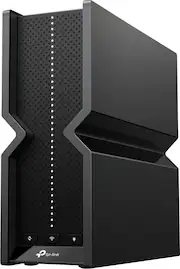
I think the model number is actually Archer BE700 Pro not BE15000, I guess it is a marketing decision to make sure consumer knows the speed for this can go up to 15,000 Mbps or 15 Gbps. This is a tri band wireless router, has three bands of frequency; 2.4Ghz, 5Ghz and 6Ghz similar to WIFI 6E. This is WIFI 7 because of the ability to achieve extremely high throughput and has multi-link operation (MLO) feature that enables the router to transmit data to a single device using multi bands simultaneously. The router also claimed 4x lower latency by switching WIFI band dynamically. Wi-Fi 7 also has Restricted Target Wake Time feature that lets your router reserve bandwidth for certain types of transmissions, this will save battery life of your connected devices. The design is very nice and compact, it uses 6 internal antennas resulted in a clean looking device that you can place anywhere unlike other router with many external antennas that is an eye sore. Internally it has a quad-core CPU and plenty of memory, with more than 40 clients connected, it only consumes 44% of memory. Externally, it has four 2.5 Gbps LAN ports, looks like it is time to upgrade all my 1 Gbps devices to 2.5. The WAN port where you connect to your ISP is a 10 Gbps port, some ISP already provides 10G service so this will future proof your network. It also has a USB 3.0 port allows fast file and media sharing. With so much bandwidth, this router can support 8K streaming. The router also has OFDMA (Orthogonal Frequency Division Multiple Access) feature to vastly improve network efficiency and capacity. If you have larger house, it supports EasyMesh to form seamless whole home mesh WIFI with compatible device. My house is 2500sf and without mesh, part of my house only gets the 2.4Ghz band. Setup is very easy unless you have ISP that must use their modem router. You just plug the router to the modem, power on and continue with the Tether app or go to 192.168.0.1 to continue setup. It should work with any ISP by auto detect the wan port. Wifi Smart Connect is automatically enabled and allows each of the router's 2.4 GHz and 5 GHz bands to use the same wireless settings. The router can balance network demand and assign devices to the optimum band. It does not smart connect to the 6 GHz band though, it has its own wifi ssid, not sure why. This router can function as access point mode if you already have a better router. These are other features included: VPN server and client, Private network for IOT devices, HomeShield with limited functionality such as limited parental controls and network check/protection. The limited parental controls only able to block content, block websites and set sleeping time. The older tp-link wifi 6 router I have has more control such as time limit and custom sleep time by day of week. To get these features you have to subscribe to the Pro package. Boooo! Here is my speed test: 6 Ghz speed test using my Pixel 8 pro phone getting 342 Mbps down and 204 Mbps up when I am one floor away. 606 Mbps down and 338 Mbps up when I am in the same room. 2.4/5 Ghz smart connect, I get 55 Mbps down and 9.5 Mbps up when I am 50 feet away from the router. Wired connection I get 945Mbps down and 942Mbps up. Beside losing parental control feature, my Feit electric light bulb cannot connect to the router smart connection. I then turn off smart connect and try to make the light bulb connect to the 2.4 GHz band but still would not connect. I had to connect it to the 2.4 Ghz guest network (I only enable 2.4GHz for the guest network). Strange. Also the paper box smell like fish. They don’t want you to keep the box.
Posted by Jason
- Rated 4 out of 5 stars
Latest Wi-Fi tech without breaking the Bank.
The new TP-Link Archer BE700 Pro is an intriguing device. It’s also known as the BE15000. Which the BE15000 references the 15Gbps 8-Stream Tri-band Wi-Fi Speed. The look of the device is pretty sleek looking. The router has a compact design that some of their other newer routers share as well. TP-Link opted for 6 internal antennas on this model. Aside from the odd choice of naming convention, I wanted to put the BE700 Pro router to the test. First as my main router in the house and secondly, using the device as an access point. My house’s outline is a 3000 sq foot open layout with 2 stories. I wanted to test the range of the router when I placed it centrally on the first and second floors. The BE700 Pro comes equipped with a 10Gig Wan/Lan port and four 2.5Gig ethernet LAN ports. This is more than enough for my broadband service that tops out at 940 Mbps but rarely hits that top end mark. In the box it includes everything I needed to get started, router, ethernet cable, ac adapter, and a router credentials. I couldn't test the full benefit of this router however; I don't have any Wi-Fi 7 clients. At some point I’ll upgrade the network card in my desktop. This router is backwards compatible as well, so I was able to test Wi-Fi 6 and 6E 2.4Ghz and 5Ghz bands. I downloaded the tether app and was up in a few minutes. I opted to setup in router mode first. Things worked pretty well; I did get great speeds to my Wi-Fi 6E clients. As I moved further away, speeds dropped considerably which surprised me. Sometimes maybe like 20 feet on the same floor. My network speeds were pretty good using the 5GHz band. The further away, My signal degraded pretty significantly. The access mode worked well as well. As expected, the speeds were amazing while using the 6Ghz band. Here are some of the pros I really like about the BE700 Pro: • Sleek compact design • 5-6Ghz Bands extremely fast with great range • Tether App allows remote management • Web interface allows additional setup and router management Some of the things that could be improved are: • Speeds aren’t great for the 2.4Ghz bands • Range falls off really quickly on all bands the further away you are. • Most security features that are important are locked behind a paywall. You do get a 30-day free trial, but other companies make some of the features standard. Overall, I really like the design of the device. The compact design allows this router to be placed anywhere without sticking out like a sore thumb. The Wi-Fi range is pretty good while using the 5-6Ghz bands, but the range declines pretty quickly. My guess is this is due to the size and build of the router. I would think this router would be suitable for 1500-2000 sq foot home, or work in an EasyMesh setup or as an access point. Speeds fall off pretty quickly while using the 2.4Ghz bands. The USB storage is great option. Having the ability to setup Samba Media Server and File sharing are a plus. The advanced features being subscription based or behind a pay-wall makes the BE700 Pro less appealing in my opinion. I would have rather seen those baked into the total cost of the device. Overall I think this is a great mid range Wi-Fi 7 router. Perfect for anyone who wants to the latest technology without breaking the bank.
Posted by kriserikka
- Rated 4 out of 5 stars
The latest technology
TP-Link/Archer is an up-and-coming manufacturer in the router business. It’s not a name I was familiar with a couple of years ago, but they are now serious players. I already have a TP-Link WIFI 6 router, and it is reliable and strong. The BE15000 has moved a few steps up the tech ladder by supporting the “newer than new” WIFI 7 standard. Additionally, the appearance of this series is a big change. It no longer has that typical space spider look with 6 or 8 antennas spouting from a flat box. Instead, it’s a vertical box with no visible antennas. It takes less shelf space and even in a living area, it won’t be out of place sitting in view. As with all TP-Link products, it’s easily installed and configured using their Teather App. If you’re old school, you can make a wired connection and set it up with your browser, but the app is reliable, clear, and easy to use. It will have your new router up and running in minutes. The app is also how you set up and activate your trial subscription to HomeShield security. With all the connect devices phones, tablets, computers, and other smart devices, there are lots of points of entry into a home network. HomeShield is designed to secure and monitor all that traffic. The Teather app reported that I have 26 clients connected, and everything wasn’t active. Obviously, it’s all about performance, and the TP-Link BE15000 (aka Archer B700) is capable and powerful. Of course, the 2.4 GHz band has the greatest range followed next by the 5GHz band. The 6Ghz band used by WIFI 6 is definitely more limited in range. I did see a notable improvement with the BE15000 with WIFI 6. It does have the advantage of more multiplexing and that band is less crowded with other users. Since I currently do not have any WIFI 7 devices, I’ve yet to be able to test the WIFI 7 performance. Hopefully, that will happen soon. Besides the ability to handle a huge number of devices, it’s worth noting that the modem input handles up to 10 G speed, and the four wired LAN outputs are all capable of up to 2.5 G speed. There’s a USB 3 jack that will let you connect modern network storage devices. It’s backwards compatible with all the previous flavors of WIFI, so older devices will not have any issues. Although this is a standalone router, it can be the heart of an Easymesh system if you need more coverage. My existing TP-Link 6e router can be configured as a mesh extender. It's not an inexpensive router, but it’s state of the art. If you have a large home with lots of connected devices, they’ll all be happy and function without delays or buffering. I can easily recommend it.
Posted by Capshroud