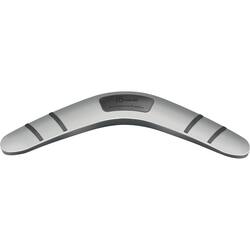
j5create - Boomerang Station Universal USB 3.0 Docking Station - Silver
- Key Specs
- Maximum Number of Displays Supported: 1
- Maximum Supported Resolution: Full HD (1080p)
- Number of DisplayPort Outputs (Total): 0
- Passthrough Power: false (Indicates whether the device allows power to passthrough, possibly with some loss, to another device, typically to charge that other device.)
- General
- Brand: j5create
- Model Number: JUD480
- Product Name: Boomerang Station Universal USB 3.0 Docking Station
- Color: Silver
- Display
- Maximum Number of Displays Supported: 1
- Maximum Supported Resolution: Full HD (1080p)
- Maximum Supported Refresh Rate: 60Hz (The number of frames per second the device can support, expressed as a frequency. Higher rates help produce smooth, seamless pictures.)
- Ports
- Display Connector(s): 1 x HDMI, 1 x VGA (The number and type of connectors used to connect to an external display.)
- Number of DisplayPort Outputs (Total): 0
- Number of HDMI Ports (Total): 1
- Number of VGA Ports: 1 (VGA (Video Graphics Adapter or Video Graphics Array) is a display standard that transmits via analog signals. This type of interface is typically used to connect a computer to a display device such as a monitor, projector, or TV.)
- Number Of Ethernet Ports: 1
- Number of USB Ports (Total): 4
- USB Ports: 4 x USB-A 3.0 (The number and type of USB ports the product has.)
- Headphone Jack: true (The device features an interface that allows for the connection of headphones.)
- Microphone Input: true (The device features an input for connecting an external microphone.)
- Power
- Powered: true
- Power Supply Included: true
- Power Supply Input: DC Jack
- Maximum Input Power: 240 watts (The maximum amount of power allowed to come into the device.)
- Passthrough Power: false (Indicates whether the device allows power to passthrough, possibly with some loss, to another device, typically to charge that other device.)
- Compatibility
- Maximum Data Speed: 5000 megabits per second
- System Requirements: Microsoft Windows XP or later (32-bit or 64-bit). macOS X 10.6 or later. CPU: Intel i3 Dual Core 1.5 GHz / Intel Atom "Bay Trail" Quad Core 1.33 GHz. RAM: 2 GB or higher. Available USB port (USB 3.0 is recommended) (The software that a product must have for it to be able to integrate with another product.)
- Brand Compatibility: Windows
- Model Compatibility: Windows XP or later (32-bit or 64-bit). macOS X 10.6 or later. Available USB port (USB 3.0 is recommended)
- Features
- Material: Acrylonitrile Butadiene Styrene (ABS)
- Dimensions
- Product Height: 1.18 inches (The out of box height of the item. Height is measured as the vertical distance from the bottom of the item to the top as it would be primarily used or placed.)
- Product Length: 4.76 inches (The out of box length of the item. Length is measured as the longest dimension of the item.)
- Product Width: 13.78 inches (The out of box width of the item. Width is measured as the horizontal distance from one side of the item to the other as it would be primarily used or placed.)
- Product Weight: 6.13 ounces (The out of box weight of the item.)
- Warranty
- Warranty - Parts: 1 year limited
- Warranty - Labor: 1 year limited
- Other
- UPC: 847626000744
The Boomerang Station Universal USB 3.0 Docking Station enables you to add an additional monitor instantly via HDMI or VGA connector. When you need to get things done fast, simply connect your monitor, keyboard, mouse, Ethernet, speakers, microphone, etc. to your laptop with a single USB 3.0 cable. It is the perfect solution for expanding virtually any laptop into a full-sized workstation.
- Enjoy the big screen: Supports four display modes: extended desktop / simultaneous display main screen switching / screen rotation.
- video + audio: Watch videos on your Mac or PC on any display connected via HDMI or VGA.
- RJ45 high-speed network: Support 10/100/1000 Mbps high-speed transmission, get rid of the unstable situation of wireless network.
- With 2 2A fast charging ports: Charge other USB devices while working.
- USB 3.0 port x4: Effortlessly expand through 4x SuperSpeed USB 3.0 ports up to 5Gb/s transfer rate.
- Enjoy the big screen: Supports four display modes: extended desktop / simultaneous display main screen switching / screen rotation.
- video + audio: Watch videos on your Mac or PC on any display connected via HDMI or VGA.
- RJ45 high-speed network: Support 10/100/1000 Mbps high-speed transmission, get rid of the unstable situation of wireless network.
- With 2 2A fast charging ports: Charge other USB devices while working.
- USB 3.0 port x4: Effortlessly expand through 4x SuperSpeed USB 3.0 ports up to 5Gb/s transfer rate.
Whats Included
- JUD480 USB 3.0 Boomerang Docking Station
- USB 3.0 cable
- Power Adapter (5V/3A)
- JUD480 USB 3.0 Boomerang Docking Station
- USB 3.0 cable
- Power Adapter (5V/3A)
Product Manuals
Q: Is your docking station compatible with a MacBook Air Laptop?
A: The Boomerang Station Universal USB 3.0 Docking Station is not compatible to a MacBook Air Laptop. This Dock require an available USB Type-A port on a computer to connect to. An example will be the JCD542 USB-C Dual HDMI Docking Station. It connects to a MacBook Air Laptop that is equipped with a Thunderbolt 3 or Thunderbolt 4 port.
A: Yes, the Boomerang Station Universal USB 3.0 Docking Station will have a USB 3.0 Micro B To Type A cable included in the box for the host interface. Available USB 3.0 port is recommended. With this device, you will only be able to either use the HDMI or VGA connection. Cannot use both video ports at the same time. It will also require an installation of a driver for proper functionality. Drivers are available on j5create website under the "Support" tab > "Downloads/Drivers". The JUD481 Boomerang Station - Universal USB 3.0 Docking Station is another option as well, where you can enable dual display's via HDMI and VGA connections at the same time. Thank you.
A: The Boomerang Station Universal USB 3.0 Docking Station is compatible with computers equipped with an available USB Type-A port (USB 3.0 is recommended). Your Lenovo should have (2 x USB-A 3.1 Gen 1), making the Dock compatible with your computer. It will also require you to have full admin rights to complete an installation of a driver. Drivers are available on j5create website under the "Support" tab > "Downloads/Drivers". Thank you.
A: The Docking Station is compatible with computer's equipped with a USB Type-A port. However, it does not support pass-through charge. If the Surface Laptop 4 supports DisplayPort Alt Mode and Power Delivery over USB-C, the JCD542 will be compatible with your computer. Please refer to the manufacturer of your hardware for more information on your device. Thank you.