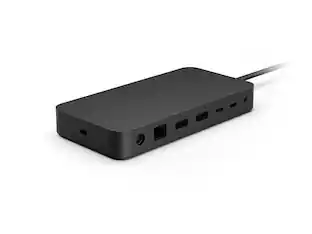
Microsoft - Surface Thunderbolt 4 Dock - Black
Customers are saying
Customers are delighted by the fast Thunderbolt USB-C connectivity and the device's seamless compatibility with Surface products. Users frequently praise the overall performance and note that the unit is incredibly easy to set up for daily use. While the product is highly regarded for its functionality, some users have expressed a desire for a wider selection of available ports.
Maximize your workspace with Surface Thunderbolt 4 Dock
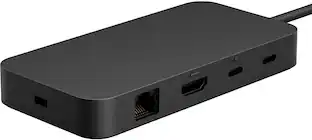
Surface Thunderbolt 4 Dock, delivers ultra high–speed data transfer, 8 versatile connection ports to power all your favorite accessories, and connect up to two 4K monitors. ²
High-speed Thunderbolt 4 ports
Transfer data and files up to 40Gbps - four times faster than USB 3 ² with compatible devices.
Ultra-fast charging
Take your laptop battery from low to full in about 2.5 hours ¹ with extra power for your phone and accessories.
Planet friendly
Surface Thunderbolt 4 Dock was designed with sustainability in mind. It's dock and PSU enclosures (excluding AC cable) are attributed to 20% ocean-bound plast. ³
Connnect up to two 4k monitors
Elevate the way you work by connecting two monitors ² while powering your device.
Connect to your devices
8 versatile connection ports: (3) USB-C with USB4/Thunderbolt 4; (3) USB-A; (1) 3.5mm Audio Jack; (1) 2.5G Ethernet; (1) Security lock slot
Inclusive design
Raised tactile indicators on the rear-facing ports, make it easier for people of all abilities to find, identify, and use the versatile connections.
Designed ⁵ for devices with USB-C with USB4/Thunderbolt 4 ports
Works best with Surface Laptop 5, Surface Laptop Studio, Surface Pro 8 and Surface Pro 9 (Intel/WiFi). Thunderbolt 4 connection supports two 4K external displays at up to 60hz (when supported by device and display).
Also compatible with these devices with USB-C port
Surface Pro (11th Edition), Surface Pro 9 with 5G, Surface Pro 7+, Surface Pro 7, Surface Pro X, Surface Laptop (7th Edition), Surface Laptop 4, Surface Laptop 3, Surface Laptop Go 2, Surface Laptop Go, Surface Go 3, Surface Go 2, Surface Book 3, Surface Studio 2+(no charging).
USB-C connection supports one 4K external display at up to 60hz (when supported by device and display).
¹ Up to 96W power passthrough to PC with compatible devices.
² Requires device with USB-C USB4/Thunderbolt 4 port and when supported by device and display.
³ Ocean-bound plastic is plastic waste recovered from oceans and waterways, cleaned, and processed into recycled plastic resin pellets. These recycled pellets are blended in with virgin plastic during the manufacturing process.
⁴ Additional compatibility details can be found at aka.ms/SurfaceDockCompatibility
⁵ Learn more about Design for Surface and the mount at https://learn.microsoft.com/en-us/surface/surface-dock-whats-new
⁶ Warranty: Microsoft’s Limited Warranty is in addition to your consumer law rights.
- Maximum Number of Displays Supported2Maximum Supported Resolution4K (2160p)Number of DisplayPort Outputs (Total)0Number of Thunderbolt Ports (Total)3Passthrough PowerYes
Reviews
Rating 4.6 out of 5 stars with 136 reviews
- Connectivity (11)
- USB-C (11)
- Overall Performance (9)
- Compatibility (8)
- Ease of use (3)
- Ports (3)
Customer Images
The vast majority of our reviews come from verified purchases. Reviews from customers may include My Best Buy members, employees, and Tech Insider Network members (as tagged). Select reviewers may receive discounted products, promotional considerations or entries into drawings for honest, helpful reviews.
Compare similar products

Surface Thunderbolt 4 Dock delivers ultra-high speed data transfer and ports to connect to two 4k monitors at 60 hertz to focus on your most important tasks. With power passthrough at 96 watts for quick charging, simplify your life with the versatility of 8 connections for your favorite accessories.

All the connections you need. Instantly turn your Surface into a desktop PC with the next-gen ports in new Surface Dock 2. Simply plug in the Surface Connect cable to charge your device and access external monitors, a keyboard, mouse, and more.

Optimize your workspace with Surface USB4 Dock, the essential dock for productivity and connectivity. Connect and power your device and accessories with 65W power delivery, ensuring peak performance throughout the workday. Surface USB4 Dock offers fast data transfer of up to 40 Gbps in a compact powerhouse. Surface USB4 Dock is the perfect blend of speed, power, and versatility.

A smarter workspace. Gain the versatility to create your ideal workspace and boost your AI PC productivity with support for up to 4 displays, up to 130W power delivery, and multiple ports to connect all your peripherals. Most manageable. Elevate the IT management experience with no software or PC connection required, allowing you to remotely manage all your Dell Pro Smart Docks. Most manageable. Remotely manage your smart docks without end-user presence from the Dell Device Management Console - the industry's first holistic peripheral management solution[2] that configures, deploys, and updates smart docks over Wi-Fi. Work securely. Keep users working confidently with enterprise-grade WPA-3 192-bit encryption for secure Wi-Fi communication. Safeguard your sensitive data with tamper-resistant, hardware-based encryption built into your Dell Pro Smart Dock. Effortless maintenance. Reduce IT efforts by scheduling updates during off-hours, while ensuring fleetwide firmware compliance and eliminating end user interruptions. Connect your way. Configure your workspace to your liking with an ambidextrous USB-C cable[4] that can be routed left or right. Designed for sustainability. The Dell Pro Smart Dock is built with at least 65% post-consumer recycled materials[5] and packaged with 100% recycled or renewable packaging.
| Pros for Microsoft - Surface Thunderbolt 4 Dock - Black | |||
|---|---|---|---|
| Connectivity, USB-C, Overall Performance, Compatibility, Ease of use | Overall Performance, USB-C, Ease of use, Compatibility, Connectivity | Connectivity, Overall Performance | There were no pros for this product— |
| Cons for Microsoft - Surface Thunderbolt 4 Dock - Black | |||
| Ports | Price, Size, Refresh Rate, Power | There were no cons for this product— | There were no cons for this product— |
Specs
Customers often buy these together
 $249.99The price was $279.99
 $1,649.99The price was $1,799.99



More to consider
 Top Deal$124.99The price was $139.99
 $229.99The price was $259.99




Explore tech essentials Sponsored



Discover related products
 $12.99The price was $13.99




Keep exploring

Acer - 5 in 1 USB C Hub with 4K HDMI, 100W Power Delivery, 3 USB A Data Ports, USB C to HDMI Adapter
$15.99The price was $16.99