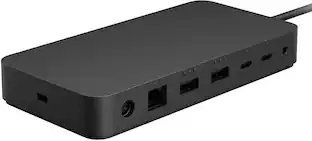
Microsoft - Surface Dock 2 - Black
About this product
All the connections you need. Instantly turn your Surface into a desktop PC with the next-gen ports in new Surface Dock 2. Simply plug in the Surface Connect cable to charge your device and access external monitors, a keyboard, mouse, and more.
Compatible with select Microsoft Surface models
Including Surface Book 3 (13.5" and 15"), Surface Pro 7, Surface Pro X, Surface Laptop 4 (13.5" and 15"), and Surface Laptop 3 (13.5" and 15").*
Six USB ports
Features two USB Type-C ports on front besides two USB Type-C Gen 2 and two USB Type-A ports at the back.
Supports dual 4K at 60Hz
Experience crystal clear 4K at 60Hz video on compatible 4K monitors for brilliant high-resolution display.
Dual 4K monitors at 30Hz
Supports by Surface Laptop Go, Surface Go 2, Surface Pro 6, Surface Pro (5th Gen), Surface Laptop 2, Surface Laptop (1st Gen), Surface Go, Surface Book 2 (13.5" and 15").
199W power supply
So you can power any other devices connected to the dock.
Gigabit Ethernet port
Provides a speedy wired connection to your home network.
3.5mm in/out audio jack
Enables you to connect your existing audio devices.
*Not compatible with: Surface Pro 4, Surface Pro 3 and Surface Book (1st Gen).
- Maximum Number of Displays Supported1Maximum Supported Resolution4K (2160p)Number of DisplayPort Outputs (Total)1Passthrough PowerNo
Reviews
Rating 4.5 out of 5 stars with 594 reviews
Top Mentions
- Overall Performance (67)
- USB-C (66)
- Ease of use (65)
- Compatibility (30)
- Connectivity (28)
- Price (34)
- Size (10)
- Refresh Rate (7)
- Power (4)
Customer Images
The vast majority of our reviews come from verified purchases. Reviews from customers may include My Best Buy members, employees, and Tech Insider Network members (as tagged). Select reviewers may receive discounted products, promotional considerations or entries into drawings for honest, helpful reviews.
Compare similar products

All the connections you need. Instantly turn your Surface into a desktop PC with the next-gen ports in new Surface Dock 2. Simply plug in the Surface Connect cable to charge your device and access external monitors, a keyboard, mouse, and more.

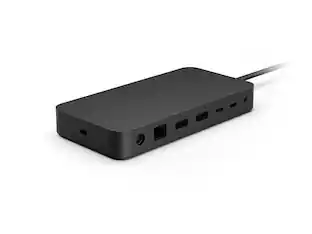
Surface Thunderbolt 4 Dock delivers ultra-high speed data transfer and ports to connect to two 4k monitors at 60 hertz to focus on your most important tasks. With power passthrough at 96 watts for quick charging, simplify your life with the versatility of 8 connections for your favorite accessories.

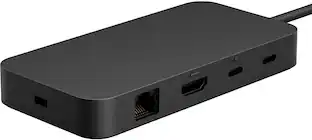
Optimize your workspace with Surface USB4 Dock, the essential dock for productivity and connectivity. Connect and power your device and accessories with 65W power delivery, ensuring peak performance throughout the workday. Surface USB4 Dock offers fast data transfer of up to 40 Gbps in a compact powerhouse. Surface USB4 Dock is the perfect blend of speed, power, and versatility.

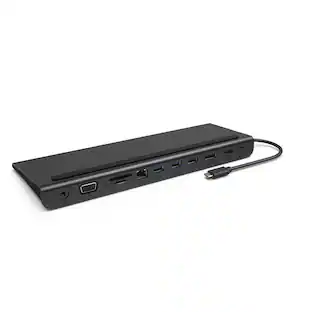
Organize needed peripherals with this Microsoft USB-C travel hub. The HDMI ports support 4K monitors for enhanced performance, while the USB ports let you connect and charge your wireless mouse, keyboard and other accessories. This black Microsoft USB-C travel hub works seamlessly with PC systems and all Surface laptops for increased compatibility.
| Pros for Microsoft - Surface Dock 2 - Black | |||
|---|---|---|---|
| Overall Performance, USB-C, Ease of use, Compatibility, Connectivity | Connectivity, USB-C, Overall Performance, Compatibility, Ease of use | Connectivity, Overall Performance | Ease of use, Overall Performance, Compatibility, HDMI, Size |
| Cons for Microsoft - Surface Dock 2 - Black | |||
| Price, Size, Refresh Rate, Power | Ports | There were no cons for this product— | Price, Ports |
Specs
What is the backward compatibility of this product with earlier generations of the Surface Book/Surface Pro?
Answered by MicrosoftOutreachTeamGreat question! Surface Dock 2 is compatible with these Surface devices: Surface Book 3 13.5” and 15” , Surface Pro 7, Surface Pro X, Surface Laptop 3 13.5” and 15”, Surface Go 2, Surface Pro 6, Surface Pro (5th Gen), Surface Laptop 2, Surface Laptop (1st Gen), Surface Go, Surface Book 2.

Will this work with the Surface Laptop Studio?
Answered by MicrosoftOutreachTeamYes, Surface Dock 2 is compatible with Surface Laptop Studio.
What kind of audio jack does the dock have?
The Surface Dock 2 has a 3.5mm in/out audio jack for connecting your audio devices.
This question and answer was generated by AI based on customer and product data.What is the maximum power output of the Surface Dock 2?
The Surface Dock 2 has a 199W power supply.
This question and answer was generated by AI based on customer and product data.How many USB ports does the Surface Dock 2 have?
The Surface Dock 2 has six USB ports in total: two USB Type-C ports on the front, and two USB Type-C Gen 2 and two USB Type-A ports at the back.
This question and answer was generated by AI based on customer and product data.
Customers often buy these together
 $12.99The price was $13.99
 $179.99The price was $189.99
 $366.32The price was $388.99


Customers ultimately bought
 $119.99The price was $129.99
 Clearance$48.99The price was $69.99


Explore tech essentials Sponsored



Discover related products
- $12.99The price was $13.99
 $143.99The price was $144.99









Keep exploring
 $38.99The price was $45.99