Rating 4.7 out of 5 stars with 2635 reviews
4.7- Streaming (415)
- Speed (382)
- Performance (214)
- Gaming (207)
- Ease of use (205)
- Remote Control (109)
- Price (55)
- Lag (36)
- Interface (9)
- WiFi (9)
Customer Images
The vast majority of our reviews come from verified purchases. Reviews from customers may include My Best Buy members, employees, and Tech Insider Network members (as tagged). Select reviewers may receive discounted products, promotional considerations or entries into drawings for honest, helpful reviews.
- Rated 5 out of 5 stars
Great for Streaming Media and for Nest Cam
Lots of bells and whistles for using as a media server but the games I dont prefer and both remotes require time to get used too. The roku remote is what I am used too and prefer over the nvidia shield and the navigation on the roku too is more user friendly. However the nvidia shield is cool as I can call up my nest cameras to the big screen by google assistant. However the roku I can use the xfinity app and I cant on the nvidia shield. Infact I can't even chromecast the xfinity to the nvida shield as comcast blocks it. The nvidia shield is better then the roku but it kinda leaves ya hanging with a few apps I wish worked with the Nvidia shield. Whats really cool as the Nvidia Shields screen conversion turns all my chosen shows and games to to 4k where even my smart tv didn't. Nor the roku I have. I just wish the remotes were better and more practical.
Posted by Marxman5
- Rated 4 out of 5 stars
Great streaming device
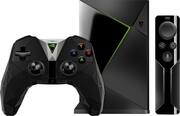
This is my first attempt at a review. I may leave a few things out, so I apologize in advance. So far, I'm loving this unit and what it can do. It runs on the Android 7.0 Nougat operating software and it is powerful and fast. It allows streaming of live television, movies, and music with surround sound and 4K HDR if you have the kind of television, receiver, and high speed internet for those options. If you need more memory other than the internal 16 Gigabytes storage, it has 2 USB 3.0 slots for thumb / hard drives and other devices. With access to the Google Play Store, there are so many apps to choose from. Netflix, Amazon Instant Video, Hulu, etc. If you use Kodi, it is awesome to use on the Nvidia Shield TV. It comes with a game controller and a remote controller. Both have a microphone that allows for voice searches versus the on screen keyboard. The remote takes a little time getting used to. It doesn't have many choices to navigate the screen. It took me a while to get used to. There is a remote app for the device that you can download for Android and iOS devices, but they are a little buggy, especially the keyboard option. This device is also made for gaming. Unfortunately, I have not tried using it for games yet, so I can't really review that feature. There are a large selection to choose from though, including some of the popular console (XBOX 360 , XBOX ONE, PLAYSTATION 3 & 4) and PC.
Posted by Noctem66
- Rated 5 out of 5 stars
Excellent!
I piddled around with Roku, Raspberry Pi and a laptop. The Roku II I've had for a couple of years and it does the "channels" job nicely. My goal was KODI, though, and the Pi was always freezing up (reboot!) and the laptop (thin model) worked better but shutting down then reopening the lid to start her up again was getting to be a pain. You can put the Nvidia Shield TV to sleep and press any button to wake her up again. Although the Nvidia Shield TV comes in at the $200 mark, you do get a great yoke-style game control along with its simpler, smaller remote with just a few buttons but it makes life so much easier in the KODI <> scroll world. So I figured I paid $100 for the box (Roku price range} and the other $100 for the fine controls and got a lot of expand-ability (Android-based apps from Google), add a storage drive (or go for the $300 model built in!) . . . If you have a SmartTV already, you might not need any of these. If you have an HDTV just pre-Smart like mine, the Nvidia Shield TV has more horsepower to keep the stream flowing, And Nvidia has been producing top notch video cards for years so they have the tech down! If you're strapped for cash, maybe go Firestick (for KODI) or Roku. If you have the cash, Nvidia Shield TV is a better choice!
Posted by Metairieman55
- Rated 5 out of 5 stars
Awesome!
I have several streaming devices and the Shield is way, way above and beyond any I've used. If you stream a lot of content, this is the one you want. It's very fast and will easily handle anything you throw at it, so long as your internet is capable. I didn't even mention the gaming capabilities. Five stars!
Posted by illhurtya
- Rated 5 out of 5 stars
Streaming box for gamers
I own a Roku, Chromecast (1st gen) and now an Invidia Sheild. This is by far my favorite streaming device that I have owned. It does what the others do (it has the newest version of Chromecast with Google Assistant built in) plus you can stream PC games to play on your television. I'm a causal gamer so this device is perfect for me. Plus it's tiny. It barely takes up any room. I highly recommend it. Note that you will need a good internet connection for streaming the games.
Posted by Deke