“I need local channels abc, CBS, nbc, and public tv. My cable has had problems and local stations haven't been on in three weeks. No reason or help or information given from Spectrum. Thank you”
Answer This Question
1-5 of 5 Answers
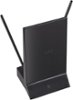
Purchase a hdmi antenna or a coaxial tv antenna and go to remote for tv and find your input or source or menu button and select antenna mode
Sorry, there was a problem. Please try again later.Yes download your local tv provider apps and when each app ask for your cable provider info just enter your login information and you have access to all the content and live tv. Just don't cancel you tv subscription because you still need it to access local tv over the internet. Cable provider pay the local tv to have have access to them otherwise you have to pay each local tv directly and that cost can add up quickly. Also you will still need a fast and stable internet to watch anything. I hope this help. I think spectrum tv app that let's you watch tv and also has guided also, I have seen it on Roku but I can't confirm on fire tv.
Sorry, there was a problem. Please try again later.You'll need an app like Hulu
Sorry, there was a problem. Please try again later.You will need to subscribe to a service such as Hulu or Sling TV, both apps can be loaded to the Fire TV.
Sorry, there was a problem. Please try again later.I say cut the chord, buy a good HD antenna, if you have a HDTV , position it well and you can get access to abc, cbs, nbc - I am not sure about public tv. Spectrum is not generally helpful. I will tell you this, you will never look back once you realize how much money you are saving. If you are hesitant, buy the antenna before you cut off cable and test it to see how many channels and what reception you get. If you are happy with it - cancel.
I would recommend:
Sorry, there was a problem. Please try again later.