“I find it hard to connect to google asst what is the easy way to connect.”
Answer This Question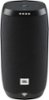
1-2 of 2 Answers
If you encounter issues when installing the JBL LINK product, then use below step-by-step guide. 1. Have the latest Google Home app version (Update if needed) 2. Make sure the internet connection is stable and working 3. Reboot your smartphone or tablet 4. Restart the LINK speaker by using the little pinhole next to the charging port (Note: This is not a reset but RESTART). 5. Make a factory reset of the LINK speaker, by pressing and holding the “Microphone Mute” button for over 10 sec 6. If you still experience setup issues, then make a screenshot of the error message during the setup and we would like to work with you directly to help you with your issue. Please submit a case request at https://www.jbl.com/support-contact.html and the Customer Service Team will be more than happy to assist you.
Sorry, there was a problem. Please try again later.You need to use your google home app to connect properly too the device upon initial setup
Sorry, there was a problem. Please try again later.