“I just bought this speaker today, it will not pair to my phone through bluetooth. I have no other BT devices connected to my phone. I've tried resetting it, I've tried re starting my phone. I can't even get the BT light to stay on for my phone to find”
Answer This Question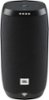
1-2 of 2 Answers
Thanks for reaching out, our apologies for the inconvenience and delay in response. We would like to work with you directly. Please submit a case request at https://www.jbl.com/support-contact.html and the Customer Service Team will be more than happy to assist you.
Sorry, there was a problem. Please try again later.You must be near your WiFi and to your cell phone before beginning to connect to the new device. Once connected to your iPhone you will find it listed under settings, Bluetooth, underneath my devices you will see other devices if you scroll down far enough. Also make sure the device is fully charged or connected and charging while setting it up with WiFi and connecting to your phone. Hope this helps. Oh there is a Bluetooth button on the Link10 you can press that might help. However while setting up today I did not have to do this. I actually took it out of the box plugged charger in and was working on my computer then without expecting it the link 10 starting asking me if I wanted to set it up.
Sorry, there was a problem. Please try again later.