“My water dispenser light is out. I have tried turning it on by holding “light” for a few seconds. How do I replace the lights?”
Answer This Question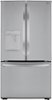
1-1 of 1 Answer
Hello there. Thank you for sharing your experience with us regarding the water dispenser light on your LRFWS2906S. We understand your situation and appreciate you taking the time to try the “light” button function by holding it for a few seconds. Based on the official LG guidelines, the control panel’s light functions are integrated into the system and aren’t designed for user-replacement of individual LED components. As a troubleshooting step, please ensure you’re pressing dead center on the “light” button and holding it for 3–5 seconds with firm, even pressure. This method helps activate the secondary function for resetting or turning on the light. If the light still remains off after confirming you’re following the recommended technique, it may indicate an internal issue that requires professional assistance. Example for Reset Water Filter Indicator Light - https://www.lg.com/ca_en/support/product-support/troubleshoot/help-library/cs-CT20098040-20150118899537/?srsltid=AfmBOopX3wDhHxBEljSnmK5M8jHY-5JVHn_MQCm_mu_GwM8wu1y-jgZZ For further personalized support or to explore repair options, please send us a private message on Social Media @LGUSSupport, and our team will be more than happy to assist you further. We appreciate your patience and are here to help every step of the way. —Renzo
Sorry, there was a problem. Please try again later.