A:AnswerHello there. Thank you for sharing your experience with us regarding the LG External Double-Layer SuperMulti Blade Drive. We understand your inquiry about installing software using this unit.
https://www.bestbuy.com/product/lg-8x-external-double-layer-dvdrw-cd-rw-supermulti-blade-drive-silver/J7Y69525Y6
Yes, this external drive is designed to read and write both DVDs and CDs, allowing you to install software from physical discs onto your compatible computer. Simply connect the drive via the USB port to begin. For further assistance and any specific concerns you may have, please contact us on lgdigitalcare@lg.sprinklrsupport.com. —Renzo
A:AnswerHello there. We understand your inquiry regarding the compatibility of your LG External Double-Layer SuperMulti Blade Drive with your HP Envy laptop and Windows 11.
We are happy to confirm that this drive is compatible with Windows 11 and connects easily to your laptop via a standard USB cable. Since your laptop does not have an internal drive, the device is "Plug and Play," meaning the basic drivers will install automatically once connected. For any additional media software, you can download the necessary files directly from the LG Support website. We want to ensure you have a seamless experience while using our external drive for your data and media needs.
https://www.bestbuy.com/product/lg-8x-external-double-layer-dvdrw-cd-rw-supermulti-blade-drive-silver/J7Y69525Y6
For further assistance and any specific concerns you may have, please contact us on lgdigitalcare@lg.sprinklrsupport.com. —Renzo
A:AnswerHi there. We understand your inquiry regarding the LG - 8x External Double-Layer DVDRW/CD-RW SuperMulti Blade Drive - Silver. This drive is designed to play audio CDs; however, you will need compatible media player software (such as Windows Media Player or VLC) installed on your computer to recognize and play the tracks.
https://www.bestbuy.com/product/lg-8x-external-double-layer-dvdrw-cd-rw-supermulti-blade-drive-silver/J7Y69525Y6
For further assistance and any specific concerns you may have, please contact us on lgdigitalcare@lg.sprinklrsupport.com. —Renzo
A:AnswerHi there. We understand your inquiry regarding the LG - 8x External Double-Layer DVDRW/CD-RW SuperMulti Blade Drive - Silver. We can confirm that this drive is compatible with Windows 11 as a plug-and-play device.
https://www.bestbuy.com/product/lg-8x-external-usb-double-layer-dvdrw-cd-rw-drive-black/JXTZZLCVZK
For further assistance and any specific concerns you may have, please contact us on lgdigitalcare@lg.sprinklrsupport.com. —Renzo
A:AnswerThe LG 8x External Double-Layer DVD±RW/CD-RW SuperMulti Blade Drive, Model # AP70NS50 is compatible with Mac OS X v.10.5.4 or Higher, Direct X 9.0 or Higher Operating Systems and connects via USB. The drive is PC USB powered so the USB port needs to be able to provide enough power for the drive. Under the Mac 10.8.x operating system, built-in DVD Player may not support the USB Drive. The drive only comes with a software installation disc for Windows only. If you iPad does not detect the drive, it may not be supported. You can check with Apple to see what drives are supported.~Tanisha
A:AnswerHi there. We understand your inquiry regarding the LG - 8x External Double-Layer DVDRW/CD-RW SuperMulti Blade Drive - Silver. We can confirm that this drive is compatible with Windows 11 as a plug-and-play device.
https://www.bestbuy.com/product/lg-8x-external-double-layer-dvdrw-cd-rw-supermulti-blade-drive-silver/J7Y69525Y6
For further assistance and any specific concerns you may have, please contact us on lgdigitalcare@lg.sprinklrsupport.com. —Renzo
A:AnswerHello there. We understand your inquiry regarding the LG 8x External Double-Layer DVDRW/CD-RW SuperMulti Blade Drive - Silver. This drive is designed to read and write a wide variety of standard DVD and CD formats; however, the ability to access encrypted or password-protected medical files depends primarily on your computer's software and operating system compatibility rather than the drive hardware itself.
https://www.bestbuy.com/product/lg-8x-external-double-layer-dvdrw-cd-rw-supermulti-blade-drive-silver/J7Y69525Y6
For further assistance and any specific concerns you may have, please contact us on lgdigitalcare@lg.sprinklrsupport.com. —Renzo
A:AnswerIt works well with both Windows 8 and MAC OS for maximum convenience and flexibility. Grab the new LG Ultra Slim Slot Load 8X External DVD-RW Writer so that you can transfer and enjoy your CD's and Apple Music library.~Tanisha
A:AnswerHi! This external DVD/CD writer/reader (model AP70NS50) is not compatible with Windows 11. It is compatible with Windows 7, Windows 8, Windows Vista™, Windows XP, Mac OS® X. ^Chris
A:AnswerHi there! We understand your inquiry regarding the compatibility of the LG 8x External Double-Layer DVDRW/CD-RW SuperMulti Blade Drive with Windows 11 on your HP Envy. We understand how important it is to ensure your accessories work seamlessly with your specific hardware and operating system. To answer your question directly, this external drive is a plug-and-play device that is compatible with Windows 11. While the original packaging may list earlier versions of Windows, the drive utilizes standard USB drivers that are recognized by the Windows 11 environment on most modern laptops like the HP Envy. If the drive is not immediately recognized, we recommend ensuring it is plugged directly into a USB port on your laptop rather than a hub to ensure it receives adequate power.
https://www.bestbuy.com/product/lg-8x-external-double-layer-dvdrw-cd-rw-supermulti-blade-drive-silver/J7Y69525Y6
For further assistance and any specific concerns you may have, please contact us on lgdigitalcare@lg.sprinklrsupport.com. —Renzo
A:AnswerHi there! We understand your inquiry regarding the compatibility of the LG 8x External SuperMulti Blade Drive with your TASCAM Model 24 Portastudio. To answer your question directly, this external drive is designed to function as a peripheral for a computer (PC or Mac) rather than connecting directly to a mixer or recorder via USB. To transfer your music, you would first move the recorded files from your TASCAM to a computer via the USB interface or SD card, and then use the LG drive and burning software on that computer to create your CD. We understand how important it is to have a seamless workflow for your audio recordings.
https://www.bestbuy.com/product/lg-8x-external-double-layer-dvdrw-cd-rw-supermulti-blade-drive-silver/J7Y69525Y6
For further assistance and any specific concerns you may have, please contact us on lgdigitalcare@lg.sprinklrsupport.com. —Renzo
A:AnswerThe LG - 8x External Double-Layer DVD±RW/CD-RW SuperMulti Blade Drive - Silver, Model # AP70NS50 DVD-R/RW/ROM, DVD-R DL, DVD-RAM (Ver.2.2), M-Disc (DVD+R SL), DVD-Video (CSS Compliant Disc), DVD+R/+RW, DVD+R DL, CD-R/RW/ROM and CD-DA(DAE) discs and it will allow you to use CDs, and DVDs to listen to music or watch movies. It will play DVD movies that are on discs that conform to the Compact Disc (CD) standard. Dual Discs and some music discs encoded with copyright protection technologies do not conform to the Compact Disc (CD) standard. Therefore, these discs may not be compatible or may not playback as expected. ^Danee
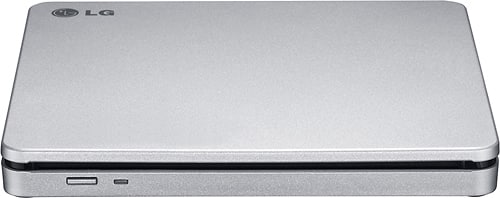
A:AnswerHello sammy. The LG 8x External Double-Layer DVD±RW/CD-RW SuperMulti Blade Drive with M-DISC™- Silver, Model # AP70NS50 requires a USB port that also supplies power to the drive for connectivity and it is compatible with Windows 7, Windows 8, Windows Vista™, Windows XP, Mac OS® X operating systems...^Ivan