Questions & Answers
- Model:
- DP132
- |
- SKU:
- 7451043
Q: QuestionDOES THIS DEVICE RECORD MOVIES?
Asked by Barb.
- A:Answer Hi, unfortunately it does not.^Venette
Answered by LG Digital Customer Care

Q: QuestionHow can I record dvd to flashdrive?
Asked by tarheel27589.
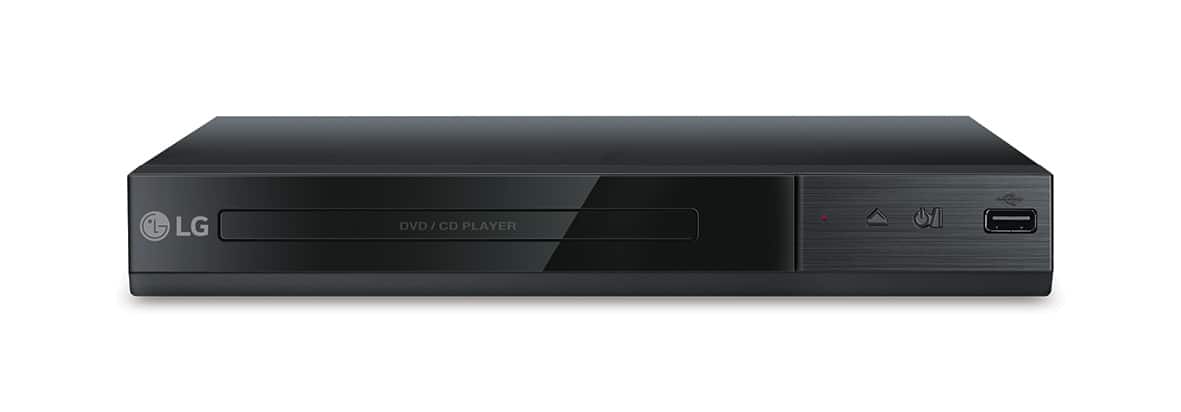
- A:Answer On player DP132 Connect USB flash drive to the unit before recording. Insert an Audio CD, and then select a track using the up/down arrows key for the DVD menu. For track recording: Press AUDIO in play, pause or resume stop mode. For all track recording: Press AUDIO in complete stop mode. For program list recording: In stop mode, press AUDIO after selecting a track on the program list. For further assistance, please reach out to our technical support team via private message on Facebook @LGUSSupport and use #VOC in your first message to our social media support team or call at 800-243-0000. Also, be sure to provide your contact information, model/serial numbers and date of purchase. ^Daphane
Answered by LG Digital Customer Care
Q: Questiondoes the dvd player also play blu ray?
Asked by schlomo.
- A:Answer No, this DVD player does not play Blu-ray discs. ^Daphane
Answered by LG Digital Customer Care

Q: Questiondoes this unit come with all necessary cords to simply plug into my tv?
Asked by onlyyou.
- A:Answer No, a cable is not supplied to hook the unit up to the TV. ^Daphane
Answered by LG Digital Customer Care

Q: QuestionHi, I just want a simple device I can connect to my small tv to record a tv program. Is this "the one" for the task? Also, can this record from my Amazon 8 tablet? Thanks!
Asked by Loulady.
- A:Answer This device only records music CDs, not programming. ^Daphane
Answered by LG Digital Customer Care

Q: QuestionIs this compatible with an Insignia tv?
Asked by Trustmedr.
- A:Answer This device can be connected to a TV via VIDEO/AUDIO OUTPUT on the unit to VIDEO/AUDIO IN on TV with Video/Audio cable, such as VIDEO with yellow, AUDIO Left/Right with white/red. I cannot confirm compatibility with a specific brand. ^Daphane
Answered by LG Digital Customer Care

Q: QuestionFor playing CD's, does this player have a display that shows the track number that is playing and the length of the track, etc. on the display? Thank you.
Asked by dangramm.
- A:Answer The display on the LG DVD Player with USB Direct Recording, Model # DP132 will display and adjust various information and settings about the content.It will show the current title number/total number of titles, the current chapter number/total number of chapters, elapsed playing time Selected total time of current title/file, the selected audio language or channel, selected title, and the selectable angle/total number of angles for a DVD disc and the track number and elapsed time for a CD disc...^IFV
Answered by LG Digital Customer Care

Q: Questiondoes this play CDs and download on a flash drive
Asked by tom4golf39.
- A:Answer Hi tom4golf39. The "USB Direct Recording" in the title for the LG DVD Player with USB Direct Recording - Black, Model # DP132 means that you can record directly to a flash drive as implied. The unit can play CDs and you can record tracks from a CD onto a flash drive plugged into USB port on the unit. The DVD Player will play Audio CD/CD-R/CD-RW discs, DVD discs, or CD-G discs...^IFV
Answered by LG Digital Customer Care

Q: QuestionIs there front digital display? Will it support Altice Optimum cable box on top? (which dimensions are larger) B/C cable box reads do not place anything on top of it. It's for kitchen tv & counter space won't accommodate side-by-side. Thank You.
Asked by Kazz.
- A:Answer The LG DVD Player with USB Direct Recording, Model # DP132 does not have a front digital display. Regrettably, we do not have any specifications about the Altice Optimum cable set-top box to determine if you can pace it on top of the DVD Player. The DVD Player does not have any vents on the top and there aren't any warnings in the owner's cautioning not to place anything on top of the player. If your set-top box generates a lot of heat, then you should not place it on top of the DVD Player...^IFV
Answered by LG Digital Customer Care

Q: QuestionI ordered a dvd set off amazon and it won’t play on my dvd. This is the message I got: “Playback prohibited by area limitations.” Any suggestions?
Asked by Gio.
- A:Answer Hello Gio. Manufacturers of DVD and Blu-ray players and player software are required by their license to include Region Coding functionality. Using region coding, a DVD or Blu-ray disc may be permitted to be played only in one geographic region, several regions, or all regions. Major commercial DVD releases are typically playable in only one region. For DVD Players that are released in the U.S. they are region coded for Region 1 for DVD discs so they will only play DVDs that are coded for Region 1. The DVD Player with USB Direct Recording - Black, Model # DP132 will play DVD discs coded for Region 1 or those coded as "All" or as "0". You will find the region code number printed over a small globe icon on the back of the case. Check your DVD discs to see what region they are coded for...^IFV
Answered by LG Digital Customer Care

Q: QuestionCan I record from a Video camera to this DVD Player?
Asked by Ruthie.
- A:Answer You cannot record from a video camera to the LG DVD Player with USB Direct Recording, Model # DP132. The USB port on the player does not recognize video cameras...^IFV
Answered by LG Digital Customer Care

Q: QuestionWill this machine record my voice on a cd?
Asked by jdh2010.
- A:Answer You can do direct recording from the CD player to the USB drive on the LG - DVD Player with USB Direct Recording - Black, Model # DP132. The recording format is MP3 Files and the Encoding Bit rates are: 128 Kbps / 160 Kbps / 192 Kbps / 256 Kbps / 320 Kbps. Your only inputs for this unit are the RCA stereo ports (Red/White) and the Video (Yellow). You cannot convert VHS to MP3 Files or DVD, nor are you able to record TV Programs to the Flash drive. It cannot record your voice. ^CP
Answered by LG Digital Customer Care

Q: Questioncan you play blue ray movies on this model
Asked by Anonymous.
- A:Answer No, this unit is not able to play Blu-ray discs. ^CP
Answered by LG Digital Customer Care

Q: Questiondoes this model record shows in advance from a regular digital TV? I use antenna. And does it play back once the show is recorded.
Asked by fordphaeton.
- A:Answer No, this DVD player is not able to record live TV. You would need a DVR for recording live TV. ^CP
Answered by LG Digital Customer Care

Q: QuestionIs it region free DVD player? Multi region in other words?
Asked by Aida.
- A:Answer This unit has a regional code printed on the rear of the unit. This unit can play only DVD discs labelled same as the rear of the unit or “ALL”. ^CP
Answered by LG Digital Customer Care

Q: QuestionCan I use this to access netflix
Asked by Rich.
- A:Answer The DP132 is not a smart player and would not be able to access applications such as Netflix. ^CP
Answered by LG Digital Customer Care

Q: QuestionLooking a replacement player for a kiosk. Will this player play automatically when it is powered on?
Asked by boogity.
- A:Answer It does start automatically. It will play the previews but you have to press play to start the actual movie. Hope this helps.
Answered by Steve
Q: QuestionCan you play regular DVDs on this as well as Blu-rays?
Asked by Karen.
- A:Answer This model is a regular DVD player, it will not play Blu-ray discs.
Answered by CommunityAnswer
Q: QuestionIs this a Blu-Ray? That's what I Googled
Asked by Cheryl.
- A:Answer The DP132 is a standard DVD player. It is unable to play Blu-ray discs. ^CP
Answered by LG Digital Customer Care

Q: QuestionDo it comes with USA outlet too
Asked by Sidney.
- A:Answer The DP132 is designed for use within the USA. The DP132 has the following power requirements: AC 120 V, 60 Hz. ^CP
Answered by LG Digital Customer Care

Most-viewed items
- $170.00$170.00The price was $249.00
- $99.99$99.99The price was $129.99
- $1,208.99$1,208.99The price was $1,299.99
- $329.99$329.99The price was $469.99
- $149.99$149.99The price was $179.99
- $39.99$39.99The price was $62.99
- $449.99$449.99The price was $649.99
- $179.99$179.99The price was $329.99
- $1,149.00$1,149.00The price was $1,299.00



















