“How do I get rid of the name of a contact in the directory once I have deleted its contents?”
Answer This Question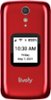
1-2 of 2 Answers
Hello! To delete a contact, navigate to the contact via the menu and select OK. The arrows will help you to scroll to the "Edit Contact" option. Select OK, and locate the option that is titled "Delete This Contact". The phone will then prompt you to confirm deletion. Please follow those prompts. If further assistance is needed, please contact our Customer Service team.
Sorry, there was a problem. Please try again later.Just press delete and then press ok.
Sorry, there was a problem. Please try again later.