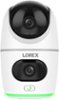
“Is there a way to turn off the light at the bottom of the camera? Kinda bright and annoying when not needed”


1-4 of 4 Answers
No. The light can not be turned off.
Sorry, there was a problem. Please try again later.Yes, in the App, Go to Settings, light settings, Smart Security Lighting Mode. Deselect “Working Mode” Set.
Sorry, there was a problem. Please try again later.Yes, go to sound configuration and then ilumination modes and in the work mode deactivate the function.
Sorry, there was a problem. Please try again later.To turn off the light, open Settings, tap Light Settings, then Smart Security Lighting Modes. Uncheck the lighting mode so that nothing is selected and tap Save.
Sorry, there was a problem. Please try again later.