“Why is this desktop loud? Sounds like the fan is loud on mine and I just bought it. Any help would be greatly appreciated. Thanks a lot!”
Answer This Question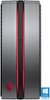
1-1 of 1 Answer
Since the desktop is new, I highly doubt there is a defect causing the noise. The most likely reason, which is common with newer HP PC's, is the cooling fan is set to Always On. There is a way to change this in BIOS settings. Another option is to use the GeForce settings (I think that's what it's called). The Omen has some software on it that lets you control the performance of the PC. I think there's an option to control the cooling fan speed. Full disclosure - changing the fan speed can significantly affect the temperature of the components in the desktop. High temps are detrimental to the lifespan of most desktop components. Hope this helps.
Sorry, there was a problem. Please try again later.