1-1 of 1 Answer
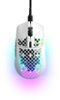
To adjust the DPI settings on your SteelSeries Aerox 3, first install the SteelSeries Engine software from the SteelSeries website. Once installed, open the software and select the Aerox 3 from the list of connected devices. In the configuration panel, you can adjust the DPI settings according to your preferences. The software allows you to set multiple DPI levels, which you can easily toggle using the DPI button on the mouse.
Sorry, there was a problem. Please try again later.