“How do you reformat for a MAC computer. I hooked it up and downloaded the Mac app and it does nothing. I can’t use time machine or transfer any data to it from my other hard drives.”
Answer This Question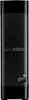
1-3 of 3 Answers
Connect the Easystore drive to a USB 3.0 port on the Mac and then run the Disk Utility app that comes with the Mac. In Disk Utility, select the Easystore drive and click on Erase.
Sorry, there was a problem. Please try again later.I did not do anything special to begin using this. My computer has the MacOS that is now updated to Monterey, but it has never given me any trouble. I either transfer files from my HD to the external HD by coping, the opening the external HD (click on the icon on the desktop) and paste file menu that pops up. Lately, I just click and drag to the icon. Then open the external HD to make sure they are in the proper folder. All of my files are 30-45 min. videos and I can do batches of them at once.
Sorry, there was a problem. Please try again later.Hello, Please be informed that the WD Easystore Portable Hard Drive is a plug 'n' play device tested and designed for Windows and Mac computers for seamless operation. Moreover, the drive comes formatted NTFS for Windows 10 and 8.1 and compatibility may vary depending on user’s hardware configuration and operating system. However, in order to use the drive for macOS you can reformat the drive with macOS supported HFS+J file system by using this link: https://support-en.wd.com/app/answers/detail/a_id/3879 . Critical: The instructions in the article above are designed to help repartition and format a hard drive. This process is Data Destructive and cannot be undone. Once the process begins, ALL THE DATA ON THE DRIVE WILL BE LOST! -Need Help? Please see our "'Contact Us" page for information. -Need Help? Please see our "'Contact Us" page for information.
Sorry, there was a problem. Please try again later.