Customer Ratings & Reviews
 See more images
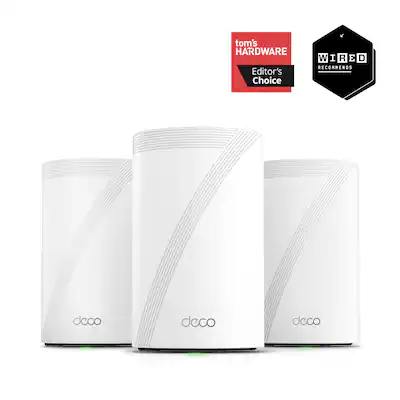
TP-Link - Deco 7 Pro BE14000 Tri-Band Wi-Fi 7 Whole Home Mesh Router System - Deco BE68 (3-pack) - White
- Model:
- Deco BE68(3-pack)
- SKU:
- 6619454
Highly rated by customers for:
Customer reviews
Rating 4.4 out of 5 stars with 98 reviews
Top Mentions
- Checking this box will move you to the filtered review section.
- Checking this box will move you to the filtered review section.
- Checking this box will move you to the filtered review section.
- Rated 5 out of 5 stars
Easy install.
BartonQ Posted
Easy to install. Still evaluating performance. Better signal than my previous system.
I would recommend this to a friend - Rated 5 out of 5 stars
Awesome mesh routing
YuanweiMA Posted
It's easy to set up, the internet is fast, and it's very advanced
I would recommend this to a friend - Rated 5 out of 5 stars
Great
ChristianR Posted
Great for the result and excellent performance in home
I would recommend this to a friend - Rated 5 out of 5 stars
So far so good
AnthonyF Posted
Works pretty well! I am not sure it cans handle 5gig
I would recommend this to a friend - Rated 5 out of 5 stars
Much faster than the Google Nest Wi-Fi
mehh Posted
Much faster than the Google Nest Wi-Fi system I bought first. and family controls are good. 2.5 gb Ethernet speed was the selling point for me
I would recommend this to a friend - Rated 5 out of 5 stars
Great system!!
Joel Posted
Super easy to set up. Great coverage! Significant improvement over my old Google mesh system.
I would recommend this to a friend - Rated 5 out of 5 stars
Outstanding mesh network product
technerd Posted
Great product, purchased this to redo my boss’s home network and it has solved all of the problems he had and has made it much easier for me to support.
I would recommend this to a friend - Rated 4 out of 5 stars
Works
GRANT Posted
Fine, it works but took a few minutes longer to set up than i expected. Range isn't quite as good as I'd want.
I would recommend this to a friend - Rated 2 out of 5 stars
Extremely Disappointed
FrankG Posted
This has got to be one of the most disappointing tech purchases I've ever made. I did a lot of research when I decided to upgrade my 5 year old Orbi mesh system and decided on this for several reason. While it was extremely easy to set up, which is why I gave it 2 stars, it has been so frustrating and inconsistent ever since that I decided to reinstall my old system and everything went back to normal. Connections on some brand new devices were unreliable, Wi-Fi calling stopped working (which we rely on because we have no cell services), texts wouldn't go through on some devices, social media and websites wouldn't load on other devices, and speeds were no better, and sometimes worse, than my old system. And we have gig speeds with Verizon. Ultimately, I will be returning this system and trying another name brand one I was trying to avoid.
No, I would not recommend this to a friendBrand response from TPLinkSupport
Posted
Hi FrankG,
Thank you for your review. Our Deco Mesh Wi-Fi systems are designed to deliver robust, seamless Mesh Wi-Fi throughout your home. In your case, we first recommend ensuring that your Deco app and firmware are fully up to date, and that your Deco units are optimally positioned within your home and in optimal proximity to each other.
Our support team is always available and happy to assist with any questions you may have about our products. Feel free to contact us through any of the resources provided with the product or on our official website, and a Support Agent will follow up with you directly.
Thank you,
TP-Link Systems Support
- Rated 5 out of 5 stars
Simply the Best Over All
ratfinke Posted
The Best in coverage, speed, and installation!!!!!
I would recommend this to a friend - Rated 5 out of 5 stars
Great price and so fast!
Rowerdink Posted
Great price for big time WiFi 7. Small satellites and looks super nice. Solid app.
I would recommend this to a friend - Rated 5 out of 5 stars
Deco system
AndreaB Posted
This is an outstanding product! It has made all the difference in our WiFi.
I would recommend this to a friend - Rated 4 out of 5 stars
Only 1 10G port
samabed Posted
Only 1 10G Port. Needs 2 10G ports for in and another for out.
I would recommend this to a friend - Rated 3 out of 5 stars
Decent but not great
JordanM Posted
Still having issues with deadspots at the end of the home. Dropped signals and slow speeds.
No, I would not recommend this to a friendBrand response from TPLinkSupport
Posted
Hi JordanM,
Thank you for your review. Our Deco Mesh Wi-Fi systems are designed to deliver robust, seamless Mesh Wi-Fi throughout your home. In your case, we first recommend ensuring that your Deco app and firmware are fully up to date, and that your Deco units are optimally positioned within your home and in optimal proximity to each other.
Our support team is always available and happy to assist with any questions you may have about our products. Feel free to contact us through any of the resources provided with the product or on our official website, and a Support Agent will follow up with you directly.
Thank you,
TP-Link Systems Support
- Rated 5 out of 5 stars
Great router
AGyo Posted
Pretty good but hard to set up. Does require the wired backhaul to get the best performance
I would recommend this to a friend - Rated 5 out of 5 stars
Rock solid
JoelK Posted
Setup was very easy; adding additional units very easy. It has been rock solid since installation.
I would recommend this to a friend - Rated 5 out of 5 stars
Great
FrankL Posted
It is reliable and fast. Much cheaper than EERO but same quality.
I would recommend this to a friend - Rated 5 out of 5 stars
Very excellent product!!!!!
DavidA Posted
I’ve always liked Deco and this is a perfect buy!!
I would recommend this to a friend - Rated 5 out of 5 stars
Best Router
Masry Posted
It the best router I have used for business in 10 years
I would recommend this to a friend - Rated 1 out of 5 stars
Definitely Don't Buy
Basement Posted
What a nightmare - TV's buffer and any Apple product, while showing connected, isn't. After hours and hours on the phone with their support we were basically told they can't help us and they have no idea why it doesn't work. Too bad I'm outside the return window - I'm stuck with 6 very expensive paper weights......
No, I would not recommend this to a friendBrand response from TPLinkSupport
Posted
Hello
There is almost no reason why support would tell you that we can't help you. If a problem is identified, what we would typically do is refer the case to engineering for further review. If you can, please email that ticket to ususpportteam@tp-link.com so we can review and evaluate the next action needed.
Best Regards
TP-Link Systems Support