What Is a Mini PC? A Guide to Small Yet Powerful Computers
Best Selling Products carousel(6 Items)
Published: March 18, 2026
Published: March 18, 2026
Mini PCs explained
Miniature PCs have become one of the most versatile and efficient computing options available. Designed to deliver impressive performance in a fraction of the space of a traditional desktop tower, these small systems offer a practical solution for homes, offices, classrooms and entertainment setups alike.
Whether you need a quiet, energy‑efficient workstation, a media center for your TV or a portable computer that doesn’t sacrifice capability, a mini PC can provide the power you need without the bulk. Keep reading as we break down what a mini PC is, how it works and why so many users are turning to these small yet powerful devices.
What are mini PCs?
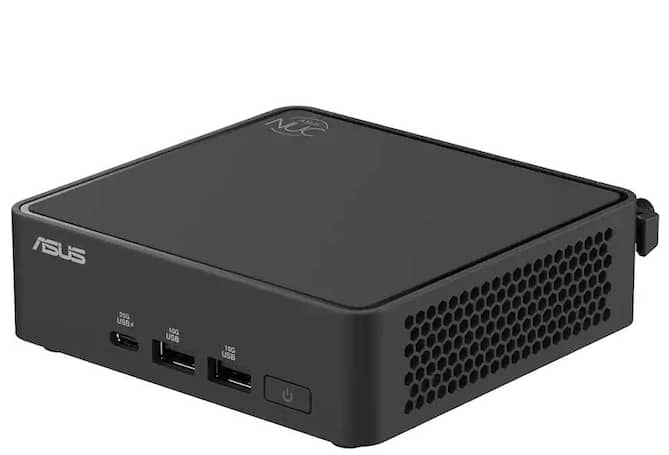
A mini PC is a small, compact desktop computer that delivers many of the same functions as a traditional desktop tower but in a much smaller form. Instead of taking up significant space on a desk or floor, a mini computer is typically about the size of a small book, making it easy to place on a desk, mount behind a monitor or tuck into a media center.
Despite their size, mini PCs can handle many everyday computing tasks. Most mini PCs are built around a single-board computer, combining the processor, memory and other core components onto one circuit board. They also often include multiple ports for connecting peripherals like keyboards, mice, monitors and external drives. Many models run full desktop operating systems and support web browsing, office work, media streaming and light creative tasks.
Mini PC vs. desktop
Mini PCs and desktops both have their strengths, but they serve different needs. Mini PCs are tiny and easy to place anywhere, while desktop computers usually offer more power, upgrade options and storage capacity.
| Mini PC | Desktop PC |
Size | Very compact, often small enough to fit in a hand | Much larger tower designed to sit on or under a desk |
Performance | Everyday computing, streaming and office tasks | Supports high-performance CPUs and GPUs |
Upgradability | Limited upgrades, usually only RAM and storage | Highly upgradeable, including CPU, GPU, RAM and storage |
Power Consumption | Low power usage and energy efficient | Higher power consumption due to more powerful components |
Price Range | Often more affordable for basic computing needs | Wide price range from budget systems to high-end builds |
As you can tell, a mini PC is a great option if you’re looking for a compact, energy-efficient computer that still delivers solid performance for everyday tasks. Its size makes it ideal for tight spaces, clutter-free desks or even portable setups that can move between rooms or locations. While you may sacrifice some upgradeability compared to a full-sized desktop, a mini desktop provides a nice balance of power, convenience and affordability.
What is the best mini PC for gaming?
When it comes to gaming, not all mini PCs are created equal. While a tiny PC is convenient and energy-efficient, gaming demands higher performance, faster graphics and efficient cooling. The best mini gaming PCs combine a capable CPU, a dedicated GPU or integrated graphics strong enough for modern PC games. Particularly, the Mac mini is capable for light-to-moderate gaming, while more demanding games can be played on a Windows mini PC thanks to a wider range of compatible GPUs and higher RAM options.
Some gaming-focused mini PCs come with features like upgraded cooling systems, high-speed memory and multiple display outputs, allowing you to connect monitors or VR headsets without sacrificing performance. Many small computer models also include ports for peripherals like gaming controllers, keyboards and mice, which lets you create a full gaming setup without needing much space.
How long do mini PCs last?
Mini PCs can last several years with proper care and normal use. On average, most mini PCs remain reliable for about five to seven years, depending on the quality of the components and how demanding the tasks are. Like any PC, the lifespan of a tiny computer is influenced by factors such as cooling, build quality and maintenance.
In many cases, the hardware may continue working even longer than five to seven years, but eventually upgrades are inevitable to keep up with newer software and performance demands.
Finding the best mini PC for you
Choosing the best mini desktop starts with thinking about how you plan to use it. For tasks like web browsing, streaming and office work, a model with a decent processor, 8GB of RAM and an SSD is often enough. If you want to use your mini PC for gaming, creative work or multitasking, look for a portable computer with a high-performance CPU, dedicated graphics and extra memory. Keep in mind, the amount of memory your computer needs depends on the applications you plan to run and how many programs you typically use at the same time.
Consider connectivity and expandability as well. Multiple USB ports, HDMI or DisplayPort outputs, and network options like Wi‑Fi 7 can make a big difference in convenience. Storage is also important. An SSD provides speed, while extra slots or USB ports let you add more space later.
Finally, think about size, design and cooling. Some mini PCs are small enough to hide behind a monitor, while others offer upgraded cooling for intensive tasks. The right mini PC balances power, portability and features to match your needs.