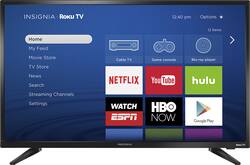
Watch your favorite programs with this 32-inch Insignia LED TV, which delivers 720p resolution for vivid detail. Enjoy the rich colors and clear picture in any lighting condition, and connect to your home network by using the built-in Wi-Fi connectivity to access streaming content. Download the Roku application to your phone to control this Insignia LED TV. 
Q: do you need to buy an extra subscription for Roku?
A: No and Yes. To access the Roku application itself you do not need an additional subscription, but you will only have access to the free content/channels. The most used applications like netflix, sling, hulu, and amazon video, require individual subscriptions through each of those entities. There are also some channels like ESPN and HBO Go that permit access through your cable provider (meaning If you can watch those general channels on other tvs, you will be able to access those channels through the roku). I hope that helps, but if it doesn't check out https://www.roku.com/how-it-works .
A: The RokuTV works as a "wi-fi" tv as well as antenna based tv. When viewing Roku it will draw from the Wifi, but when watching local channels it should not
A: You just need wifi. No 2nd device needed. You can use your tablet or smartphone as a remote for this tv which makes entering information a lot easier.
A: I purchased this tv for the bedroom. When I hooked it up I could not get any signal for wifi. Then I realized that my router was not strong enough to get a signal to the bedroom on the other end of the house. I bought a new stronger router and now it works great.
A: The tv does come with a remote designed around Roku. Roku apps and channels switch just like a normal Roku. However, when connecting to an antenna, you will hit left to show a menu of local channels and then you can scroll up and down to choose the channel you like. Its actually pretty neat. I would highly recommend the RCA amplified antenna
Q: Since the TV is equipped with Roku, can the TV stream Amazon Instant Video?
A: Yes, you can stream Amazon Prime. There's an icon on the home screen for selecting that service for streaming. Don't have Prime so haven't tried it, but it's there as an option.
A: No. You can watch Roku which comes with the TV but you will need internet connection, wifi or wired.
Q: How (or does) does this remote control the volume?
A: The volume buttons are located on the side/edge of the remote. You do not see the volume controls when the remote is facing you, turn the remote on its side to see volume controls.