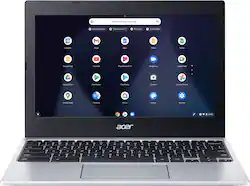
Acer - Chromebook 311 Laptop–11.6” HD Display– MediaTek MT8183C Octa-Core– 4GB LPDDR4X– 32GB eMMC - WiFi 5– USB Type-C
- Key Specs
- Screen Size: 11.6 inches (Size of the screen, measured diagonally from corner to corner.)
- Screen Resolution: 1366 x 768 (HD) (Screens come in a range of resolutions (measured in pixels, horizontal x vertical). The higher the resolution, the greater the picture quality.)
- Touch Screen: false (Touch-screen devices make navigating more intuitive. Using a touch-screen display, you can do things such as tap to select, hold and drag to move items, swipe to scroll, and pinch to zoom.)
- Processor Model: MediaTek MT Series (Your computer's processor is like its brain. Working in combination with system memory, the power of the processor determines the complexity of software you can run, how many programs you can have open at the same time, and how fast those programs will run. Most computers feature an AMD, Intel or Snapdragon processor.)
- Storage Type: eMMC, eMMC
- Total Storage Capacity: 32 gigabytes
- System Memory (RAM): 4 gigabytes (Random-access memory (RAM) is a computing device's short-term data storage, which allows active information to be accessed quickly. The size and type of RAM determines how efficiently the device can handle large amounts of information at one time. For example, gaming or video editing requires more RAM for optimal performance.)
- Graphics: Other (Often referred to as a "graphics processing unit" (GPU), this device is responsible for displaying image content and decoding/encoding video content in programs and games.)
- Battery Life (up to): 15 hours (Battery life will vary depending on the product configuration, product model, applications loaded on the product, power management setting of the product and the product features used by the customer. As with all batteries, the maximum capacity of this battery will decrease with time and usage.)
- Backlit Keyboard: false (Integrated lights allow for visibility of the keys in low-light conditions.)
- General
- Brand: Acer
- Model Number: CB311-11H-K04N
- Product Name: Chromebook 311 Laptop–11.6” HD Display– MediaTek MT8183C Octa-Core– 4GB LPDDR4X– 32GB eMMC - WiFi 5– USB Type-C
- Year of Release: 2021
- Display
- Screen Size: 11.6 inches (Size of the screen, measured diagonally from corner to corner.)
- Screen Resolution: 1366 x 768 (HD) (Screens come in a range of resolutions (measured in pixels, horizontal x vertical). The higher the resolution, the greater the picture quality.)
- Touch Screen: false (Touch-screen devices make navigating more intuitive. Using a touch-screen display, you can do things such as tap to select, hold and drag to move items, swipe to scroll, and pinch to zoom.)
- Processor
- Processor Brand: MediaTek
- Processor Model: MediaTek MT Series (Your computer's processor is like its brain. Working in combination with system memory, the power of the processor determines the complexity of software you can run, how many programs you can have open at the same time, and how fast those programs will run. Most computers feature an AMD, Intel or Snapdragon processor.)
- Processor Model Number: MT8183C
- Storage
- Storage Type: eMMC, eMMC
- Total Storage Capacity: 32 gigabytes
- eMMC Capacity: 32 gigabytes (The amount of data that can be stored on the device's embedded Multimedia Card (eMMC). eMMC is a flash-based storage used in smartphones and personal computers; it typically has a smaller capacity than HDD or SSD storage.)
- Memory
- System Memory (RAM): 4 gigabytes (Random-access memory (RAM) is a computing device's short-term data storage, which allows active information to be accessed quickly. The size and type of RAM determines how efficiently the device can handle large amounts of information at one time. For example, gaming or video editing requires more RAM for optimal performance.)
- Type of Memory (RAM): LPDDR4X (Each type of RAM delivers a different level of speed, bandwidth, energy efficiency and performance.)
- Graphics
- Graphics Type: Integrated, Integrated (Dedicated graphics uses a separate graphics card for processing video images. Because it does not use memory from the system's RAM, there is no extra burden on the CPU and graphics are processed more efficiently. Integrated graphics shares system RAM to process video images.)
- GPU Brand: None
- Graphics: Other (Often referred to as a "graphics processing unit" (GPU), this device is responsible for displaying image content and decoding/encoding video content in programs and games.)
- Compatibility
- Operating System: Chrome OS (The operating system manages all software and hardware, including files, memory and connected devices. Most importantly, it lets you interact with your device and your programs in a visual way; otherwise, you'd be typing computer code to get anything done.)
- Connectivity
- Wireless Connectivity: Bluetooth, Wi-Fi (The manner in which a device sends data to another device over a short distance without the use of wires or cables.)
- Power
- Battery Life (up to): 15 hours (Battery life will vary depending on the product configuration, product model, applications loaded on the product, power management setting of the product and the product features used by the customer. As with all batteries, the maximum capacity of this battery will decrease with time and usage.)
- Camera
- Front-Facing Camera: true
- Front Facing Camera Video Resolution: 720p (Refers to the number of pixels, both horizontally and vertically, used by the camera facing the user to capture video. The higher the resolution the finer the video detail that can be seen.)
- Built-In Microphone: true
- Features
- Backlit Keyboard: false (Integrated lights allow for visibility of the keys in low-light conditions.)
- Dimensions
- Product Weight: 2.2 pounds (The out of box weight of the item.)
- Certifications Listings & Approvals
- ENERGY STAR Certified: true (Devices carrying the ENERGY STAR service mark, such as computer products and peripherals, kitchen appliances, and other products, generally use 20% to 30% less energy than required by federal standards.)
- EPEAT Qualified: false (The Electronic Product Environmental Assessment Tool (EPEAT) was designed to provide an environmental assessment tool for purchasers. In order to qualify for EPEAT, a product must meet all 23 required criteria.)
- Other
- UPC: 195133123730
The Acer Chromebook 311 is the ideal laptop for all ages from the very young upwards. Weighing in at just 2.2lbs., it’s ultra-light and easily transported in a backpack or bag. The power efficient MediaTek MT8183C processor and generous battery give it up to 15 hours of battery life, meaning a full charge will easily last the working day and all evening. Get the best of Google, more than 2 million Android apps, Gmail, Maps, Docs and Pics. Back up all your files safely in Google Drive. Whatever your need, this super portable design meets the rigors of daily life—inside and outside the classroom.
- Polished Performance: Powered by the MediaTek MT8183C, it mixes four Arm big cores up to 2GHz and four power-efficiency cores together in its octa-core CPU. Fast graphics and 4GB of high performance LPDDR4X memory give it responsive performance and capable graphics for everyday activities.
- Effortless Mobility: At just 0.74 inches thin and weighing 2.2 lbs, this Chromebook floats like a butterfly and slips into your bag with ease.
- The Power of Wireless: The Wi-Fi 5 with dual antenna increases connectivity reliability and throughput, while integrated Bluetooth 4.2 means wireless peripherals such as mice, keyboards, headphones, game controllers can connect with ease.
- All Day Battery Life: “All day”? Could mean a lot of things depending on who you talk to. We figure with up to 15 hours of battery operation, you’ll agree, whatever you call a day, we’ve got you covered.
- Comfortably Accurate Keys: Make every keystroke a joyful one with concave keycaps. Along with a key travel distance of 1.6mm, find pleasure in how you’ll not only work faster, but make fewer typing mistakes along the way.
- Stay Productive: Fast boot times, tough security and a long battery life. With a boot time of about 8 seconds you’ll start working quicker; integrated malware protection stops viruses in their tracks, and finally an efficient use of power means you can work all day without your power adapter.
- USB Type-C: USB Type-C port for ultra-quick data transfer, DisplayPort over USB Type-C, and battery charging. The reversible USB Type-C™ connector is the same at both ends and on both sides, so it’s easy to attach.
- Google Play: No matter what you’re looking for, Google Play has it all. Get access to more than 2 million Android™ apps from Google Play™ to learn and do more.
A: According to Google, the AUE for this Chromebook is June 2028.
Q: What’s so special about the chrome book
A: Chromebooks are different from standard laptop products in that they are designed to be used primarily while connected to the Internet, with most applications and documents living in the cloud. Because of this they don’t have much for on board storage but they also are not expensive either. If you need to use third party software applications that must be installed on the computer, a Chromebook is likely not for you, where a Windows laptop would suit you better.
A: No, this Chromebook has USB-C to connect a monitor.
Q: can I use MS Office on this chromebook?
A: You can only use the online/browser version of Microsoft programs (MS Office, Word, Powerpoint, etc) on this Chromebook or any Chromebook really. If you want to download and use the full MS Office programs, you need to obtain a laptop or PC capable of running Windows.
A: No, this Chromebook uses USB-C for display out.
A: According to Google, the AUE is June 2028.
A: There might be a way on google play
Q: Can I use and downloads apps from Google play store?
A: Yes you can, just like you would on a android smart phone.