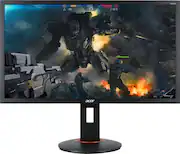
Rating 4.7 out of 5 stars with 1418 reviews
4.7- Price (138)
- Gaming (132)
- Refresh rate (103)
- Picture quality (77)
- Size (44)
- Color (29)
- Speakers (20)
- Dead pixel (14)
- Durability (6)
- Viewing angles (5)
Customer Images
The vast majority of our reviews come from verified purchases. Reviews from customers may include My Best Buy members, employees, and Tech Insider Network members (as tagged). Select reviewers may receive discounted products, promotional considerations or entries into drawings for honest, helpful reviews.
- Rated 5 out of 5 stars
Great gaming monitor!
First off: The pic on BB’s website is outdated! The new one has a much thinner bezel. I needed a gaming monitor for my Xbox One X because playing on a 40 inch 4K TV gives me headache. Plus my eyes gets tired quick. Looked at Best Buy for gaming monitors and this one caught my eye. It has sharp visuals that I couldn’t believe it was only 1080p! So I bought it, got it home and on to calibration. I wish the manual is a bit more detailed but the monitor’s menu was easy to learn nonetheless. Overall, I’m very happy with this one. Sharp visuals for a 1080p monitor. A 1ms response time and very vibrant colors! Viewing angles aren’t too bad.
Posted by BrownishGambino
- Rated 3 out of 5 stars
Great Performance! Bad lifespan?
I bought this monitor in March of 2018 and I have been more than satisfied with its performance. Fantastic resolution, vivid colors, fast refresh and response, just overall a beastly monitor. Yesterday however, October 2019, in the middle of playing a game, the monitor screen went completely white. The only thing it could display was a blank white screen. I had a second monitor and that one worked fine, it displayed correctly. For the broken monitor, i tried switching from display port to HDMI, switching to a different computer and running a deep computer scan. Nothing mattered, it was just a white screen. I couldn't even change the monitor settings via the control keys on the back because the screen stayed blank and white. To my dismay, when i checked online, I noticed other people with Acer products have also experienced this problem (nothing new i guess). What i couldn't find online was a solution that worked. Good news, apparently this monitor is covered by Acer warranty and they will fix it for free. Bad news is you pay for shipping. I payed 35 for shipping but that is because i packaged the monitor myself (good thing i still had the original box), FED Ex estimated another 100 dollars if i want them to package it.
Posted by Stephen
- Rated 5 out of 5 stars
Fantastic monitors for an even better price!!
Honestly, I bought these out of urgent need at the start of Covid-19 lockdowns in my state. My job already allowed me to work from home on occasion but with things moving to 100% WFH for the foreseeable future, I rushed to Best Buy to get anything I could find that day and they had 2 of these in stock and the rest were $600 top of the line gaming monitors. For being in the middle price point, these are fantastic monitors. I bought 2 so I had dual monitors for work, but the picture quality is stellar, setup was beyond easy, the stands are super quality and very sturdy, and the height adjustment with the rotation for vertical viewing is a super nice feature and works incredibly well. You do need to tilt the monitor outward on the bottom a bit to compensate for the size of the screen in relation to the stands max height, but at most it’s about 5-10 degrees and it slides right around on the spot. The base also rotates, which I didn’t initially realize. Depending on how tight you screw the screw on the bottom, it can be kind of difficult to rotate, but considering everything is to ensure the safety of the monitors, it’s a very small price to pay. I have not used these for true gaming yet, just work, but based on my experience and image quality of even more work desktop displayed is reason enough for me to feel confident these will be perfect for gaming as well. DisplayPort cords come included, but if your computer doesn’t have a DP input, HDMI is just as good. As well, these will auto-sense inputs for when one device turns off but you want to switch to another. Only thing to note about this is that it cycles each input before it turns off. As an example, when I shutdown my laptop and no other devices or cords are connected, the monitor will show that its switching to the other modes then proceed to go into auto-sleep mode. I turned the Auto-sense function off so that they just sleep right away and don’t look for anything else. Considering it takes the click of a button to switch the input displayed on the monitor at any given time, this was not at all a burden for me. If you’re looking for a monitor that won’t break the bank but makes it look like you robbed it instead, then you won’t regret picking up one (or two) of these. :)
Posted by JoshmoJoe
- Rated 5 out of 5 stars
Nice
I use this monitor for gaming, and I’m happy with it. Don’t rely on the speaker for sound. It’s horrible. But the picture is great. I’ve had for a week or so, and today I had a couple of stuck pixels pop up, which scared me, but I was able to rub them and they disappeared. Monitor is bigger than I was expecting. Don’t think I want to get an ultra wide anymore when I get a second monitor. This is perfect.
Posted by loubear
- Rated 4 out of 5 stars
Awesome Monitor with some Adjustments
I bought this monitor for console gaming (Xbox One) and to make working from home easier. So far it's been very good! A 27" screen is a lot bigger than I expected and is more than plenty for the work I'm doing. As other reviews have stated, the product pictures Best Buy has are a bit outdated. This current screen has very minimal bezels. It only has the thick bezel at the bottom. One thing to note is that the color isn't the greatest out of the box and need some playing around with. I did some research and the following color settings is the best I've found for my uses (Call of Duty on Xbox and looking at graphs for work.) Picture: - Brightness: 50 - Contrast: 45 - Black Level: 3 - Blue Light: Off - ACM: Off Color: - Gamma: 2.4 - Color temp: User ---- R Gain: 55 ---- G Gain: 52 ---- B Gain: 50 ---- All color bias to 49 sRGB mode: off 6-axis hue: Default 6-axis Saturate: Adjust all to 55 except Yellow Saturate to 59. Again, these are the best settings I've found that work for me. Decided to post them here as it took a bit of Googling around to find something that works. Hopefully this helps out other people.
Posted by Carl