Rating 4.4 out of 5 stars with 52 reviews
4.4- Performance (26)
- SSD (13)
- Graphics (9)
- Processor Speed (5)
- Cooling (7)
- Case Size (3)
Customer Images
The vast majority of our reviews come from verified purchases. Reviews from customers may include My Best Buy members, employees, and Tech Insider Network members (as tagged). Select reviewers may receive discounted products, promotional considerations or entries into drawings for honest, helpful reviews.
- Rated 5 out of 5 stars
Quality you trust from Alienware
Amazing!!! Was between a few different computers and am very happy with my purchase! Waited 2-3 months to make review and would purchase again, no question!!!
Posted by Gamerguy
- Rated 4 out of 5 stars
Great High-End PC, Restrictions on Upgradability
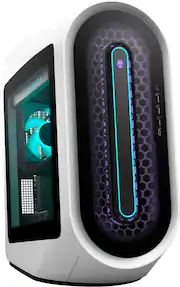
Besides a few issues I’m loving the R13. It’s a great high-end gaming PC and performs exactly as I’d expect something with its specifications. The design won’t be to everyone’s liking and Dell made some weird decisions with the power supply and motherboard, but overall I’d recommend it if you’re looking for a prebuilt gaming PC with a little extra flair. The first thing to get out of the way straight off the bat is this thing has a look to it. I did not think I would be into it, but I think it looks a lot better in person than it does in pictures and videos. Still, it’s a bold look and if the minimalist look is what you are going for this is not it. The case is hilariously large due to the fact that the whole thing has this upward tilt going on and it’s probably 30% bigger than it actually needs to be. The pictures even show it with an additional rear cover for the I/O to make it even bigger, but mine did not come with that. The case has a ton of RGB 6 customizable zones. At full brightness, this thing lights up my basement no problem. I’m personally not big on RGB myself, but I do like the arrangement Dell has gone for here and you can come up with some pretty cool looks. The specs in general are excellent. For gaming I think I’d get by with an i7 no problem, but the i9 is nice to have. I’ve heard it can have cooling issues, though I did not notice it in my usage and admittedly for gaming it’s probably not pushing the i9 to its limits anway. The RTX 3080 is still one of the best GPUs you can get today, though the 4000 series is probably just around the corner. The 1TB is a fast WD SN810 and I added another 1TB SN770 that I had to the second M.2 slot. The motherboard, which uses the Z690 chipset, is not a standard design. The I/O on the front of the case is actually part of the motherboard itself like rear I/O. I have no idea why Dell would use a design like this. Realistically I couldn’t see myself upgrading the motherboard even if it was a standard design, but this seems very odd. The motherboard also does not use standard power connectors, which means the PSU is not standard as well. This bothers me a bit more because if I ever want to upgrade to a more power hungry GPU down the line I have to hope that Dell is going to offer a larger power supply that is compatible with the board. The 32GB of RAM is DDR5, but it’s limited to 4400 MHz by the motherboard. The RAM sticks themselves are 4800 MHz though. The modules are also green against the black PCB of the motherboard and it stands out in a bad way. I almost want to buy new RAM just so the color matches. For the size of this case these components are actually packed into a relatively small area within it, owing again to the fact that it has this upward tilting design. The I/O selection is pretty solid. You get 4 USB 2.0, 5 USB-A 3.2 ports, and 3 USB-C 3.2 ports (2 support 10 Gbps and 1 supports 20 Gbps; none are Thunderbolt).The Ethernet port is 2.5 Gbps capable. Getting logged in and booted up the first time, besides the normal driver and Windows updates, I was shocked at the lack of bloatware. Windows comes with its assortment of junk apps (Facebook, Instagram, etc.) and those are easy to remove with a single click, but Dell didn’t bundle anything unnecessary; not even antivirus! All of the preinstalled apps I found like Alienware Command Center and Dell SupportAssist were actually useful, though Command Center is constantly popping up notifications about warranty, which is annoying. I liked the Command Center application for customizing the lighting and it offers a few preset ‘overclock’ profiles, though the overclocking options are pretty limited. Gaming performance is about what I expected for the RTX 3080, in that it is great. The monitor I use right now is 4K and most every game I played had no issues running at 60+ FPS at high or max settings. I can run Cyberpunk with all the ray-tracing settings turned on (aided by DLSS). I ran through a bunch of other games like Control, RDR2, Halo Infinite, and Alan Wake Remastered. For the most part, even at 4K, most every game I ran I could just push all the sliders to max and everything runs just fine, though I did use DLSS where it was available. I had the ‘Overclock 1’ profile turned on most of the time, and that seemed to do fine. The fans occasionally spun up to a level that would be bothersome, but with my headset it barely registered for me. Overall, besides a few minor gripes and some upgradeability concerns, I’m very happy with this PC. It’s got the specs to handle all of today’s games and I think it’s going to last me a long time. It’s certainly not a budget PC and you can do these specs for less money, but it’s still a pretty good prebuilt option if you can appreciate the aesthetic.
Posted by SamG
- Rated 5 out of 5 stars
Perfect gaming pc
Great fast working and beautiful machine runs every game I play amazingly
Posted by JAM97
- Rated 5 out of 5 stars
Powerhouse
Great gaming pc. Was able to run most on my games on high settings
- Rated 4 out of 5 stars
Great Specs, Solid Performance with Quirks
About The Alienware Aurora 13 desktop is a high-end Alienware gaming machine that’s absolutely spec-loaded and seems to handle anything I can throw at it. Lots of attention to detail from the packaging, to the casing, to the loaded system components. It performed very well for me. Packaging & Appearance The box is huge and opens like a medium sized appliance. Alienware took that large box and designed it to be like a spaceship that has landed, the door opens, and you receive your spaced-aged technology from within. Once you get the desktop and the components out, you realize that the casing isn’t typical either. The case is a lunar white color (not quite bright white, but more white than gray). It’s wrapped in plastic stickers to protect the entire outer case. It has a unique shape with rounded corners. There are honeycomb air intakes, the internal component display area, and Alienware branding components all over the outside. The internal component area has RGB lighting illuminating the fan and the Alienware brand name. The graphics card illuminates to show the GEFORCE RTX branding Contents It doesn’t come with much other than the desktop. There are very plain keyboard and mouse accessories and a power cord. Specs I won’t cover every single spec here, but here are the highlights: Windows 11 Home 64-bit 12th Gen Intel i9 Processor 32 GB DDR5 RAM (2 sticks of 16GB, 4 slots available, expandable up to 128 GB) 1 TB SSD Hard Drive (2 expansion slots available) 10GB NVIDIA GeForce RTX 3080 Graphics Card Wireless – AX 2.5 GB Ethernet 750 Watt Power Supply Liquid Cooled System 12 USB Ports (various types) Performance Generally speaking, this computer seemed to do every task well and I was pleased with the performance. Here are some of the things that I noticed: Restore Drive – The first thing that I did after downloading updates was make a restore drive. It took about an hour to back the information up to a USB 3.0 drive. I was a little surprised that it took that long. If you do this it will ask for a drive that holds at least 32 GB. Speed – Everything was fast. Booting, internet browsing, games, all of it. Noise – There are 3 fans so I tried to pay attention to the level of noise that the desktop generated. This was placed at ear level 2-3 feet away. While I could hear it, it was not noticeable. My other custom gaming machine is much louder. Heat – It does have some heat being released, but I did not feel that it was excessive. If fact, my other two desktops produce more than the Aurora. Wireless Connection – I have not upgraded my router to Wi-Fi 6 / AX yet, but my wireless connection was strong enough for me to play a game on Steam for 3 hours and not notice any lag. Gaming – Games displayed well. There was no lag or pixilation at any point. Was very happy with the sharp, smooth image. Disappointments While this machine was great overall, here are some things that I was disappointed in: Windows 11 Home – IMO, I feel that a machine at this price point should have a higher version of Windows such as Windows Pro. 1 TB SSD – For a gaming machine the use of the SSD was correct but the size seems small. Games take up a lot of room, and gamers tend to have several games in their library. A larger hard drive would have been preferred. A second storage drive would have also been nice. I will note that it comes prepared to add the second drive if you want to do that. Keyboard and Mouse – For a machine at this price point, the generic keyboard and mouse were a letdown. It should have come with at least a RGB version that ties into the Alienware Command Center. RGB Lighting – Would be nice if you could change the graphics card light to coordinate with the rest of the RGB. The white GEFORCE RTX letters are brighter than anything else on the machine. The memory sticks were plain and could have included lighting. There are 3 fans, but only one has a light. Should have had lights on the other two with options to control if desired. Proprietary Parts – Several components appear to be proprietary. For a gaming PC, this is a headache because you know that customization is a key component to gamers. Memory items such as the RAM, Hard Drive, and Graphics Card can all be changed/ added to/ or upgraded with the Aurora. (But why would you want to touch this graphics card?) The liquid cooling, motherboard, and power supply all appear to be proprietary. Warranty – This very expensive machine has a 1 year warranty. That’s a standard timeframe. This, IMO, should come with an exceptional warranty, not a standard. Quirks Video Connection – I am using a 40” 4K TV for my “monitor”, and it kept losing connection with the PC. This is not the first computer that I have had this happen with, but my last one did not do this. I ended up turning the screen saver / power saver functions off on the PC to cut down on these instances, but I still have problems with no signal being shown on the screen at times. RGB Lighting – I used the Alienware Command Center to set my RGB lighting. When I went to Steam to play a game, the RGB lighting set itself to a different color and pulsed for the entire game. It didn’t do that on a previous game from the night before. I tried to change it in the Command Center, but it would not stick to the settings. Not sure what is going on there. Rear Fan Light – The fan has a tiny wobble which is more noticeable with the light on. I am concerned that this fan will not last as long as it should if the fan isn’t balanced. This is a problem since it’s the main fan attached to the cooling system. Summary I am giving the Alienware Aurora 4 stars. It was exciting to unbox and see the detail put into the design. The specs are crazy and the PC should feel “current” for the next several years. While it had some disappointments and quirks, the performance was really good and it seems to be a solid PC.
Posted by sgriesch