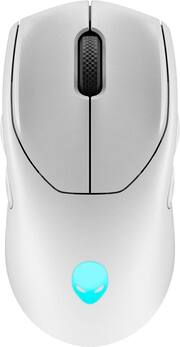
Rating 4.6 out of 5 stars with 89 reviews
4.6- Battery Life (18)
- Design (14)
- Bluetooth (13)
- RGB Lighting (10)
- DPI (9)
- Price (7)
- Size (4)
- Click (3)
Customer Images
The vast majority of our reviews come from verified purchases. Reviews from customers may include My Best Buy members, employees, and Tech Insider Network members (as tagged). Select reviewers may receive discounted products, promotional considerations or entries into drawings for honest, helpful reviews.
- Rated 5 out of 5 stars
An Alienware Mouse That Is ACTUALLY Worth It
It Performed better than I thought it would! Only thing this is missing is some better mouse feet, but it has become part of my collection next to the Logitech's and Finalmice that I have. Feels nice in my hand, and I love that it is ambi. The price range is a little high for it, but other than that, really impressed with the mouse.
Posted by DawnsRevengeYT
- Rated 4 out of 5 stars
Mouse is good but AW610M feels better
The mouse itself glides smoothly and works well with either usb cable , usb dongle or Bluetooth. The magnetic quick connection is very clever and makes it easy to charge and use at the same time as well. I use it with 2 PCs , one Bluetooth and one with the usb receiver and switching between them is easy. I just wish the design was the same as the AW610M I have because that one feels much better in the hand.
Posted by CSStudios
- Rated 5 out of 5 stars
I’m not saying it’s Aliens but… it’s RGB
Solid mouse so far. I’ve had it for around a week. No complaints. I typically only use it in wired setup. The RGB works nicely with the native Alienware software on my laptop. A+ hardware
Posted by Corn
- Rated 4 out of 5 stars
Lightweight & Comfortable, Software is Half-Baked
KEY FEATURES 26k DPI Resolution Customizable Buttons No Overdone LED lighting effects I have gaming mice from nearly every manufacturer. The manufacturers include: Razer, Corsair, Logitech, Roccat, Steel, and Microsoft. Much like a car or truck, peoples’ opinions vary widely and differently and what one likes, the other may not. Designing a mouse to appeal to a wide variety of folks can be a challenge. Did Alienware do it correctly? The short answer is: Hardware-wise: Yes, Software: No. INITIAL IMPRESSIONS Hardware-wise, Dell aka Alienware, knocked it out of the park. The mouse has a nearly perfect weight for me and a very nice design. Unlike my G303 Shroud, the Alienware’s curves are comfortable and the buttons all line up perfectly for my average sized hands. I especially appreciate the actual physical buttons and switches on the bottom of the mouse. So many manufacturers are trying to eliminate buttons and switches, it is refreshing to know that I can set the mouse exactly how I like it (as far as DPI and transmission mode) without relying upon button programming and the manufacturer’s software. The bottom of the Alienware has dedicated switches for power, DPI resolution, and wireless connection method. Simple, effective, intuitive. Thanks, Alienware! Speaking of connection method, this tri-mode gaming mouse has what I consider the single, most important, must have feature for any mouse. The ability to work via wired, Bluetooth, or wireless 2.4G. The AW720 checks all my boxes. It can use Bluetooth 5.1, thereby saving battery life, you can use the included USB-C wireless dongle for ultra-fast, low latency response times in gaming, or if you are running out of juice, you can just plug it in via the included USB-C cable. I’ve concluded, that if a mouse, gaming or otherwise, doesn’t have these 3 communication methods built-in, it is instantly stricken from my list of consideration. Being a frequent traveler, I don’t want to have to pull out my wireless receiver to use a mouse. Those receivers are often so small and if you lose it, it renders a mouse useless. USE As I stated above, the AW720 has an awesome weight and feel. It is light and comfortable. It is not near as heavy as my Corsair Dark Core Pro, but more in line with my Razer, Roccat, and Logitech Shroud. The Alienware supports some VERY impressive specs. According to Dell, the AW720 supports a sensor resolution of up to 26k DPI, up to 140 hours of gaming using the 2.4G receiver and mind boggling 420 hours of battery life via the Bluetooth connection!!! Wow! Impressive. Even more, should you need a charge, you can get up to 20 hours of extra juice with only 5 minutes of charge. Excellent work Alienware. NEGATIVES Software and firmware. Ugh. What a debacle this thing is. I was able to connect the mouse initially via Bluetooth with little to no issue. Everything was going smoothly. So, I tried the included USB-C cable. Everything worked as expected. But I hate having a tethered mouse, and I was ready to try a few games. I plugged in the wireless dongle and after several frustrating attempts, the mouse paired to the receiver, and all was good. But my laptop only has 1 USB-C connection. So, I tried the USB-C splitter, giving me a place for my 2.4 receiver and an extra USB-C port. Problem solved? Nope. That when everything went downhill. My laptop lost its connection to the mouse. I unplugged the adapter, oh wait, its magnetic. The USB-C connector is just barely long enough to fit in my laptop. So, Alienware includes a metal “gripper” to put around the connector. But it makes the connector stick out too far and doesn’t allow for a secure connection. So, I ditched everything and went back to a wired connection, and everything started working again. My next thought; firmware update. So, I headed to the Dell website and sure enough, there were 2 firmware updates listed, one for the mouse, and one for the receiver. After downloading them and following the instructions, I hoped it solve my problems. Did it? Nope. 2.4 mode still didn’t work. So back to the Dell support site I went. Ah, the Alienware Control Center, I must need that to control the mouse. After installation, my computer, nor the Alienware app recognized the mouse. Not even with it plugged directly into the PC. Back to the Dell support site for a 4th time. Yet another file is available that must be installed to get the PC and the Alienware software to recognize the mouse. Ugh. What a joke. But at least I have it working now. Right? Nope. As soon as I launched the Alienware Control Center, it told me I needed 2 mandatory updates for the mouse and receiver. The same 2 I just updated less than 10 minutes earlier. Seems the firmware updates on the Dell support site did nothing. After nearly 30 minutes of troubleshooting, downloading, updating, flashing, I am happy to report that the mouse now works properly now matter which connection method I use, and the receiver now works whether its plugged directly into the laptop or into the splitter. FINALLY. The Alienware Control Center (AWCC) lies my next negative. As much as I dislike software to control peripherals, some companies offer a ton of features and options for their devices. Anyone that has used the Razer Synapse software, Corsair iCue, or Logitech G-Hub knows how you can fine tune nearly any and every aspect of the peripheral attached. There are so many parameters in some of these that it makes you nauseated. The AWCC is half-baked, at least half baked for this mouse anyway. Selecting certain features, disables other options, etc. For example, I like to dim the lighting on the mouse. I don’t need a glaring LED light show on my mice, so I like to lower the brightness & conserve battery. Great. My choice. However, if I select my desired illumination theme, I can’t adjust the brightness, nor can I use the mouse as a temperature gauge showing me the current temp of my CPU like I can with my Corsair products. These are just two of my frustrations with the Alienware software. The AWCC feels like a beta software. MY THOUGHTS & CONCLUSIONS I really want to like the Alienware AW720 mouse. The hardware seems to be first rate. The mouse has a great feel, excellent ergonomics, and the best battery life I’ve seen to date in a gaming mouse. I love the fact that Dell has shown great restraint in not blowing the mouse up with unnecessary and tacky RGB lighting. The glowing Alienware logo is just the right amount of RGB. The mouse tracks true and consistent, glides easily on all my mouse pads, and even after long gaming or working sessions, does not make my hand and arm feel tired. I have no issue giving the Alienware hardware a 5-star rating. However, the initial device setup and Dell support site stinks. It took me longer just troubleshoot this mouse and get the bugs worked out than it did to set up ALL my other gaming mice combined. In this day and age, that is totally unacceptable. Like I stated earlier, I have a lot of experience with the competitions’ products. Not a single other manufacturers' software failed to recognize their device. Not a single manufacturer put out firmware update files that didn’t update firmware. Not a single manufacturer makes you manually install a separate file and program to get its own program to work correctly with its peripheral. I give the overall setup, configuration, and software a 2-star rating. I’ll be generous and give this product a 4-star rating. I really do like the mouse. It is enjoyable to use and checks all my necessary boxes for connections. It is a shame that Dell / Alienware has not included a USB-C to USB-A adapter with the product. My laptop has 4 USB-A ports and only 1 USB-C. While they do include a small splitter / hub, it isn’t very robust and the half-hearted metal gripper (it looks like the metal levers on a binder clip) doesn’t work right for me and that is on one of Dell’s own laptops. While I’m giving it a 4-star rating, I CANNOT recommend the product at this time. Once Dell is able to work out the kinks in the software, which I’m sure they will, I’d be willing to change my review, but as it stands now, there are too many other products that do the same, without the frustrations. NOT RECOMMENDED.
Posted by NAMO
- Rated 5 out of 5 stars
So good. Treat yourself!
I never cared too much about my mouse, as long as it worked. Last year I decided to treat myself to a Razer Basilsk Hyperspeed, which was much better than my $20 Logitech, but after a year of use, didn’t feel so great. I tried another Razer, the Viper, and was very let down that it wasn’t Bluetooth. I then went for the Alienware and was blown away. Fit and finish is as nice as the Razer but the mouse buttons feel much higher quality. Smoother in the hand and more premium in every way. Lighting is easy to set on my Alienware system. Well worth the price.
Posted by MrGoldfish