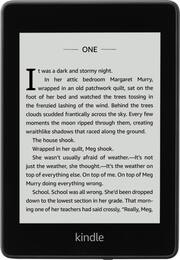
Take your favorite books along with this Amazon Kindle Paperwhite e-reader. It's water-resistant for use by the pool or in the bath, and you can pair it with a Bluetooth speaker to listen to Audible audiobooks. This Amazon Kindle Paperwhite e-reader has an adjustable built-in light that provides clear screen viewing day or night.
Q: Is this available without the ads?
A: I have heard you can pay a monthly fee to get rid of the ads, but the only ad that I have seen is the book suggestion when you wake up the device. Once you swipe to turn on the ad goes away and the book comes up. Ads do not appear while you are reading. This is similar in all Kindle devices that I have owned.
Q: Is this the 10th generation? Is it the 2018 or 2019 model? Thank you.
A: I called Amazon-Kindle Division and was told that indeed it is a 10th generation.
A: The kindle page has ads as a screensaver, but not when you are reading the book. At least as far as my experience goes, I haven't seen ads pop up or anything.
A: If you have previous Kindle, all your books are stored through your Amazon account--so that way if you need to replace your kindle it is easy to access on a new one. Your Kindle Library is accessible on any Kindle.
Q: How many books can I save at this 8GB capacity kindle?
A: About 5000
A: Yes, This is device is great for that. Not only is this less intrusive to other people around you but also great for reading before bed. The idea of these devices is there is no backlight so it is lit from around the edges more like light shining on the page of a book. The light settings go from 0-24, usually in a normal reading setting during the day I have mine set anywhere from 20 - 24 but then at night when the lights are low reading before bed I set it between 8 - 10. It is very simple to adjust the brightness while reading.
A: You can get some free books. Most current bestsellers require payment, but less than buying a hard copy of the book. Local public librarys also allow you to check books out digitally for free with a library card.
Q: Does it have Audible and Whyspersinc capability? Audio jack or/and Bluetooth?
A: Whispersync is Amazon's technology that lets readers switch “back and forth between a Kindle book and Audible professional narration - without ever losing your place.” The way it works is that you first buy the Kindle book, and then for Whispersync enabled books you can add the Audibile audiobook to the purchase. Yes it does have audible.com store on the device. All you need to do is to tap on the 3 vertical dots on the right side of the Home Screen. Then you will see the audible store. You can tap on the audible store, and you are there to purchase your audiobooks and then they will be downloaded onto the device upon purchase of them. It has a 3.5mm jack connector hole on the top of the device, so that you can connect your headphones/earbuds to the device (Bluetooth enabled headphones or earbuds). It has Bluetooth capabilities on the device as well. And here are the directions on how to connect: To listen to Audible books on your Kindle, you must first pair a Bluetooth audio device, such as headphones or speakers. There are two ways you can pair a Bluetooth audio device. Pairing a Bluetooth device when opening an audiobook: 1. Tap My Library from the Home screen, then tap Downloaded. 2. Tap on the audiobook you want to listen to. If you have not paired a Bluetooth device, you will receive a prompt to do so after the Play button is pressed. 3. Put your Bluetooth audio device into pairing mode. 4. Tap on the Bluetooth device you want to use. 5. Once the device is paired, the audiobook will play through that device. Pairing a Bluetooth device via Settings: 1. Put your Bluetooth audio device into pairing mode. 2. Tap My Library in the top left of the Home screen. Tap the Quick Actions icon on the toolbar, then tap All Settings. On the Settings page, tap Wi-Fi & Bluetooth, then Bluetooth devices. 3. If you have already downloaded an Audible book, open the book and tap No Bluetooth Connected to open the Bluetooth dialog.