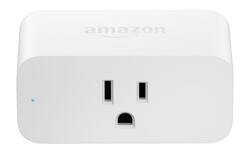
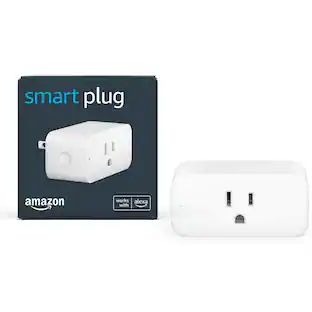
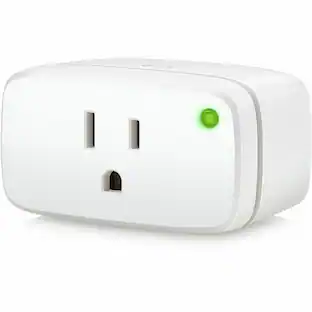
Amazon - Smart Plug - White
- Key Specs
- Works With: Amazon Alexa (Compatible with or able to be connected to other smart devices or applications.)
- App Compatible: true (The product can be connected to a program or software application on a mobile device, which then receives collected data from the product.)
- General
- Brand: Amazon
- Model Number: B01MZEEFNX
- Product Name: Smart Plug
- Color: White
- Power
- Amperage: 15 amperes (Strength of electrical current.)
- Voltage: 120 volts (Amount of power needed to support an electrical current.)
- Features
- Material: Other
- Compatibility
- Works With: Amazon Alexa (Compatible with or able to be connected to other smart devices or applications.)
- Voice Assistant Built-in: No (A digital assistant built into the device that uses voice commands to answer questions and control smart devices.)
- App Compatible: true (The product can be connected to a program or software application on a mobile device, which then receives collected data from the product.)
- Dimensions
- Product Height: 2.2 inches (The out of box height of the item. Height is measured as the vertical distance from the bottom of the item to the top as it would be primarily used or placed.)
- Product Width: 1.5 inches (The out of box width of the item. Width is measured as the horizontal distance from one side of the item to the other as it would be primarily used or placed.)
- Product Length: 3.2 inches (The out of box length of the item. Length is measured as the longest dimension of the item.)
- Product Weight: 0.22 pounds (The out of box weight of the item.)
- Warranty
- Warranty - Parts: 1 year
- Warranty - Labor: 1 year
- Other
- UPC: 841667145075
Amazon Smart Plug lets you voice control your lights, fans, coffee makers, and more. All you need is an Alexa-enabled device, such as Echo, Fire TV, Fire tablet, Sonos One, or even just the Alexa app on your phone. And with multiple Amazon Smart Plugs, you can control multiple outlets.
Whats Included
- Amazon Smart Plug
- Owner's manual
Q: Do I need special smart lightbulbs if I have this smart plug?
A: No you don't. That's why I went with the plug. Bulbs will burn out after all. Works just fine with our 4 lamps with regular bulbs, actually I use led bulbs, but it should work either way.
A: Yes, you can go into your Alexa app and create a group. In this example, we'll use 3 candles on 3 separate smart plugs. We'll name them Candle 1, Candle 2, and Candle 3, for simplicity. In your Alexa app, after you've discovered the devices and named them, you could create a group called "All the candles." Once you're done, you'll be able to tell Alexa to turn on individual candles by saying their name...or you can tell Alexa to "Turn on all the candles", if you want all of them on. I hope this helps.
A: I use The Alexa app. Create a group, like Living Room, and when editing the group add all devices you want to assign that group. You can then tell Alexa to turn on or off the Living Room and both plugs will be controlled. You can still call out for the individual plugs to be turned on or off. Also, you can create other groups with the same devices. In other words, a device can be added to more than one group. I have groups by room name, but also have some extra that are pieces of the room group and still more that span more than one room. Opportunity to be creative.
A: You can use the switch on the lamp. Just make sure you set the smart outlet to "ON" and you will be able to turn the lamp on/off manually.
Q: how to install and activate alexa use?
A: Open your alexa app and select add device then follow the procedures as per alexa
Q: Can this turn on my clothes dryer in the basement ?
A: Yes you can.
A: On it Hello yes there is a Alexa app in the App Store Just get the one that just say’s alexa it’s blue with a white circle on it. that’s the app , and if you want to just use lights you can get them with a hub Built in ,and it will say that on the light box ,no hub is required that means it will work with Alexa but you don’t need any special plugs. You can even get the white ones that change colors you just can’t name each room light , it’s like you say Alexa turn on bedroom light then in the living room say Alexa turn on the light so if using in more then those two rooms name kids room spare room they can not be the same I bought a plug I don’t need it cause the lights have that built in hub. I bought my lights on amazon I did not know at the time Best Buy carries them as well. I sent the picture of App and the picture with my light I have the bulb in the reading light size hope this helps you
Q: What does blinking red light mean
A: The blinking red light means there is no network connection or the setup has timed out.
People also viewed
Today's top picks
 $629.99The price was $1,099.99
 $129.99The price was $219.99
 $49.99The price was $79.99
 $1,399.00The price was $1,499.00
 $149.99The price was $299.99
 $549.99The price was $849.99
 $399.99The price was $499.99