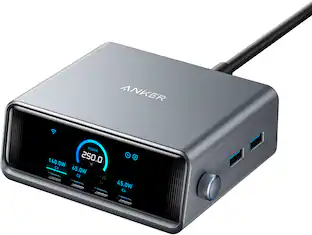
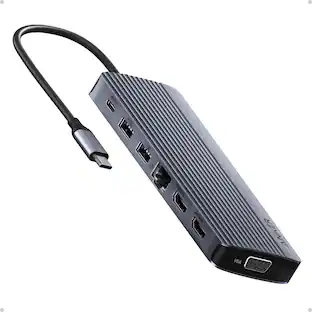
Anker - Prime Docking Station (DL7400), 14-Port Triple Display with DisplayLink, 140W Max USB-C Port - Phantom Gray
About this product
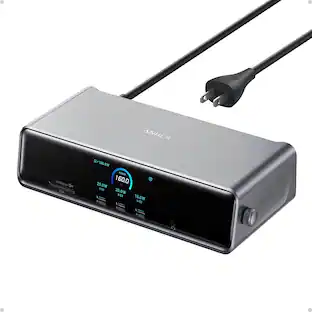
Anker Prime Docking Station (DL7400), 14-Port Triple Display with DisplayLink, 140W Max USB-C Port, Smart Display and Built-In Cooling Fan, Up to 8K, For macOS and Windows, DisplayLink Driver Required
Features
14 Powerful Connections
Designed for modern setups, featuring a 140W 10Gbps USB-C upstream port, two 100W 10Gbps USB-C ports, one 100W 5Gbps USB-C port, two HDMI ports, one DisplayPort, two 5Gbps USB-A ports, one 480Mbps USB-A port, a 2.5Gbps Ethernet port, a headphone and mic combo jack, plus SD and TF card slots for complete desktop connectivity.
One 8K Output, Triple Display Versatility
Power up three external monitors at once, including one in 8K, for ultra-efficient multitasking. Compatible with both macOS and Windows setups. (Note: Only monitors that support 8K resolution can display in 8K. DisplayLink driver required.)
Each Port Powers and Performs
Every USB-C port supports both charging and data transfer. Power your laptop with up to 140W via the upstream port, while each front USB-C port delivers 100W of high-speed charging. (Note: The front USB-C ports do not support media display.)
Always Cool, Always in Control
View real-time updates on charging power, display performance, fan cooling mode, and settings directly from the smart display. The built-in fan and ActiveShield 3.0 help keep your device running cool and stable.
What You Get
Anker Prime Docking Station (14-in-1, Triple Display, DisplayLink), USB-C to USB-C 3.2 Gen 2 cable for upstream port (3.3 ft, 10 Gbps), 6ft AC power cord, safety sheet with user manual QR code , 24-month warranty, and our friendly customer service.
Specifications
- Maximum Number of Displays Supported3Number of DisplayPort Outputs (Total)1
Reviews
Rating 2 out of 5 stars with 1 review
The vast majority of our reviews come from verified purchases. Reviews from customers may include My Best Buy members, employees, and Tech Insider Network members (as tagged). Select reviewers may receive discounted products, promotional considerations or entries into drawings for honest, helpful reviews.
Compare similar products

Anker Prime Docking Station (DL7400), 14-Port Triple Display with DisplayLink, 140W Max USB-C Port, Smart Display and Built-In Cooling Fan, Up to 8K, For macOS and Windows, DisplayLink Driver Required

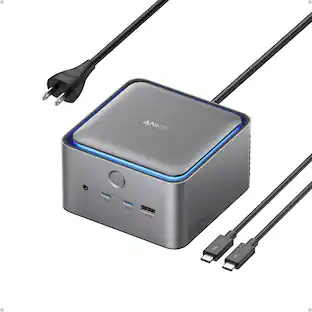
Anker Prime Docking Station, 14-Port with 160W Max Output, 10Gbps Fast Data Transfer, Real-Time Smart Interface, Audio and Ethernet Ports, Dual 4K Displays for Dell, HP, Lenovo and More
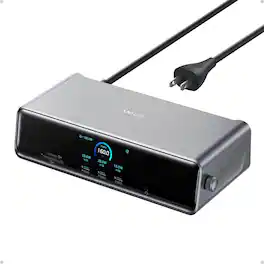
Anker Prime Docking Station (DL7400), 14-Port Triple Display with DisplayLink, 140W Max USB-C Port, Smart Display and Built-In Cooling Fan, Up to 8K, For macOS and Windows, DisplayLink Driver Required

Unleash TB5 Speed: Experience the revolutionary performance of the latest Intel Thunderbolt 5 technology. Benefit from a stable 80Gbps bi-directional bandwidth and the dynamic Bandwidth Boost feature, providing up to an incredible 120Gbps when needed for tasks like high-resolution display output, ensuring smooth and efficient data handling.
Specs
Questions & Answers
It this Thunderbolt 4 or 5?? I don't see anywhere in the specifications which one it is.
Answered by Anker TeamThat dock is not Thunderbolt 4 or Thunderbolt 5. The Anker Prime Docking Station (DL7400) uses USB-C technology (likely USB 3.2 Gen 2), which supports DisplayPort Alt Mode and the DisplayLink protocol—not the Thunderbolt standard. Thunderbolt specs are rarely mentioned in the description because it does not have one.
If used with a MacBook Air 2020 with intel i5 processor, will this allow for dual extended monitor usage? I mean not just mirroring MacBook screen onto two monitors but actually allowing both monitors to serve as individual monitors?
Answered by Anker TeamThe Prime Docking Station 14-Port (Model DL7400) does not support dual extended monitor usage with a MacBook Air 2020 running macOS. Devices running macOS only support Single-Stream Transport (SST) mode, which means that if you connect multiple monitors to the dock, the monitors will only mirror the MacBook screen, not act as individual extended monitors. If you want to achieve extended displays with your MacBook, you would need a docking station that utilizes DisplayLink technology, as this can enable extended mode for multiple monitors on a MacBook. Do note that DisplayLink-enabled docks require the installation of the DisplayLink driver and enabling the Screen Recording permission during installation. These steps are necessary for the extended display functionality on macOS.
Will this dock work with a MackBook Pro with the M5 chip? it was significantly lagging, and when looking at activity monitor, DisplayLink Manager was using 50% CPU and 20% GPU.
Answered by Anker TeamThe dock you mentioned should be able to work with your MacBook Pro with the M5 chip using DisplayLink technology. However, if you are experiencing lag issues and noting high CPU and GPU usage with the DisplayLink Manager, here are some steps you can take to troubleshoot the issue: Update DisplayLink Software: Ensure that you have the latest version of the DisplayLink Manager app installed. You can download it from the DisplayLink website: https://www.synaptics.com/products/displaylink-graphics/downloads/macos. Enable Screen Recording: Confirm that "Screen Recording permission" is enabled for the DisplayLink Manager in macOS. This is required for proper video output through the dock's DisplayLink ports (such as 2K HDMI and 2K DisplayPort). Check MacOS Updates: Update your macOS to its latest version. Compatibility and performance often improve with system updates. Optimize Dock Connection: Use the included USB-C to USB-C cable when connecting the dock, and ensure that the USB-C port on your MacBook supports DP Alt Mode. Avoid using adapters or USB-A to USB-C cables. Reboot and Reconnect: Disconnect the dock and unplug all connected devices. Reboot your MacBook, then reconnect the dock to see if performance improves. Compatibility Note: If the issue persists, you can try testing the dock with another laptop to confirm whether the lag is specific to your MacBook Pro. If you've tried these steps and still experience issues, the high usage of DisplayLink Manager may indicate limitations in handling extended displays or an interaction with your specific macOS setup. To reduce the strain on CPU/GPU, consider limiting the resolution or the number of monitors connected at the same time.

Customers often buy these together






More to consider
 $169.99The price was $269.99
 $207.36The price was $264.99

Explore tech essentials Sponsored


Keep exploring
 $219.89The price was $249.99
 $111.00The price was $119.99