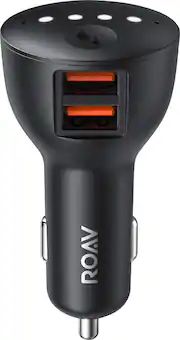
Rating 3.6 out of 5 stars with 429 reviews
3.6- Bluetooth (59)
- Microphone Quality (51)
- Charging Speed (23)
- Ease of use (19)
- Google Assistant (40)
- Response Time (20)
- Compatibility (11)
- Setup (10)
Customer Images
The vast majority of our reviews come from verified purchases. Reviews from customers may include My Best Buy members, employees, and Tech Insider Network members (as tagged). Select reviewers may receive discounted products, promotional considerations or entries into drawings for honest, helpful reviews.
- Rated 1 out of 5 stars
Trash - Microphones are totally useless
This appeared to be the perfect car solution for me. I have a Honda CR-V with an aux port, but a "dumb" car stereo. Letting me upgrade to add google assistant and be able to use it even if my phone is in my pocket sounded perfect. I own tons of google assistant devices and know what to expect. This falls short in every category. Set up I have a galaxy s9+ running Android Pie. Setup cannot complete with the aux cable. It just says "Preparing your Roav Bolt This should take a few seconds to set up AUX." It then times out and is in an infinite loop of "Try Again." Finally I gave up and decided to hook up a bluetooth adapter to pair via bluetooth. In order to do this, you have to unpair the Roav Bolt, factory reset it (which instructions do not indicate how to do, but you push and hold the button on the Roav Bolt until the lights turn blue). Afterwards, it seems to work fine. Awesome. Not what I wanted, but still it works. Using the Device While parked, it had trouble hearing me. Parked. No background noise of any kind and it still struggles. Instructions indicate you can also tap the button to activate the voice assistant, but isn't the point to be hands free? While on the freeway, I found myself screaming "HEY GOOGLE" at the top of my lungs to get it to respond. Horrible. It cannot hear well at all. I have two cigarette lighter adapters in my car. Below the console in front of me towards my feet and in the center console next to the cup holders of the car. Neither location works for it to hear me, though while parked it can sort of hear me next to my cup holders. How is it as a google assistant? When using Google Home, you can easily switch around between music services with ease. With this device, you have to be very specific of what to play. I have a free tunein account I listen to radio shows on and a paid spotify subscription. While at home, I can easily play specific songs without saying "from spotify" even when tunein is running. WIth this, "I cannot find _________ from tunenin." This wouldn't be annoying, but since it can barely hear me as is, repeating myself is infuriating. Similar issues happen across other apps that are not standard for the google home experience. I'm sure it can be patched, but it's annoying at launch. Bottom line Many of the issues I have with this can be patched. The aux issue certainly will be fixed for Samsung phones if they expect to sell any of these. Unfortunately, the microphones are so bad. Soooooo bad. It would be less drama to just use my phone's built-in google assistant. This solves exactly zero of my issues and I don't see who could benefit from using it. Even if this were at a price point of 1/5 of what it retails for, I still would not recommend it to anyone.
Posted by Steve
- Rated 3 out of 5 stars
It's ok
It works great 60% of the time. You must press the button to activate the Google Assistant. Unfortunately, voice activation doesn't really work well. Also, beware of the status your device is in. One day, not sure how and why it happened, my Anker Bolt wasn't syncing to my Bluetooth. It was working before this issue, but somehow it wasn't booting up. I restarted it and went through the activation process and still didn't work. Then I noticed the status on my device says it is disconnected. It was plugged and connected to my car bluetooth so I didn't understand why it saying disconnected. I ignored for about a week and it started working again out of nowhere. When I went to my Google app, the status changed to Connected. For now, it works fine. Hopefully the same issue won't come up again.
Posted by ms5085
- Rated 4 out of 5 stars
iPhone users beware…
With the age of smartphones and smart homes, it was only a matter of time before we have smart cars. No, this won’t make your car self-driving per se, but it does free your hands to do more important things…like driving. Pros: • Awesome mics • Smallish profile • 2 USB jacks Cons: • Does not play well with iPhones • Not much for instructions First and foremost, you will most likely have a more positive experience with an android/google phone. I have an iPhone and find that the cross-platform use has some wrinkles that needs to be ironed out. For iPhone users, one would need to download the “Assistant” app by google. I luckily already have this app installed on my phone. Setting up the device can be easy but I wished the box packed more printed instructions on what to expect. The setup solely relies on the Assistant app and not a “Roav” app. Upon launching the app on your phone, the app passively looks for new devices to setup and this Roav did pop up on its own. Following the onscreen prompts leads you down a path of using Bluetooth or the included 3.5mm output for sound. I tried both and I’ll list the pros and cons of both in a later section. The entire setup process took me about 20 minutes as the new software/firmware update took over 10 minutes to complete (with wifi too). After the initial setup, I found the microphones were so awesome that I was able to place the Roav in the cigarette lighter found in my center console. The microphones are that amazing. The Roav can pick up the “Hey Google” through my armrest with road noise and windows down. Which worked great since my 3.5mm aux jacks are also located in the armrest too. The downfall is the cross-platform support between a google device and my iPhone. It was a hit or miss if my voice commands will play iHeartRadio or Pandora on the first try. The Roav “heard” my commands and knows what I want to do…it was the phone trying to execute opening the music apps via the “Assistant” app that was buggy. After the 9th time of asking Google to play a radio station, I manually opened iHeartRadio app on my phone and it plays through my car speakers. Which indicates the complexity of having a Google product work with an Apple product. When it comes to selecting the 3.5mm vs using Bluetooth, that will be based on how new your car is. My 2010 car doesn’t support Bluetooth music (just phone calls) and im stuck using the 3.5mm in that car. The 3.5mm works fine for sound quality but that means you are stuck listening to streaming or MP3s in your car if you want the “hey google” to work. My newer 2017 supports Bluetooth streaming and that allows a better listening choice. With Bluetooth streaming and a setting that allows the google commands to come in as a “phone call”, I can listen to the car’s radio and when I ask google something, the car’s radio will silence like im accepting a phone call and answer my command. Once the command is done, the radio comes back on. Much better than the 3.5mm option. In summary, I can’t fault the hardware as the mics are amazing. It’s the software that’s buggy on an iPhone. Asking google questions like “whats the weather” or “whats on my google calendar” works great. Asking it to play music can be a hit or miss. My luck increases that the music will play the first time if I had recently opened the music app and is running in the background. Another software and not a hardware issue. With that being said, I want to split the reviews with 5 stars out of 5 for the hardware and 2 out of 5 stars for the iPhone integration software. But since I cant, the rating is 4 out of 5. And BTW, most phones have a “hey siri” or “hey google” already built into their phones so why have this Roav bolt? Good question…
Posted by TonyMSP
- Rated 4 out of 5 stars
Tough Sell
I like the Roav Bolt. I think it’s a good product that does what it’s supposed to do very well. It’s a tough sell because it doesn’t do anything in your car that your phone can’t already do, but it does do those things much better. I have some issues with it, but overall I think it’s a worthwhile purchase, especially for older stereos. What the Roav Bolt is is basically a Google Home for your car. It plugs into the 12V outlet connects to your car’s audio through an aux cord that’s included in the box. You can also make the connection via Bluetooth, but the aux connection is more reliable and doesn’t introduce the delay that you hear a lot of the time when trying to do voice commands over Bluetooth. Setup via the Google Assistant app is dead simple and I was up and running in about 5 minutes. There’s 2 microphones on the top of the of Bolt for receiving voice commands and they work great in that department. The response is just about instantaneous and it does an excellent of picking me up saying ‘Hey Google’ even with the stereo cranked up. There were a few moments where I would give a command and it seemed to need to think about for a few seconds, but in general most of my interactions via voice command went off without a hitch. You can do all the standard Google Assistant stuff: play music, launch navigation (which unlocks your phone and starts Google Maps), read notifications, make calls, etc. There’s also an Assistant button that you can use to start talking to Google, as well as answer and end phone calls, but it doesn’t have any play/pause/skip functions for music, which seems like a big miss to me. Of course you can control playback through voice, but it gets a little tiresome having to say ‘Hey Google, pause’ and ‘Hey Google, next song’ all of the time. While the microphones worked great for voice commands, my experience using them for phone calls was less than stellar. There was a ton of background noise on the other side of the call and my wife told me it just sounded like I was on speakerphone. I have a feeling this has more to do with the placement of the Bolt in my car though; my 12V outlet is in front of the shifter and kind of tucked into the center console. If that outlet was more out in the open I suspect my voice would come through a lot clearer on calls, but it’s something to keep in mind if your 12V outlet is tucked away like mine is. The Bolt also has 2 built-in USB charging ports. There’s no fast-charging on these ports, but they do each put out 2.4A of current for decently fast 12W charging. At the end of the day, the Bolt doesn’t do anything that your phone can’t already do on its own with an aux cord hooked up. Most Android phones have Google Assistant built-in and can do all of the same commands that the Bolt can. There are also less expensive chargers out there too. I can say that using voice commands with my phone’s built-in microphone has never been reliable experience for me and the Bolt completely flips that. I think that’s worth something to people who spend a lot of time in their cars.
Posted by SamG
- Rated 3 out of 5 stars
Don't Bolt out to buy this.
“Hey Google, is there a car adapter I can get to bring you with me?” " Yes, there is, but it's still a work in progress.” Roav makes car devices which work with both Amazon Echo (Viva) and with Google (Bolt). The Roav Bolt packs a lot into its compact size. There is a small button on the top which you can use to initiate a conversation or for the device to read out your notifications. This is a neat little feature which works well to help you keep your eyes on the road. Unfortunately, that's the highlight. It may be that the device is still in beta. it consistently took a significant amount of time to respond to even simple commands. I've used Roav’s Alexa device (Viva), and that one respond as much more quickly. I also had a hard time getting the Bolt to connect to my phone, a Samsung Galaxy S9. The problem was eventually solved after I contacted technical support, and they suggested I install Google’s Beta software. If you're not using the voice assistant the device works well as a Bluetooth receiver for older cars. My 2010 Nissan does not have Bluetooth audio, so I used the Bolt to connect with the aux input. Music sounded great and my son reported no lag when he was watching a video. The Bolt also has to USB power outputs at 2.4A each. It does not support QC 3.0 or USB C power delivery. If you are already in bed with Amazon or Google Music Services, that is the voice assistant device you should choose. However, functionality, the Alexa powered device is much more polished at this point. It's likely that Google will continue to iterate and the device will get better over time, like many of their products. If you can get this cheaply on sale, it may be worth purchasing and waiting for those improvements to come.
Posted by Dan0Sterling