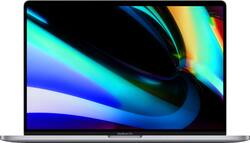
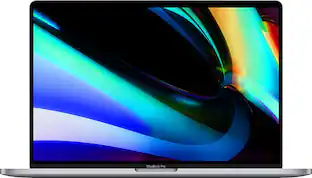
Apple - MacBook Pro 16" Certified Refurbished - Intel Core i7 2.6GHz - Touch Bar/ID - 16GB Memory - 512GB SSD (2019) - Space Gray
Model: MVVJ2LL/A
SKU: 6471145
This item is no longer available in new condition. See similar items below
- Key Specs
- Screen Type: STN
- Screen Size: 16 inches (Size of the screen, measured diagonally from corner to corner.)
- Screen Resolution: 3072 x 1920 (Retina) (Screens come in a range of resolutions (measured in pixels, horizontal x vertical). The higher the resolution, the greater the picture quality.)
- Touch Screen: false (Touch-screen devices make navigating more intuitive. Using a touch-screen display, you can do things such as tap to select, hold and drag to move items, swipe to scroll, and pinch to zoom.)
- Processor Model: Intel 9th Generation Core i7 (Your computer's processor is like its brain. Working in combination with system memory, the power of the processor determines the complexity of software you can run, how many programs you can have open at the same time, and how fast those programs will run. Most computers feature an AMD, Intel or Snapdragon processor.)
- CPU Base Clock Frequency: 2.6 gigahertz (Actual central processing unit (CPU) speed may vary by device configuration and design. The average rate at which the processor is able to execute tasks under normal operating conditions as asserted by the manufacturer.)
- Storage Type: SSD
- Total Storage Capacity: 512 gigabytes
- System Memory (RAM): 16 gigabytes (Random-access memory (RAM) is a computing device's short-term data storage, which allows active information to be accessed quickly. The size and type of RAM determines how efficiently the device can handle large amounts of information at one time. For example, gaming or video editing requires more RAM for optimal performance.)
- Graphics: AMD Radeon Pro 5300M (Often referred to as a "graphics processing unit" (GPU), this device is responsible for displaying image content and decoding/encoding video content in programs and games.)
- Display Connector(s): 4 x Thunderbolt 3 (The number and type of connectors used to connect to an external display.)
- Battery Life (up to): 11 hours (Battery life will vary depending on the product configuration, product model, applications loaded on the product, power management setting of the product and the product features used by the customer. As with all batteries, the maximum capacity of this battery will decrease with time and usage.)
- Battery Chemistry: Lithium-polymer
- Backlit Keyboard: true (Integrated lights allow for visibility of the keys in low-light conditions.)
- General
- Brand: Apple
- Model Number: MVVJ2LL/A
- Product Name: MacBook Pro 16" Certified Refurbished - Intel Core i7 2.6GHz - Touch Bar/ID - 16GB Memory - 512GB SSD (2019)
- Color: Space Gray
- Year of Release: 2019
- Display
- Display Type: LED
- Screen Type: STN
- Screen Size: 16 inches (Size of the screen, measured diagonally from corner to corner.)
- Screen Resolution: 3072 x 1920 (Retina) (Screens come in a range of resolutions (measured in pixels, horizontal x vertical). The higher the resolution, the greater the picture quality.)
- Touch Screen: false (Touch-screen devices make navigating more intuitive. Using a touch-screen display, you can do things such as tap to select, hold and drag to move items, swipe to scroll, and pinch to zoom.)
- Processor
- Processor Brand: Intel
- Processor Model: Intel 9th Generation Core i7 (Your computer's processor is like its brain. Working in combination with system memory, the power of the processor determines the complexity of software you can run, how many programs you can have open at the same time, and how fast those programs will run. Most computers feature an AMD, Intel or Snapdragon processor.)
- Processor Model Number: Not provided
- CPU Base Clock Frequency: 2.6 gigahertz (Actual central processing unit (CPU) speed may vary by device configuration and design. The average rate at which the processor is able to execute tasks under normal operating conditions as asserted by the manufacturer.)
- Number of CPU Cores: 6-core (A core, or "brain" of a CPU, allows it to receive and execute instructions. Each core can work independently or together to perform parallel operations.)
- Storage
- Storage Type: SSD
- Total Storage Capacity: 512 gigabytes
- Solid State Drive Capacity: 512 gigabytes (The amount of data that can be stored on the device's solid state drive (SSD). SSD is a flash-based storage with faster speeds than a hard disk drive (HDD).)
- Memory
- System Memory (RAM): 16 gigabytes (Random-access memory (RAM) is a computing device's short-term data storage, which allows active information to be accessed quickly. The size and type of RAM determines how efficiently the device can handle large amounts of information at one time. For example, gaming or video editing requires more RAM for optimal performance.)
- Type of Memory (RAM): DDR4 (Each type of RAM delivers a different level of speed, bandwidth, energy efficiency and performance.)
- System Memory RAM Speed: 2666 megahertz (How fast the information-storing hardware operates. The faster the RAM, the faster memory can be transferred to other system components. Ultimately, faster RAM improves operational efficiency.)
- Graphics
- Graphics Type: Dedicated (Dedicated graphics uses a separate graphics card for processing video images. Because it does not use memory from the system's RAM, there is no extra burden on the CPU and graphics are processed more efficiently. Integrated graphics shares system RAM to process video images.)
- GPU Brand: AMD Radeon
- Graphics: AMD Radeon Pro 5300M (Often referred to as a "graphics processing unit" (GPU), this device is responsible for displaying image content and decoding/encoding video content in programs and games.)
- GPU Video Memory (RAM): 4 gigabytes (Random-access memory (RAM) is a GPU’s, or graphics cards, short-term data storage, which allows active information to be accessed quickly. The size and type of RAM determines how efficiently the GPU can handle large amounts of information at one time. For example, larger amounts of RAM for gaming or video editing increases performance.)
- Compatibility
- Operating System: Mac OS (The operating system manages all software and hardware, including files, memory and connected devices. Most importantly, it lets you interact with your device and your programs in a visual way; otherwise, you'd be typing computer code to get anything done.)
- Voice Assistant Built-in: Siri (A digital assistant built into the device that uses voice commands to answer questions and control smart devices.)
- Connectivity
- Display Connector(s): 4 x Thunderbolt 3 (The number and type of connectors used to connect to an external display.)
- Number of Thunderbolt Ports (Total): 4
- USB Ports: 4 x USB-C 3.1 (The number and type of USB ports the product has.)
- Number of USB Ports (Total): 4
- Headphone Jack: false (The device features an interface that allows for the connection of headphones.)
- Wireless Connectivity: Wi-Fi (The manner in which a device sends data to another device over a short distance without the use of wires or cables.)
- Wireless Standard: AC (The wireless networking protocol used by the device. Each iteration of the protocol is based on the 802.11 standard developed by the Institute of Electrical and Electronics Engineers (IEEE) Standards Association. Denoted by letters following 802.11 (802.11a, 802.11ac, etc.), each version, published in alphabetical order, encompasses all previous versions.)
- Wireless Networking Standard: Wi-Fi 5 (The wireless networking standard used by the device. Each iteration of the standard developed by the Wi-Fi Alliance corresponds to an existing IEEE 802.11 protocol; for example, standard 802.11ac (or AC) is termed Wi-Fi 5. Refers specifically to the standard the device is designed to use, but ultimately determines product interoperability and backward compatibility including previous versions.)
- Cooling
- CPU Cooling System: Air
- Power
- Power Supply Maximum Wattage: 96 watts
- Battery Life (up to): 11 hours (Battery life will vary depending on the product configuration, product model, applications loaded on the product, power management setting of the product and the product features used by the customer. As with all batteries, the maximum capacity of this battery will decrease with time and usage.)
- Battery Chemistry: Lithium-polymer
- Camera
- Front-Facing Camera: true
- Front Facing Camera Video Resolution: 720p (Refers to the number of pixels, both horizontally and vertically, used by the camera facing the user to capture video. The higher the resolution the finer the video detail that can be seen.)
- Built-In Microphone: true
- Features
- Backlit Keyboard: true (Integrated lights allow for visibility of the keys in low-light conditions.)
- Touchpad Type: Multi-touch
- Audio Technology: Wide stereo sound
- Speaker Type: High-fidelity six-speaker system with force-cancelling woofers
- Mac Features: Siri, Touch ID sensor, Force touch trackpad
- Security Features: Fingerprint reader
- Casing Material: Aluminum
- Dimensions
- Product Height: 0.64 inches (The out of box height of the item. Height is measured as the vertical distance from the bottom of the item to the top as it would be primarily used or placed.)
- Product Width: 14.1 inches (The out of box width of the item. Width is measured as the horizontal distance from one side of the item to the other as it would be primarily used or placed.)
- Product Depth: 9.68 inches (The out of box depth of the item. Depth is measured as the distance from the front of the item to the back as it would be primarily used or placed.)
- Product Weight: 4.6 pounds (The out of box weight of the item.)
- Certifications Listings & Approvals
- ENERGY STAR Certified: false (Devices carrying the ENERGY STAR service mark, such as computer products and peripherals, kitchen appliances, and other products, generally use 20% to 30% less energy than required by federal standards.)
- EPEAT Qualified: true (The Electronic Product Environmental Assessment Tool (EPEAT) was designed to provide an environmental assessment tool for purchasers. In order to qualify for EPEAT, a product must meet all 23 required criteria.)
- EPEAT Level: Gold (The Electronic Product Environmental Assessment Tool (EPEAT) was designed to provide an environmental assessment tool for purchasers. In order to qualify for EPEAT, a product must meet all 23 required criteria. Products are rated Bronze, Silver or Gold based on how many of 28 optional criteria they meet (below 50%, 50%, 75%).)
- Included
- Stylus Included: false
- Warranty
- Warranty - Parts: 90 days
- Warranty - Labor: 90 days
- Other
- UPC: 698769380688
Expand your view of everything on MacBook Pro thanks to a larger 16" Retina display with sharper pixel resolution and support for millions of colors.¹ Harness the power of 6-core processors and AMD Radeon Pro 5000M series graphics with 4GB of GDDR6 memory, together with an optimized thermal architecture for groundbreaking performance.
- Intel Core i7: Processing power that will save your time. Finish all your productivity tasks faster and more reliably.
- AMD Radeon Pro 5300M: With a dedicated GPU, the graphics processing load will be taken off the CPU. Get more horsepower in graphics rendering and gaming.
- Cooling Solution: The dual fan design has been optimized by Apple to keep your components cool and quiet.
- 16 GB DDR4: Get 16 GB of the latest gen. DDR4 memory. Combine this with the multi-threaded i7 processor to make multi-tasking a breeze.
- 16 Inch Retina Display: The 16 inch 3072 x 1920 provides and unmatched viewing experience with virtually no pixelation and near perfect color accuracy.
Whats Included
- Apple MacBook Pro 16" Certified Refurbished - Intel Core i7 2.6GHz - Touch Bar/ID - 16GB Memory - 512GB SSD (2019)
- Non-OEM Charger
People also viewed
 $659.99The price was $699.00
 $689.99The price was $1,299.99
 $1,064.99The price was $2,799.99

Today's top picks
 $3,299.00The price was $3,599.00
- $2,799.00The price was $2,999.00
- $659.99The price was $699.00
 $4,499.00The price was $4,999.00
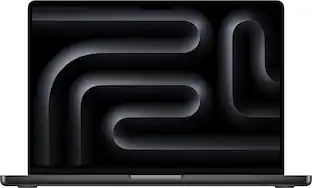 $2,899.00The price was $3,199.00
- $2,699.00The price was $2,999.00
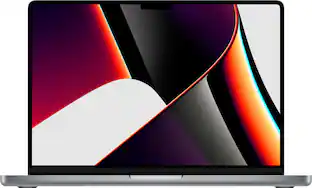 $1,099.99The price was $1,999.00