Screen Size: 14 inches (Size of the screen, measured diagonally from corner to corner.)
Screen Resolution: 1920 x 1080 (Full HD) (Screens come in a range of resolutions (measured in pixels, horizontal x vertical). The higher the resolution, the greater the picture quality.)
Touch Screen: false (Touch-screen devices make navigating more intuitive. Using a touch-screen display, you can do things such as tap to select, hold and drag to move items, swipe to scroll, and pinch to zoom.)
Processor Model: Intel Celeron (Your computer's processor is like its brain. Working in combination with system memory, the power of the processor determines the complexity of software you can run, how many programs you can have open at the same time, and how fast those programs will run. Most computers feature an AMD, Intel or Snapdragon processor.)
CPU Base Clock Frequency: 1.1 gigahertz (Actual central processing unit (CPU) speed may vary by device configuration and design. The average rate at which the processor is able to execute tasks under normal operating conditions as asserted by the manufacturer.)
Storage Type: eMMC
Total Storage Capacity: 64 gigabytes
System Memory (RAM): 4 gigabytes (Random-access memory (RAM) is a computing device's short-term data storage, which allows active information to be accessed quickly. The size and type of RAM determines how efficiently the device can handle large amounts of information at one time. For example, gaming or video editing requires more RAM for optimal performance.)
Graphics: Intel UHD Graphics (Often referred to as a "graphics processing unit" (GPU), this device is responsible for displaying image content and decoding/encoding video content in programs and games.)
Display Connector(s): 1 x HDMI 1.4 (The number and type of connectors used to connect to an external display.)
Battery Life (up to): 10 hours (Battery life will vary depending on the product configuration, product model, applications loaded on the product, power management setting of the product and the product features used by the customer. As with all batteries, the maximum capacity of this battery will decrease with time and usage.)
Battery Chemistry: Lithium-ion
2-in-1 Design: false (A laptop and a tablet combined in one lightweight, portable device. Sometimes referred to as "convertible" or "hybrid" laptops, these devices deliver the processing power and keyboard of a laptop. When you're ready to play, either detach the screen or fold your 2-in-1 into tablet mode to comfortably watch movies, play games, read an e-book and more.)
Backlit Keyboard: false (Integrated lights allow for visibility of the keys in low-light conditions.)
General
Brand: ASUS
Model Number: E410KA-CL464
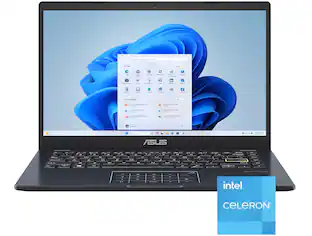
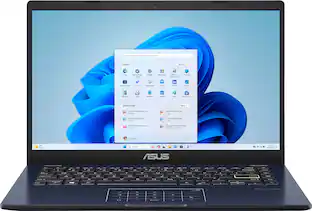
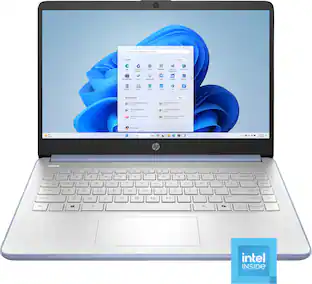
Product Name: ASUS 14" FHD Laptop - Intel Celeron N4500 with 4GB Memory - 64GB eMMC
Color: Star Black
Year of Release: 2024
Display
Display Type: LED
Screen Size: 14 inches (Size of the screen, measured diagonally from corner to corner.)
Screen Resolution: 1920 x 1080 (Full HD) (Screens come in a range of resolutions (measured in pixels, horizontal x vertical). The higher the resolution, the greater the picture quality.)
Touch Screen: false (Touch-screen devices make navigating more intuitive. Using a touch-screen display, you can do things such as tap to select, hold and drag to move items, swipe to scroll, and pinch to zoom.)
Processor
Processor Brand: Intel
Processor Model: Intel Celeron (Your computer's processor is like its brain. Working in combination with system memory, the power of the processor determines the complexity of software you can run, how many programs you can have open at the same time, and how fast those programs will run. Most computers feature an AMD, Intel or Snapdragon processor.)
Processor Model Number: N4500
CPU Base Clock Frequency: 1.1 gigahertz (Actual central processing unit (CPU) speed may vary by device configuration and design. The average rate at which the processor is able to execute tasks under normal operating conditions as asserted by the manufacturer.)
CPU Boost Clock Frequency: 2.8 gigahertz (Actual central processing unit (CPU) speed may vary by device configuration and design. The maximum rate at which the processor is able to execute tasks, typically only used for a short period of time as needed. This rate may temporarily boost the processor's performance, but may result in overheating, shutdown, or damage to equipment if sustained.)
Number of CPU Cores: 2-core (dual-core) (A core, or "brain" of a CPU, allows it to receive and execute instructions. Each core can work independently or together to perform parallel operations.)
Storage
Storage Type: eMMC
Total Storage Capacity: 64 gigabytes
eMMC Capacity: 64 gigabytes (The amount of data that can be stored on the device's embedded Multimedia Card (eMMC). eMMC is a flash-based storage used in smartphones and personal computers; it typically has a smaller capacity than HDD or SSD storage.)
Memory
System Memory (RAM): 4 gigabytes (Random-access memory (RAM) is a computing device's short-term data storage, which allows active information to be accessed quickly. The size and type of RAM determines how efficiently the device can handle large amounts of information at one time. For example, gaming or video editing requires more RAM for optimal performance.)
Type of Memory (RAM): DDR4 (Each type of RAM delivers a different level of speed, bandwidth, energy efficiency and performance.)
System Memory RAM Speed: 3200 megahertz (How fast the information-storing hardware operates. The faster the RAM, the faster memory can be transferred to other system components. Ultimately, faster RAM improves operational efficiency.)
Number Of Memory Slots: 1
Number of Memory Sticks Included: 1
System Memory RAM Expandable To: 4 gigabytes (Adding more random-access memory (RAM) to a computer speeds up performance and improves efficiency. Upgrades to memory are limited by the number of expansion slots for additional RAM and existing RAM installed on the device.)
Graphics
Graphics Type: Integrated (Dedicated graphics uses a separate graphics card for processing video images. Because it does not use memory from the system's RAM, there is no extra burden on the CPU and graphics are processed more efficiently. Integrated graphics shares system RAM to process video images.)
GPU Brand: Intel
Graphics: Intel UHD Graphics (Often referred to as a "graphics processing unit" (GPU), this device is responsible for displaying image content and decoding/encoding video content in programs and games.)
Compatibility
Operating System: Windows 11 Home in S Mode (The operating system manages all software and hardware, including files, memory and connected devices. Most importantly, it lets you interact with your device and your programs in a visual way; otherwise, you'd be typing computer code to get anything done.)
Operating System Architecture: 64-bit (An operating system (OS) manages computer hardware, software resources, and programs in conjunction with the system's processor. 64-bit operating systems can handle more data at once than 32-bit systems, resulting in faster speeds, more effiency, and overall improved performance.)
Connectivity
Display Connector(s): 1 x HDMI 1.4 (The number and type of connectors used to connect to an external display.)
Number of HDMI Outputs (Total): 1
Number of DisplayPort Outputs (Total): 0
Number of Thunderbolt Ports (Total): 0
Number of VGA Ports: 0 (VGA (Video Graphics Adapter or Video Graphics Array) is a display standard that transmits via analog signals. This type of interface is typically used to connect a computer to a display device such as a monitor, projector, or TV.)
USB Ports: 1 x USB-A 2.0, 1 x USB-A 3.2, 1 x USB-C 3.2 (The number and type of USB ports the product has.)
Number of USB Ports (Total): 3
Headphone Jack: true (The device features an interface that allows for the connection of headphones.)
Microphone Input: true (The device features an input for connecting an external microphone.)
Wireless Connectivity: Bluetooth, Wi-Fi (The manner in which a device sends data to another device over a short distance without the use of wires or cables.)
Wireless Standard: AC (The wireless networking protocol used by the device. Each iteration of the protocol is based on the 802.11 standard developed by the Institute of Electrical and Electronics Engineers (IEEE) Standards Association. Denoted by letters following 802.11 (802.11a, 802.11ac, etc.), each version, published in alphabetical order, encompasses all previous versions.)
Wireless Networking Standard: Wi-Fi 5 (The wireless networking standard used by the device. Each iteration of the standard developed by the Wi-Fi Alliance corresponds to an existing IEEE 802.11 protocol; for example, standard 802.11ac (or AC) is termed Wi-Fi 5. Refers specifically to the standard the device is designed to use, but ultimately determines product interoperability and backward compatibility including previous versions.)
Network Connectivity: None (The manner in which a device sends data to another device over a long distance using a cellular network.)
Cooling
CPU Cooling System: Air
Power
Power Supply Maximum Wattage: 33 watts
Battery Life (up to): 10 hours (Battery life will vary depending on the product configuration, product model, applications loaded on the product, power management setting of the product and the product features used by the customer. As with all batteries, the maximum capacity of this battery will decrease with time and usage.)
Battery Cells: 3-cell
Battery Chemistry: Lithium-ion
Camera
Front-Facing Camera: true
Front Facing Camera Video Resolution: 720p (Refers to the number of pixels, both horizontally and vertically, used by the camera facing the user to capture video. The higher the resolution the finer the video detail that can be seen.)
Built-In Microphone: true
Features
2-in-1 Design: false (A laptop and a tablet combined in one lightweight, portable device. Sometimes referred to as "convertible" or "hybrid" laptops, these devices deliver the processing power and keyboard of a laptop. When you're ready to play, either detach the screen or fold your 2-in-1 into tablet mode to comfortably watch movies, play games, read an e-book and more.)
Backlit Keyboard: false (Integrated lights allow for visibility of the keys in low-light conditions.)
Customizable Keyboard Lighting: No
Foldable Screen: false
GPS Enabled: false
Media Card Reader: true (A hardware device that allows for access to data on a memory card and enables the transfer of its files to a computer. These devices may have one or multiple slots for various types of memory cards, and may be integrated into the computer or available as an external device.)
Media Card Slot: microSD
Stylus Dock: None
Dimensions
Product Height: 0.71 inches (The out of box height of the item. Height is measured as the vertical distance from the bottom of the item to the top as it would be primarily used or placed.)
Product Width: 8.54 inches (The out of box width of the item. Width is measured as the horizontal distance from one side of the item to the other as it would be primarily used or placed.)
Product Depth: 12.8 inches (The out of box depth of the item. Depth is measured as the distance from the front of the item to the back as it would be primarily used or placed.)
Product Weight: 2.87 pounds (The out of box weight of the item.)
Certifications Listings & Approvals
ENERGY STAR Certified: true (Devices carrying the ENERGY STAR service mark, such as computer products and peripherals, kitchen appliances, and other products, generally use 20% to 30% less energy than required by federal standards.)
EPEAT Qualified: false (The Electronic Product Environmental Assessment Tool (EPEAT) was designed to provide an environmental assessment tool for purchasers. In order to qualify for EPEAT, a product must meet all 23 required criteria.)
Included
Numeric Keypad: false
Stylus Included: false
Warranty
Warranty - Parts: 1 year
Warranty - Labor: 1 year
Other
UPC: 197105482524
Enjoy everyday activities with this ASUS notebook PC. The Intel Celeron processor and 4GB of RAM let you run programs smoothly.
Windows 11 Home In S Mode Operating System: Windows 11 has all the power and security of Windows 10 with a redesigned and refreshed look. It also comes with new tools, sounds, and apps. Every detail has been considered. All of it comes together to bring you a refreshing experience on your PC.
14" FHD Display: The 1920 x 1080 resolution boasts impressive color and clarity. Energy-efficient LED backlight.
Processor: Intel Celeron-N4500
Graphics: UMA
4GB System Memory: Reams of high-bandwidth DDR4 RAM to smoothly run video-editing applications and numerous programs and browser tabs all at once.
64GB eMMC: Save files fast and store more data. With massive amounts of storage and advanced communication power.
Whats Included
ASUS 14" FHD Laptop - Intel Celeron N4500 with 4GB Memory - 64GB eMMC
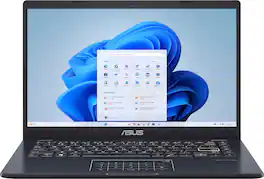
Life is all about finding the right balance, and Vivobook Go 14 delivers just that. Lightweight and compact, it sports a stylish new look that fits right in with your dynamic lifestyle. Designed for daily computing and productivity tasks, and boasting innovative features such as the ASUS NumberPad, Vivobook Go 14 gives you everything you need for work or play.
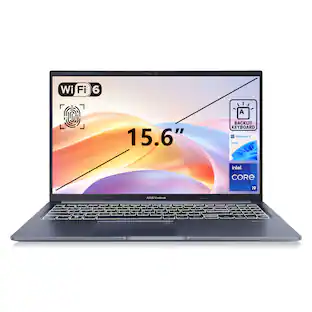
The Acer Chromebook 315 features a 15.6" Full HD anti-glare screen designed to let you get more done, no matter where you are. You'll stay focused in either the classroom or the office with a dedicated number pad, a fast processor, and an eco-friendly OceanGlass touchpad. Recognized as the perfect multi-media companion, this special machine is super thin, extra light and delivers unmatched value in today’s fast-paced, technology-driven world. It features an impressive HDR camera, fast wireless connectivity and long-lasting battery life, so you can run your favorite Google apps or access your photos, videos, music and documents—all day long.
Live animated, live lively, live balanced. When you’re packing the thin and light IdeaPad Slim 3 Chromebook laptop, featuring WiFi 6 and 13.5 hours of battery life, balancing work and play all day becomes effortless. The 14" FHD IPS touchscreen display and MediaTek Kompanio 500 Series processors are a significant upgrade to your work and entertainment, with front-facing Waves-tuned speakers.
Pros for ASUS - 14" FHD Laptop - Intel Celeron N4500 with 4GB Memory - 64GB eMMC - Star Black
There were no pros for this product—
Overall Performance, Portability, Battery Life, Weight, Port Count
There were no pros for this product—
Overall Performance, Touchscreen Usability
Cons for ASUS - 14" FHD Laptop - Intel Celeron N4500 with 4GB Memory - 64GB eMMC - Star Black
The vast majority of our reviews come from verified purchases. Reviews from customers may include My Best Buy members, employees, and Tech Insider Network members (as tagged). Select reviewers may receive discounted products, promotional considerations or entries into drawings for honest, helpful reviews.

Rated 4 out of 5 stars
Cheap. Works. Cant complain
Hinestly its bare bones. Cant upgrade it with anything really. But it was stupid cheap and it works and i knew what i was getting. If y9u just need a laptop for something small. Cant go wrong with cheap i use for tuning. Functions
For the price, you get what you pay for. It’s a laptop mean for simple day to day tasks. From streaming your favorite videos on the web or simply doing research. I’ve had it for a month now and the battery life is good. Sound quality is also good however the speakers on the bottom make it slightly difficult to hear while on your lap resulting in having to either move to a hard surface, using headphones or turning the audio up. If you’re looking for a great laptop for children to use for school or entertainment.
I bought the previous version of this ASUS back in 2022 and honestly loved it, so when it was finally time to replace it, I grabbed this model. The first one lasted me way longer than I expected — and that’s saying a lot, because I really put it through heavy use. I had Roblox running 24/7 for two straight years and it still held up!
I’ve seen some negative reviews, but my experience has been the opposite. This laptop is super light, easy to carry, and the screen looks sharp for the price. It handles everyday stuff like browsing, streaming, checking email, and even managing eBay sales all at the same time without slowing down. Even though it’s “not meant for gaming,” Roblox runs totally fine, which is really all I needed.
Battery life is great, it boots fast, and I really like the keyboard/touchpad setup.
Overall, for the price, you can’t beat it. If you need something simple, lightweight, and reliable, this is an awesome pick — and based on how long my first one lasted, I’d definitely recommend... and have! My 70 year old friend got one for herself after seeing all I did on mine. She got the hang of it in no time and thoroughly enjoys hers as well.
The ASUS Vivobook Go (E410K) is a 14” entry-level laptop that I have been messing around with for about a week now. With my kids home for summer I have let them take turns using it as well. This laptop has a very thin profile and lightweight construction that makes for a very portable laptop.
Specs
CPU – Intel Celeron N4500 Dual Core 1.10 GHz (Boost to 2.8 GHz) w/ integrated Intel UHD graphics
Memory – 4GB DDR4-3200
Graphics – integrated Intel 600 graphics
Screen – 14” 1920 x 1080p FHD TN panel
Storage – 64GB eMMC – expandable via internal M.2 Gen 3 slot
Ports – 1X USB 3.2 Gen 1 Type-C / 1X USB 3.2 Gen 1 Type-A / 1X USB 2.0 Type-A / 1X HDMI 1.4 / 1X TRRS 3.5mm Jack (headphone and mic support)
Network Connectivity – Wireless AC
Audio – dual speakers
Webcam – 720P with dual microphone
Dimensions – 12.8 x 8.54 x 0.71”; 2.87lb
Battery – 42 Wh Li-ion
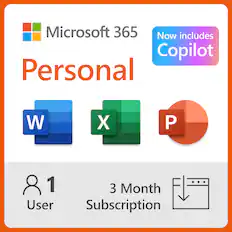
Other – Windows 11 S w/ 1 year subscription of Office 365 Personal
Design
The design of the Vivobook Go gives it a sleek look that belies its entry level price point. The thin profile and dark finish makes for an appealing looking laptop. Once you get your hands on it you can feel that the entire chassis is made out of lightweight plastic. The top cover has a smooth finish while the bottom shell has a light texture to it. The plastic on the bottom shell does feel cheap – it reminds me of the plastic used on the back panels of LED TV’s. This isn’t really an issue, and it is to be expected at this price level. The inner surface reverts back to the same smooth plastic finish of the top shell, which does look and feel nice.
The keyboard and touch pad keep with the color scheme with only the “Enter” key deviating. The keys are not backlit but they do feature white lettering. The “Enter” key has a highlighter yellow outer ring that goes around the perimeter of the key. The touchpad is what I would consider on a bit of the small side, but it does have a cool trick. By pressing the top-right corner of the touchpad you can toggle it into a numberpad mode. I thought this was a pretty cool feature I had not seen before. I now wish every laptop I own that doesn’t have a physical numberpad would at least have this. The keyboard, like most laptops, doubles the function row up with media controls, camera toggle, etc. The default status for the function keys is the media controls. This keyboard does feature a function button lock, which toggles the keys over to their F1-12 roles. The keys themselves have 1.4mm of travel so they feel nice to type with – not overly shallow or too light on the actuation force.
Performance
The Vivobook’s 4GB of RAM coupled with the 1.1GHz dual core means it’s not going to be a high powered machine. The performance matches what I would expect out of an entry level machine device. It takes about a minute to go from powering on to getting into an Edge Browser. There isn’t going to be a lot of extra bandwidth for multitasking, but things like light web browsing and Word documents are well within the capability of this device. Loading up Youtube videos does stretch the CPU and RAM utilization to the limit. The CPU usage is at 100% and RAM utilization sits at 89% with just a Youtube tab and Task Manager Open. Switching between open programs is slow, and launching new ones takes a few moments to process before a splash screen even appears. Under full load the bottom of the chassis does heat up but it doesn’t get uncomfortably warm. Looking at the internals this is a fanless design with a large, thin copper heat plate. For the most part it will just get warm over the area the heat plate covers.
I tried launching the Xbox app because you get a free month of Gamepass with the laptop. Unfortunately the Xbox app is not compatible with “S” mode. This brings up a unique problem with the “S” version of the OS because you can’t download another game launcher like Steam, and if you leave “S” mode you can’t go back. I want to leave it in “S” for the time being and use this as a computer for my kids to tinker with over the summer. It still is kind of a bummer that it’s walled off like that.The only games available were part of the arcade games section. These worked and ran fine for the most part but they are glorified mobile games, so I would expect them to be handled by any PC. My kids will be fine with the selection, but it’s not something that interests me at all.
The 64GB of eMMC isn’t a whole lot – it will fill up quickly. eMMC is essentially a soldered SD card and is more akin to the memory in your phone. The 64GB drive moves a little faster than 5400rpm HDD, but not by a long stretch. Adding an M.2 SSD to the available slot would greatly improve speeds and capacity.
Performance-wise if you are coming from a moderately powerful workstation or gaming PC/laptop this machine will feel very slow. I would argue that you are not the intended audience. This is a machine for new PC users or someone that just needs a basic system to handle emails and light web browsing. It can handle that without any issue.
Display
The 14” 1920 x 1080p (FHD) display is perfectly adequate and its pixel density is pretty good (157 ppi) for the size. On a machine at this price point I expected a pretty basic TN display, which is pretty much what it is. The screen is bright enough to be useable in bright locations. Color-wise its petty basic - Its not too bad of a display, and it absolutely fits the budget on the machine. The screen colors are somewhat flat and look less vibrant/dynamic. The 45% NTSC color gamut points to the low end nature of the screen, and the reason for it looking on the dull side. I would not want this as a daily screen, but its similar to what other low-end laptops like to spec.
Speakers and Webcam
There are dual speakers onboard. They aren’t too bad – I expected worse based on prior experiences with budget laptops. They weren’t tinny sounding, so listening to a dialog heavy Youtube video sounds just fine – same with video calls. Where they fall flat is the lack of depth and anything really resembling a low end. They do get plenty loud with clipping, so I do appreciate that.
The webcam does a nice job overall. It has shortcomings that I would expect like the need for a well-lit room, but it handles the image just fine. The dual mics pick up your voice well, but you do sound a bit grainy. Background noise comes through a little bit, but its not too bad.
Other Thoughts
This is my second time coming across an “S” version of Windows. My other machine that has it is a Windows 10 machine that the kids have used for a few years. The “S” version does have a frustrating amount of limitations, but I do appreciate the “walled garden” approach with the verified apps. I can trust that my kids can’t download some random program through a pop-up. For inexperienced users I think it is best to leave in “S” mode. People more familiar with technology that have the ability to recognize/avoid spammy pop-ups and malware will want to exit “S” mode as soon as possible.
Overall
This is a low-end, budget friendly PC option. It’s not going to win any races, but it works well as an entry level platform for someone that needs a reliable PC to handle some simple tasks. The individual parts used are nothing special, but they seem to be put together well and the laptop has a nice look and feel to it. My only wish for this laptop was for expandable RAM, but I am happy that at least the storage can be easily increased.
This laptop is much to my shock and awe, a highly usable laptop for basic users! I have had many disappointments in my laptop reviewing the last year, particularly when it comes to machines with less than 8gb of RAM. Random Access Memory, or RAM, contributes massively to the ability of a laptop to feel snappy and to be able to multitask with multiple programs open at the same time. 4gb of RAM in a PC these days is like driving on the German Autobahn with a beat up 4 cylinder 90’s Honda Civic from the 1990’s, it just doesn’t really cut it and leaves you wanting for more speed and performance. This Asus basic laptop defies that notion entirely. Even with only 4gb of RAM, I am managing to simultaneously type documents (including this review) on this laptop while having multiple Microsoft Edge tabs open and a couple other programs in the background. In this review, I will give a detailed overview of the laptop and give some set up and usage tips as well for a smooth experience with this incredible bargain-priced machine!
Operating system:
This PC is loaded with Windows 11 S edition, which is essentially a lightweight, Windows-app only version of Windows 11 that will truly work just fine for the majority of basic users who aren’t wanting to fiddle around with a bunch of novel software installs. You get your basics here: a Microsoft Edge web browser, Microsoft Office products like Word, Excel, PowerPoint, and other apps available and/or preinstalled in the Microsoft Apps store. I think this is perfect for users who aren’t looking for all the bells and whistles and are happy to use Microsoft Edge for web browsing and checking email, as well as whatever programs are available natively through Windows. If you really want full featured Windows 11, you can get into the settings and switch out of Windows 11 S into normal Windows 11 Home, just have caution that this laptop model does only have 64GB of storage and you will quickly run out of room (and speed) if you try to load this up with too many programs. If you are or your child are in need of Google Chrome for Google University and apps, you will need to switch this laptop to Windows 11 Home to be able to install Google Chrome onto the laptop.
Set up:
This laptop, to the shock of no one who is familiar with budget PCs with Windows 11 loaded on it, takes forever to get through its initial booting processes, updates, and setups. Have no fear, you as the user have little to do except wait: this laptop took over an HOUR to fully get through all of its Windows 11 updates, initial setups, and to get you logged in to your desktop screen for the first use, only to have to let the machine do MORE updates via Windows Updater. Yawn. This is not on ASUS specifically; I have had this experience with multiple other budget Windows machines I have reviewed and that is just the way it is when you are dealing with lower end hardware that runs such a bloated and poorly optimized OS like a factory Windows 11 install. Just get your laptop plugged in, boot it up, and put your favorite show in the background on your TV for a couple episodes while you wait on this machine to go through its steps for set up. Additionally, when it seems to be done updating, make sure to go into settings and click on the Windows update icon in the top right corner of that screen to make sure you check and install for any more updates. This is unfortunately what you must deal with on most any Windows 11 OS laptop these days.
Regular use:
Overall, I think this laptop is unequivocally perfect for basic users. What do I mean when I keep saying, basic users? What I mean is, people who are only opening this laptop up to do a few basic tasks at a time, like browse the web, check their emails, type up a Word document, work on an Excel spreadsheet, maybe play some Solitaire built into the computer, haha! The important qualifier in this use case, is that you, the user, MUST have excellent “computer hygiene”. What I mean by this is that you must close programs you are not using in order to avoid slow downs and program stutters. This is due to the fact of what I talked about earlier, this laptop has very little RAM (Random Access Memory) and cannot keep multiple programs open and running smoothly at a time because of it. So, with whatever you are doing on this laptop, expect to have to keep browser tab counts down and to have to close programs you aren’t using. You will be less frustrated and enjoy a much smoother experience on this machine!
Build Quality:
The build quality of this laptop utterly belies what the price tag for it says. It is actually an admirably well-built machine. It is, for one, very lightweight and thin. It measures on my scale a few hairs under 3 pounds in weight and is 3/4 of an inch thick at its thickest point. It is a little thicker and wider than a current generation Apple MacBook Pro 14 for comparison, but half a pound lighter! I think aged users who are tired of carrying around bulky, hot machines are going to be happy with this laptop. It is gentle on the body to use and gentle on the budget too. More on the build quality is a metal keyboard deck and lid with an otherwise plastic housing construction. Truly not bad!
Keyboard:
This excellent keyboard with a surprising amount of logic used in its layout, sports a solid and comfortable keyboard deck and keycaps that offer a great typing experience. The keyboard is not backlit which is a bit of a bummer, but at this price I don’t think anyone can complain. I love typing on this keyboard, it feels like a simple scissor switch membrane style keyboard which is perfect for most users.
Touchpad/Numpad:
The touchpad with the number pad built into it is so clever! If you are a Microsoft Excel number cruncher like I am with our household budget, you are going to appreciate this handy feature for your longer equations or calculations. There is a simple on/off touch sensitive button in the top right of the track pad that has a white LED indicator that turns on when the numpad is active. Then you are able to use the numpad no problem just like a touchscreen phone calculator. Even better though, is the fact that you can still use the trackpad to scroll around and mechanically click! Albeit this takes a bit of practice to get right and you still might run into a couple registration issues on your spreadsheet where you accidentally get a numpad input. It is easy enough to switch the numpad on and off with the touch sensitive area.
Display:
The display here is excellent for a budget laptop! It is a full HD resolution 1920X1080p display running at 60hz. Translation: for a budget laptop, you are not getting a crappy looking display. It displays YouTube videos and picture content nicely and gets nice and bright for working in brighter environments like out on a coffee shop patio. The lay flat display may be nice for some, but I personally have never seen the utility in a laptop screen that lays totally flat, so I am not losing my mind over this feature. Altogether, an excellent full HD display for this budget laptop!
Battery:
The battery life on this laptop is, as expected with lower-end and lower power internals, pretty decent! My projections are showing about 7 hours of sustained multitasking use at 40% brightness on the “best power efficiency mode” in the Windows power settings. I think this is reasonable and far exceeds the laptops of even half a decade ago in this price range. It charges via a proprietary charger barrel port and does NOT charge via the USB-C port included on the laptop. I understand that Asus would want to keep costs down on such a budget laptop, but it is still nice to have power delivery through a USB-C port available for versatility when on the go.
Opening up the laptop:
I got peppy and decided to open up this laptop to see what is inside the guts of it. Take a look at the pictures! What I found is a highly organized and not overstuffed internal configuration, complete with soldered on RAM (bummer), a cute lil’ 64GB eMMC storage module, a user replaceable Wifi card, and an extremely sturdy and nicely thermal pasted CPU heat sink! I was impressed by this. I really think there could have been room in here for user replaceable RAM, so that is a bummer that means you are stuck with the amount of RAM that you buy this with. However, I found something quite interesting in the motherboard… what appears to be an M.2 slot complete with a full-sized mounting screw position for a M.2 SSD! So, if you or your kid are tech savvy, they might enjoy the ease of opening this laptop up and installing an M.2 SSD to transfer the OS onto in order to gain more storage and faster boot speeds of varying programs. This laptop was really easy to get into with Philips head screws and the bottom popped off with just a little jostling from a gift card in a couple spots near the hinges. If only this laptop had replaceable RAM, I would be losing my mind! But it is still excellent and speaks to being future proof for easy battery replacements too.
Stats:
Speedometer 2.1 score: 89.3
CrystalDiskMark: Internal eMMC 64gb Drive: Read MB/s: 299.32 Write MB/s: 195.35 (These are reasonable speeds for eMMC memory; better by far than the old 5000rpm spinning disk hard drives that were common for OS installs a decade ago.
Test of USB-C 3.2 port (Test Drive: Crucial X9 2TB SSD with 1gb read/write speed capabilities): 449.29 read/ 436.48 write.
To summarize, I am amazed to find myself at the end of this review to actually be recommending a budget laptop in 2024 as usable for basic users with a 5 STAR RATING! This laptop is amazing for what it offers for basic users. When you try this laptop, make sure you give it a good hour to hour and a half or so to fully get all of its first-time boot, updates, and system tweaks completed before you expect to do any intensive use with it. Thanks for reading and I hope this review has helped you!