Rating 4.4 out of 5 stars with 114 reviews
4.4- Ease of use (33)
- Price (12)
- USB (10)
- Design (7)
- Size (6)
- Stand (20)
Customer Images
The vast majority of our reviews come from verified purchases. Reviews from customers may include My Best Buy members, employees, and Tech Insider Network members (as tagged). Select reviewers may receive discounted products, promotional considerations or entries into drawings for honest, helpful reviews.
- Rated 3 out of 5 stars
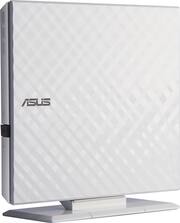
where is the stand? your ad shows a stand.
I purchased this model because i like the stand that your ad shows. if the stand was not supposed to be included then the ad shouldn't have a stand!
Posted by Alfspug
- Rated 4 out of 5 stars
Does what it should, a little noisy
First, this product does exactly what you expect. It reads, and writes both CDs and DVDs with the appropriate software on your computer for play back and writing of course. The packaging contains all of the necessary materials to run the equipment, and helpful materials on getting started. Second, the drawbacks are relatively few, but notable. The unit is relatively noisy. If you can manage to get your sound sufficiently high, and don't mine a little background noise, it would be completely fine for a movie on your computer. If that won't work, then this won't work well for a movie player for you. You notice the noise, so that is something to consider. If you use it primarily to instal software, it is no problem as noise doesn't matter much there. It also really needs 2 USB ports to function correctly. The cable provided has a double ended USB cable that plugs into the unit and two plugs go into your computer's USB ports. This could be a problem if you either don't have 2 available, or if you don't have them close by. The reason you really need 2 is that the unit draws a lot of power. It could run on one, but it may slow down the speed, and give unsatisfactory performance if you do that. Hubs won't accommodate lack of USB ports because the power supply isn't boosted. In conclusion, this unit is functional. It is a work-horse. It isn't a power sipping, stealth machine. It is a piece of computer equipment that needs power, makes noise, and you should really use on a desk. If that is good for you then you should buy it. I gave 4 stars because it does what you need, but may not be perfect for everybody.
Posted by AReviewerNamedDan
- Rated 4 out of 5 stars
Where's the STAND?
Sure would be nice if BB included the STAND. It's not in the box. ASUS says optional.
Posted by Gunner45
- Rated 5 out of 5 stars
A MUST HAVE
Got this Asus Slim External Optical Drive for the new Asus 2-in-1 14” i5 126 ssd laptop I bought for my niece. This device is beautiful! Nice diamond design & it has a high gloss finish. On the Best Buy website, this drive is shown with a stand. There is no stand included in the box. This device comes with a Y usb power connector, which one usb connects to the device & the other 2 usb plug in to you laptop/computer— it is a must to connect both usb to the computer or else this device will not work properly. Inserted the setup cd that came with the device & followed the simple setup instructions. A “Setup Complete” dialog will pop up when it’s done. Setup took less than 5 minutes. I inserted a music cd to test it — no problem. The only challenge i have right now is to get the new laptop to play movie dvds. I was told that to be able to do this, i have to download an app. I like this drive, even though at first look it looks like an art piece. It is also very light compared to my older external optical drive. But it works just as well, so i’m very glad i got this good looking drive. I’m sure my niece will like this drive & will be playing & burning dvds & cds with it.
Posted by DIwata
- Rated 4 out of 5 stars
Excellent Value
My new laptop no longer has an optical drive so this serves the purpose just fine for the rare occasions I need it. It's a little thicker than I was hoping for which is why I didn't give it 5 stars. The included software works fine for recording files on a DVD-R/RW or CD-R/RW. However if you are using Windows 8 & above and want to play DVD movies, you will need to install external software to do this. The included software will not allow you to play movies on your windows 8 computer. I located software on-line to do this at no cost. Here's the name of the file: Combined-Community-Codec-Pack-2014-07-13
Posted by bsquare