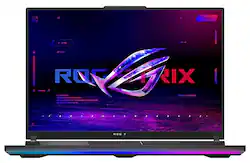
ASUS - ROG Strix SCAR 18” 240Hz Gaming Laptop QHD – Intel 14th Gen Core i9 with 32GB Memory – NVIDIA GeForce RTX 4080 – 1TB SSD - Off Black
- Key Specs
- Screen Size: 18 inches (Size of the screen, measured diagonally from corner to corner.)
- Screen Resolution: 2560 x 1600 (Screens come in a range of resolutions (measured in pixels, horizontal x vertical). The higher the resolution, the greater the picture quality.)
- Touch Screen: false (Touch-screen devices make navigating more intuitive. Using a touch-screen display, you can do things such as tap to select, hold and drag to move items, swipe to scroll, and pinch to zoom.)
- Refresh Rate: 240Hz (The number of frames per second the device can produce natively without enhancement. Higher rates help produce smooth, seamless pictures.)
- Brightness: 1100 nits (A measure of the total light output.)
- Processor Model: Intel Core i9 14th Generation (Your computer's processor is like its brain. Working in combination with system memory, the power of the processor determines the complexity of software you can run, how many programs you can have open at the same time, and how fast those programs will run. Most computers feature an AMD, Intel or Snapdragon processor.)
- CPU Base Clock Frequency: 2.2 gigahertz (Actual central processing unit (CPU) speed may vary by device configuration and design. The average rate at which the processor is able to execute tasks under normal operating conditions as asserted by the manufacturer.)
- Storage Type: SSD
- Total Storage Capacity: 1000 gigabytes
- System Memory (RAM): 32 gigabytes (Random-access memory (RAM) is a computing device's short-term data storage, which allows active information to be accessed quickly. The size and type of RAM determines how efficiently the device can handle large amounts of information at one time. For example, gaming or video editing requires more RAM for optimal performance.)
- Graphics: NVIDIA GeForce RTX 4080 (Often referred to as a "graphics processing unit" (GPU), this device is responsible for displaying image content and decoding/encoding video content in programs and games.)
- Display Connector(s): 1 x HDMI 2.1, 1 x Thunderbolt 4 (The number and type of connectors used to connect to an external display.)
- Battery Chemistry: Lithium-ion
- Backlit Keyboard: true (Integrated lights allow for visibility of the keys in low-light conditions.)
- General
- Brand: ASUS
- Model Number: G834JZR-XS96
- Product Name: ROG Strix SCAR 18” 240Hz Gaming Laptop QHD – Intel 14th Gen Core i9 with 32GB Memory – NVIDIA GeForce RTX 4080 – 1TB SSD
- Color: Off Black
- Year of Release: 2024
- Display
- Screen Size: 18 inches (Size of the screen, measured diagonally from corner to corner.)
- Screen Resolution: 2560 x 1600 (Screens come in a range of resolutions (measured in pixels, horizontal x vertical). The higher the resolution, the greater the picture quality.)
- Touch Screen: false (Touch-screen devices make navigating more intuitive. Using a touch-screen display, you can do things such as tap to select, hold and drag to move items, swipe to scroll, and pinch to zoom.)
- Refresh Rate: 240Hz (The number of frames per second the device can produce natively without enhancement. Higher rates help produce smooth, seamless pictures.)
- Brightness: 1100 nits (A measure of the total light output.)
- Processor
- Processor Brand: Intel
- Processor Model: Intel Core i9 14th Generation (Your computer's processor is like its brain. Working in combination with system memory, the power of the processor determines the complexity of software you can run, how many programs you can have open at the same time, and how fast those programs will run. Most computers feature an AMD, Intel or Snapdragon processor.)
- Processor Model Number: 14900HX
- CPU Base Clock Frequency: 2.2 gigahertz (Actual central processing unit (CPU) speed may vary by device configuration and design. The average rate at which the processor is able to execute tasks under normal operating conditions as asserted by the manufacturer.)
- CPU Boost Clock Frequency: 5.8 gigahertz (Actual central processing unit (CPU) speed may vary by device configuration and design. The maximum rate at which the processor is able to execute tasks, typically only used for a short period of time as needed. This rate may temporarily boost the processor's performance, but may result in overheating, shutdown, or damage to equipment if sustained.)
- Number of CPU Cores: 24-core (A core, or "brain" of a CPU, allows it to receive and execute instructions. Each core can work independently or together to perform parallel operations.)
- Number of CPU Threads: 32 (Generally, the more threads, the faster and more responsive the operating system.)
- Neural Processing Unit (NPU): false (Whether the product comes with an integrated neural processing unit (NPU) that performs computations for AI (artificial intelligence) functions to increase proficiency of the CPU and reduce power consumption.)
- Storage
- Storage Type: SSD
- Total Storage Capacity: 1000 gigabytes
- Solid State Drive Capacity: 1000 gigabytes (The amount of data that can be stored on the device's solid state drive (SSD). SSD is a flash-based storage with faster speeds than a hard disk drive (HDD).)
- Solid State Drive Interface: PCIe 4.0 (Connects the solid state drive to the host system. PCI and SATA interfaces are the most common; PCI interfaces are typically faster, but SATA interfaces are compatible with a wider range of systems.)
- Memory
- System Memory (RAM): 32 gigabytes (Random-access memory (RAM) is a computing device's short-term data storage, which allows active information to be accessed quickly. The size and type of RAM determines how efficiently the device can handle large amounts of information at one time. For example, gaming or video editing requires more RAM for optimal performance.)
- Type of Memory (RAM): DDR5 (Each type of RAM delivers a different level of speed, bandwidth, energy efficiency and performance.)
- System Memory RAM Speed: 5600 megahertz (How fast the information-storing hardware operates. The faster the RAM, the faster memory can be transferred to other system components. Ultimately, faster RAM improves operational efficiency.)
- Number Of Memory Slots: 2
- Number of Memory Sticks Included: 2
- System Memory RAM Expandable To: 64 gigabytes (Adding more random-access memory (RAM) to a computer speeds up performance and improves efficiency. Upgrades to memory are limited by the number of expansion slots for additional RAM and existing RAM installed on the device.)
- Graphics
- Graphics Type: Dedicated (Dedicated graphics uses a separate graphics card for processing video images. Because it does not use memory from the system's RAM, there is no extra burden on the CPU and graphics are processed more efficiently. Integrated graphics shares system RAM to process video images.)
- GPU Brand: NVIDIA
- Graphics: NVIDIA GeForce RTX 4080 (Often referred to as a "graphics processing unit" (GPU), this device is responsible for displaying image content and decoding/encoding video content in programs and games.)
- Advanced Graphics Rendering Technique(s): DLSS 3 (Deep Learning Super Sampling), Ray tracing (Imaging technology designed to improve graphics rendering.)
- GPU Video Memory (RAM): 12 gigabytes (Random-access memory (RAM) is a GPU’s, or graphics cards, short-term data storage, which allows active information to be accessed quickly. The size and type of RAM determines how efficiently the GPU can handle large amounts of information at one time. For example, larger amounts of RAM for gaming or video editing increases performance.)
- GPU Video Memory Type (RAM): GDDR6 (Each type of RAM delivers a different level of speed, bandwidth, energy efficiency and performance.)
- Compatibility
- Operating System: Windows 11 Pro (The operating system manages all software and hardware, including files, memory and connected devices. Most importantly, it lets you interact with your device and your programs in a visual way; otherwise, you'd be typing computer code to get anything done.)
- Connectivity
- Display Connector(s): 1 x HDMI 2.1, 1 x Thunderbolt 4 (The number and type of connectors used to connect to an external display.)
- Number of HDMI Outputs (Total): 1
- Number of DisplayPort Outputs (Total): 2
- Number of Thunderbolt Ports (Total): 1
- USB Ports: 2 x USB-A 3.2, 1 x USB-C 3.2 (The number and type of USB ports the product has.)
- Number of USB Ports (Total): 3
- Headphone Jack: true (The device features an interface that allows for the connection of headphones.)
- Microphone Input: true (The device features an input for connecting an external microphone.)
- Wireless Connectivity: Wi-Fi, Bluetooth (The manner in which a device sends data to another device over a short distance without the use of wires or cables.)
- Ethernet Card: 10/100/1000/2500 (Also known as an Ethernet adapter, this card plugs into a computer's motherboard and enables it to access an Ethernet network. Ethernet data transmission speeds are measured in Mbps (megabits per second) and Gbps (gigabits per second). For example, a 10/100 Ethernet port transmits 10 and 100 Mbps, while a 10/100/1000 Ethernet port transmits 10 and 100 Mbps and has a maximum speed of 1000 Mbps (1 Gbps).)
- Number Of Ethernet Ports: 1
- Power
- Power Supply Maximum Wattage: 330 watts
- Battery Cells: 4-cell
- Battery Chemistry: Lithium-ion
- Expansion
- Number of M.2 Slots: 2 (This interface is most commonly used for high-speed solid state drives (SSDs), and is often used in laptops due to its small size.)
- Camera
- Front-Facing Camera: true
- Front Facing Camera Video Resolution: 720p (Refers to the number of pixels, both horizontally and vertically, used by the camera facing the user to capture video. The higher the resolution the finer the video detail that can be seen.)
- Built-In Microphone: true
- Features
- Backlit Keyboard: true (Integrated lights allow for visibility of the keys in low-light conditions.)
- Customizable Keyboard Lighting: RGB
- Customizable Case Lighting: true
- Dimensions
- Product Height: 0.91 inches (The out of box height of the item. Height is measured as the vertical distance from the bottom of the item to the top as it would be primarily used or placed.)
- Product Width: 15.71 inches (The out of box width of the item. Width is measured as the horizontal distance from one side of the item to the other as it would be primarily used or placed.)
- Product Depth: 11.57 inches (The out of box depth of the item. Depth is measured as the distance from the front of the item to the back as it would be primarily used or placed.)
- Product Weight: 6.83 pounds (The out of box weight of the item.)
- Certifications Listings & Approvals
- ENERGY STAR Certified: true (Devices carrying the ENERGY STAR service mark, such as computer products and peripherals, kitchen appliances, and other products, generally use 20% to 30% less energy than required by federal standards.)
- EPEAT Qualified: false (The Electronic Product Environmental Assessment Tool (EPEAT) was designed to provide an environmental assessment tool for purchasers. In order to qualify for EPEAT, a product must meet all 23 required criteria.)
- Warranty
- Warranty - Parts: 1 year
- Warranty - Labor: 1 year
- Other
- UPC: 197105348967
Break all limits with the ROG Strix SCAR 18 gaming laptop. Dominate the Windows 11 Pro battlefield with a powerful 14th Gen Intel Core processor, and NVIDIA GeForce RTX 40 Series Laptop GPU. With its swift 32GB memory and expansive PCIe storage, multitasking becomes easy and loading times become minimal. The ROG Nebula display guarantees bright and vivid visuals for gaming, editing, and productivity.
- Windows 11 Pro: Windows 11 Pro features BitLocker Drive Encryption for enhanced security and combines the power of Windows 10 with a redesigned, refreshed look. It introduces new tools, sounds, and apps, ensuring every detail has been carefully considered. Together, these elements create a refreshing experience on your PC.
- Exceptional visuals with the 18" ROG Nebula HDR: The Nebula HDR badge means you are getting the highest tier panel, featuring Mini LEDS with up to 110 nits brightness, 2000 dimming zones, QHD 240Hz/3ms, 100% DCI-P3 color with Pantone Validation, among other premium features.
- 14th Gen Intel Core i9-14900HX Processor: Effortlessly handle gaming and intensive tasks with the Intel Core i9-14900HX Processor with 24 cores and 32 threads.
- NVIDIA GeForce RTX 4080 Graphics: Powered by NVIDIA DLSS 3 and ultra-efficient Ada Lovelace architecture, and Max-Q Technologies, the NVIDIA GeForce RTX 4080 Laptop GPU is fully unleashed with a max TGP of 175W with Dynamic Boost.
- NVIDIA® Advanced Optimus with MUX Switch: Blazing fast memory - 32 GB RAM
- With 32GB DDR5-5600MHz memory, the Strix SCAR 18 seamlessly manages graphics-heavy PC games, video editing, and numerous applications.: 1TB Solid State Drive
- The 1TB PCIe 4x4 SSD not only provides ample storage for large files but also ensures rapid access, enhancing overall system performance.: A MUX Switch increases laptop gaming performance by 5-10% by routing frames directly from the dGPU to the display bypassing the iGPU. With Advanced Optimus the switch between iGPU and dGPU becomes automatic based on the task, optimizing battery life.
- Sustain peak perforamance with ROG Intelligent Cooling: To put this amount of power in a gaming laptop, you need an even better cooling solution. The Strix SCAR 18 features Thermal Grizzly’s Conductonaut Extreme liquid metal on the CPU, and a third intake fan among other premium features, to allow for better sustained performance over long gaming sessions.
- Stay connected: Extensive connectivity with 1 x 2.5G LAN port, 1x Thunderbolt 4 support DisplayPort, 1x USB 3.2 Gen, 2 Type-C support DisplayPort / power delivery / G-SYNC, 2x USB 3.2 Gen 2 Type-A, 1x 3.5mm Combo Audio Jack, 1x HDMI 2.1 FRL. Wi-Fi 6E(802.11ax) (Triple band), and Bluetooth 5.3.
- Showstopping Design: The Strix SCAR 18 embodies ROG's distinct style with a unique chassis design with dot matrix elements and RGB accents in the front, rear, and keyboard.
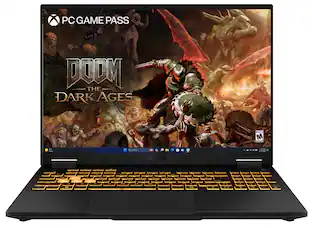
- XBOX GAME PASS Included: Get a free 90-day pass and gain access to over 100 high-quality games. With games added all the time, there’s always something new to play.
- Stay connected: Extensive connectivity with 1 x 2.5G LAN port, 1x Thunderbolt 4 support DisplayPort, 1x USB 3.2 Gen, 2 Type-C support DisplayPort / power delivery / G-SYNC, 2x USB 3.2 Gen 2 Type-A, 1x 3.5mm Combo Audio Jack, 1x HDMI 2.1 FRL. Wi-Fi 6E(802.11ax) (Triple band), and Bluetooth 5.3.
Whats Included
- ROG Strix SCAR 18” 240Hz Gaming Laptop QHD – Intel 14th Gen Core i9 with 32GB Memory – NVIDIA GeForce RTX 4080 – 1TB SSD
Q: does this model have the Mini LED display?
A: According to the "Features" list found on the Best Buy page is seems so, see below: Exceptional visuals with the 18" ROG Nebula HDR The Nebula HDR badge means you are getting the highest tier panel, featuring Mini LEDS with up to 110 nits brightness, 2000 dimming zones, QHD 240Hz/3ms, 100% DCI-P3 color with Pantone Validation, among other premium features.
Q: i have a simple question is the SSD TB space expanable? if so how much
A: Yes, the SSD storage space in the ASUS ROG Strix SCAR 18 (G834JZR) is expandable. The laptop comes with an M.2 2280 PCIe, Gen4x4 Performance SSD, and it has two slots. The maximum capacity of the SSD that the laptop can support is 2TB per slot.
A: Latest is 834, previous was 814. Difference is that 834 has max capacity of 64GB of RAM while 814 has max capacity of 32GB of RAM. You are welcome!
A: No, RAID was not implemented on this laptop, it is preinstalled with 1TB SSD.
Q: Is the battery replaceable if it goes bad?
A: Yes, the battery is replaceable.
Q: What is the minimum brightness? Like, can the screen be seen at minimum brightness in the dark?
A: The minimum brightness for the display may vary and it can be setup manually inside Settings > System > Display.
Q: How easy is it to clean the three dust filters?
A: For the air filters located on the bottom plastic panel on the Strix Scar 18", any soft bristled brush such as a clean and dry paintbrush can be used to swipe away any visible dust. If you want to clean inbetween the fans and heatsink, you will have to remove the entire heatsink as the fans are placed underneath the heatpipes. This makes the whole process very tedious and risky since both the GPU and CPU use liquid metal TIM and is not recommended. There is the danger of the liquid metal dripping onto the motherboard and shorting it out if the heatsink removal process is done incorrectly.
People also viewed
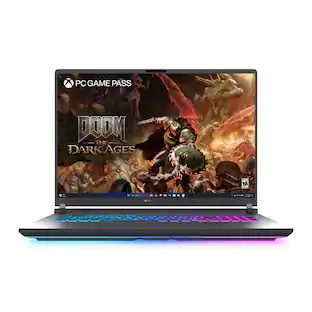 $3,249.00The price was $3,299.99
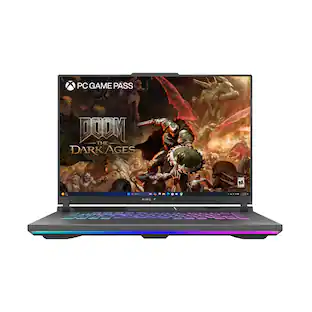 $2,079.99The price was $2,299.99
 $4,099.99The price was $4,146.59
 $2,049.00The price was $2,719.00
 $2,059.00The price was $2,719.00
 $3,899.99The price was $4,399.99
 $999.99The price was $1,299.99
Today's top picks
 Clearance$2,719.99The price was $3,199.99
 $2,649.99The price was $3,169.99
 $2,069.00The price was $2,199.99
 $1,789.99The price was $2,249.99
 $1,299.99The price was $1,849.99