Rating 4.5 out of 5 stars with 34 reviews
4.5- Sound Quality (26)
- Ease of use (12)
- Size (4)
- AI (3)
Customer Images
The vast majority of our reviews come from verified purchases. Reviews from customers may include My Best Buy members, employees, and Tech Insider Network members (as tagged). Select reviewers may receive discounted products, promotional considerations or entries into drawings for honest, helpful reviews.
- Rated 5 out of 5 stars
GREAT LITTLE SPEAKER PHONE
GREAT LITTLE SPEAKER PHONE REVIEW: AVERMEDIA - USB CONFERENCE SPEAKER PHONE MODEL:AS311 Best Buy Tech Insider Network SUMMARY: I’m on video conference calls seemingly all day everyday while I’m working remotely along with the rest of the company. A good quality speakerphone is a must have and not as easy to find as one might think. Probably 50% of the people in our organization have substandard speakerphones and headsets making it difficult to hear well on calls. The AVERMEDIA - USB CONFERENCE SPEAKER PHONE (AS311) works really well as a personal speakerphone, and does an excellent job blocking background noises while proving clear audio for both the listener and speaker. I thought I had a pretty good speakerphone already. After I installed the AVERMEDIA - USB CONFERENCE SPEAKER PHONE (AS311) several people asked if I got a new speaker phone due to the increased call quality. I really like the well lighted control panel, which takes the guess work out of mute, volume, set. I also like that it uses USB-C instead of USB-Micro for the interface. I like the compact size (maybe a large set of oversized playing cards), and it takes up much less room on my desk than my prior speakerphone. SETUP: Unbox and plug it in, at least for windows that is all you need to do. I would suggest you use the included USB cable. I initially used one I had laying around to charge my headset, and nobody could hear me talk. I realized after the call that I must have had a “charge only” cable and not a full USB data cable. As soon as I switched to the included cable, everything was perfect. SUMMARY: The AVERMEDIA - USB CONFERENCE SPEAKER PHONE (AS311) met all of my needs and expectations. I fully recommend this product, especially for personal use. I’m sure it would work in small workgroup as well, but I think it is optimized perfectly a for single person / remote worker.
Posted by TheOffice1234
- Rated 5 out of 5 stars
A great speakerphone for PC
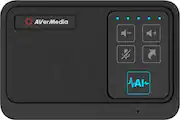
I’ve never had a conference speakerphone at home, and with the shift to remote work I began to experience headset fatigue from call after call with clients. I missed the easy-to-use conference speaker in our office conference rooms, but never thought about getting one for home use. In the box, you’ll find the speakerphone, a USB C to USB A cable, and the manuals/guide. I was impressed to see this was plug and play, was immediately recognized, and worked after plugging into both my laptop and desktop running Windows 10. It will default to taking over all audio, which can be changed in the Windows settings; including the volume icon on your taskbar. This worked well with Zoom, Skype, Facebook Messenger calls, Discord, and Microsoft Teams. In each case, it was simple to change the audio settings in those apps to use the speaker and microphone from the AverMedia device. After restart of my PC, there was no need to update the audio settings again, as the speakerphone continued to be the default in each app I used. This claims to have “AI” built in to help block out background noise, including dogs barking. This doesn’t require any additional software installation, as it’s handled on the hardware itself. The speaker is relatively small but does a GREAT job with audio. Calls were easy to hear, understand, voice quality was excellent, and the device does a wonderful job blocking out background noise. The speakerphone effectively cut out my dogs barking over days of use, and I didn’t have one issue with its use. The touch pad buttons are easy to see, with volume up/down, a mute button, and an arrow button that would launch my default browser when pressed. There are 5 indicator lights for volume level, that turn red when you mute. So far, I’ve used this with three different Windows PC’s and has worked flawlessly for about 15 calls. I was even asked during a call if I had a new headset, as my voice audio was captured clearly and heard easily by those on the call. Overall, I really love this device. It’s made joining calls easy, without the hassle of plugging in or powering on a wireless headset for use. If you’re in the market for a conference call speaker phone for use at home, or the office, this is a SOLID choice.
Posted by Samrio
- Rated 4 out of 5 stars
Great noise cancelation, tiny speaker.
A plug and play microphone and speaker is essentially what this is, so any application that needs just that, this will pretty much work. No additional software needed as the computer picks it up and uses it right away. You may need to ensure it is the device for some applications, but most were set to default and this made itself default when plugged into a Windows computer. The AI noise cancellation works pretty well, keeping out even the sounds of music and games playing in the background, only hearing bits of it in parts where I was long winded. Everyone I talked to said I sounded clear and crisp, but sounded distant, like I was on a speakerphone. The only issue I have is that the speaker sounds tiny. With it able to keep sound from being heard by others, it was hard to hear them with that noise on my side. With volume maxed out the other side does sound clear, and it sounds like it has an EQ for voice, but with it being so small, and any noise on my side it is hard to hear them. Now, you can essentially change your output to something else, like headphones while still using the AI noise cancellation of the AS311, but that sort of defeats the purpose. Controls are simple with volume displayed in 5 LED dots, mute changing them from blue to red, AI enable/disable and a shortcut button that opens your default browser on Windows. However, if you already have a browser window open and you touch that shortcut key, it will open the default page right over the tab you already have open. Essentially closing out anything you may already have open and requiring you to go back to it. Something that can easily be bumped if you are trying to touch mute instead. Overall, it does well with canceling out noise, but unless you are already in a fairly quiet space, you are going to have a hard time hearing the other side. Plus, I don’t want to know the frustration that shortcut key can cause if using a browser based conference call.
Posted by DavidJr
- Rated 4 out of 5 stars
Good Speakerphone but ok Microphone
I like the idea of a portable speakerphone for video conferencing calls. It helps when more than one person is with me. I wanted to like this a lot but the microphone sounded to distant to the person on the other side. The speaker however was really loud and clear. I tried to use the AI and that only made the sound more muffled and like I was talking from another room. I like the product but there are better solutions out there.
Posted by KKCNIck
- Rated 5 out of 5 stars
Great USB conference speaker phone.
AverMedia USB speaker device is great! Plug and play with my windows PC. Installation (Windows 10 PC): Simple Plug and Play Works with MS Teams, WebEx, Zoom, and Google Meet Operation: Feedback cancellation works great. Volume Control buttons work great. Mute Button easy to use. Great Sound Mic is good Hot key button works and opens web browser. Eahhh.. Not really functional in my opinion. But ok. I think they just wanted to even out the number of buttons to have on the unit for aesthetics. Overall functions great and does what it says. I would recommend this product.
Posted by PhillipB