
Belkin - Connect USB-C to 4-Port USB-C Hub, Multiport Adapter Dongle with 4 USB-C 3.2 Gen2 Ports & 100W PD with Max 10Gbps High - Black - Open Box
- Works like new.
- May have larger dents or scratches.
- May be missing parts, accessories, or packaging.
About This Item
About Open Box
Reviews
Customer Images
Compare similar products

Connect USB-C peripherals — including cameras/webcams, keyboards, mice, audio interfaces, and external SSD PCIE hard drives — quickly and painlessly. Whether you’re in the office creating content, at home gaming, or setting up a workstation for remote use, this 4-port hub will keep you up to speed. With a max of 10Gbps high speed data transfer, it won’t flinch when you’re editing videos or trying to level up in-game. Compatible with MacBook, iPhone 17, 17 Pro Max & 17 Pro, iPad, Chromebook, or PC, when you need to expand, this hub is at your command.
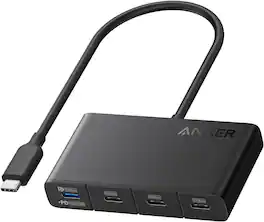
Anker USB-C Hub, Fast 10Gbps USB 3.2 Display Hub, USB-C to 4-Port Hub with 100W Max PD-IN for MacBook Pro, iPad, iPhone 15, Surface Pro, Dell and More

Whether you’re working in a cushy office, a cramped home workspace, or on the go, the Plugable USBC-9IN1E is the preferred USB C hub for productive people. This versatile USB dock expands your laptop’s capabilities by offering a 4K 60Hz HDMI port, a high-speed 10Gbps USB-C port, two 10Gbps USB-A ports (one with BC 1.2 charging), a dedicated USB 2.0 port for input devices, SD and MicroSD (UHS-II) card readers, Gigabit Ethernet, and an impressive 140W (125W to host) EPR pass-through charging, all in a portable package. Designed for maximum flexibility, this USB-C hub works with most USB-C, USB4, and Thunderbolt laptops including MacBook Pro/Air, Dell XPS, Lenovo, HP, Surface, and Chromebooks. As a powerful MacBook dock, it offers reliable charging, data, and display support when connected to compatible MacBooks and other leading devices. For full charging and 4K video, your laptop’s USB-C port must support Power Delivery and DisplayPort Alt Mode.

If you’re like many busy people, you have a dozen things going on at once, and working on the computer is no different. There’s a good chance you’re already using all your computer’s ports and wish you had extras to connect new devices. Thankfully, this hub helps optimize your workspace by adding two extra USB ports, an ethernet port, an HDMI port, a USB-C Power Delivery port, and SD and Micro SD slots. Simply plug it into your computer’s USB-C port and start connecting your mouse, keyboard and other accessories. Transfer speeds up to 5 Gbps move files quickly and efficiently and its compact size makes it perfect for slipping into a purse or backpack. Don’t limit your connected devices – enjoy more options with the Insignia 7-Port USB-C Hub.
| Pros for Belkin - Connect USB-C to 4-Port USB-C Hub, Multiport Adapter Dongle with 4 USB-C 3.2 Gen2 Ports & 100W PD with Max 10Gbps High - Black | |||
|---|---|---|---|
| Overall Performance, Connectivity, Compatibility, USB-C Ports, Portability | There were no pros for this product— | There were no pros for this product— | Overall Performance, Compatibility, Connectivity, Ease of use, USB-C |
| Cons for Belkin - Connect USB-C to 4-Port USB-C Hub, Multiport Adapter Dongle with 4 USB-C 3.2 Gen2 Ports & 100W PD with Max 10Gbps High - Black | |||
| Power Delivery, Cable Length | There were no cons for this product— | There were no cons for this product— | There were no cons for this product— |