Rating 4.5 out of 5 stars with 289 reviews
4.5- Sound Quality (73)
- Ease of use (67)
- Bluetooth (32)
- Compatibility (9)
- Size (7)
- Price (4)
- Setup (3)
Customer Images
The vast majority of our reviews come from verified purchases. Reviews from customers may include My Best Buy members, employees, and Tech Insider Network members (as tagged). Select reviewers may receive discounted products, promotional considerations or entries into drawings for honest, helpful reviews.
- Rated 5 out of 5 stars
The Future of Wireless Music
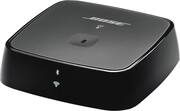
The Bose Soundtouch Wireless Link has been feeding my Bose Companion 3 Series II speakers for a couple of weeks now making them gloriously wireless! I use the 2.1 computer system as bookshelf speakers and they fill our library with fantastic sound quality. Now with the Link, the speakers are Bluetooth and wi-fi connected and are easily controlled with the SoundTouch app on our phones and tablets. If you are considering making your current speakers wireless with this Bose Soundtouch Link, here are some thoughts to consider before you buy. First the positives... - The adaptor is small! As soon as I opened the box I was impressed with the size. The footprint is about that of the average bar of soap, yet it does so much. This thing has Bluetooth, wifi, an optical/analog audio-out jack, an audio-in jack and all kinds of other internal circuitry no-doubt. Yet, it remains small enough to sit inconspicuously just about anywhere. - All needed wires are included. Optical, RCA, 3.5 mm - they are all there. - Set-up is simple. I have read a couple of reviews where people said they had to call Bose for help with configuration. Not my experience. I found that the app itself gave perfect instructions and walked me though every part of the set-up. The entire process would have taken just 5 minutes except that the Link had to download and install a firmware update. - The Soundtouch app is feature rich. Seriously there is so much to do and control if you want to. The whole experience is much more flexible than my previous wireless set-up. If you prefer to keep it simple then you can program the system to play a selection of six presets with a touch of a button. Hopefully we can ad some actual SoundTouch speakers in the future where we can just press one of the six preset buttons on top of the speaker. No app needed! The not so great... - The user interface lacks. The app is nice, but just not as intuitive as a native Apple app would be. It looks and feels more like an Android or Windows app even on my iPhone. My suspicion is that the app is designed by engineers as opposed to actual app designers :). Nothing horrible here, but still room for refinement. - The other downside is that streaming suddenly quits once every several hours. Again not horrible. Closing the App and pushing play again immediately fixes the problem. Just still a little buggy. From what I have read, Bose keeps updating and making the app better. In the end, the Bose SoundTouch Wireless Link may not be for everyone but it really deserves a try. Personally, I hope to eventually make all my existing powered speakers wireless with Bose because for me the SoundTouch ecosystem does feel like the future of wireless music.
Posted by David
- Rated 5 out of 5 stars
Great for integrating to your old stereo system
The SoundTouch Wireless Link Adapter is a wonder little adapter to add SoundTouch capabilities to your old media systems. I love my SoundTouch SA-5 amp, my two SoundTouch 10 and SoundTouch 20 for the rest of my house but I like the way I have my family room's surround sound systems is set up with my Onkyo Receiver and Bose Ceiling/Wall Speakers. But yet I was missing the SoundTouch system integration in that room. SoundTouch Wireless Link Adapter solves integration problem for me. I hooked up the Link Adapter to my receiver's CD in via the fiber optical port. Now I can have SoundTouch system throughout my house. The sound coming from my system sound just as good if not better than my old CD player ( I actually removed it after installing the Link Adapter ). The installation of the SoundTouch Wireless Link Adapter is just as easy as adding Bose SoundTouch 10 or 20. Now I can control every speaker in my house through the SoundTouch App. This Christmas I will be able to play Christmas all through the house.
Posted by Merv61
- Rated 4 out of 5 stars
Great addition to an older stereo system
I decided to try the Bose SoundTouch Wireless Link in an older Bose Lifestyle system since I already have a Bose Waveradio with SoundTouch that I like very much. As I expected this new SoundTouch Wireless Link allows me to listen stream music on my Bose Lifestyle system without the need to have my iPad directly wired to the system. I used Amazon Music with the system and I am really happy how it sounds my Bose Lifestyle. I like that I can remotely control the wireless link adaptor from my iPhone and iPad. I also like that I can link the other SoundTouch devices and play the same music in other rooms at the same time. The application was recently updated and it has a new design which I think that it's harder to navigate. The Amazon Music part of the application needs work. You cannot do a search for a specific artist. I didn't have the same issue with the Pandora side of the Bose application. The Amazon Music playlist do not show in the Bose application. The device also stops playing music after a while, that becomes an issue when you have to check on the issue multiple times a day. Overall, I like the device but the Bose application needs improvement.
Posted by wilreyca
- Rated 4 out of 5 stars
Easy to use, meet my needs and expectations.
Bose is an equivalent of reliability, quality, ease of use, predictability. I eill continue buying Bose products.
Posted by Gladiator
- Rated 5 out of 5 stars
Great gadget!
This unit is absolutely great! Our Bose wave system is at least 8 years old. Rather than spend money on a new model that was capable of receiving satellite signal reception, we did our research and found this unit was available. Very easy to hook up, downloaded the Soundtouch wireless app and that was it. I highly recommend this unit.
Posted by Cytheguy