Rating 4.7 out of 5 stars with 1629 reviews
4.7- Sound Quality (1172)
- Ease of use (265)
- Bluetooth (144)
- Size (122)
- CD Player (80)
- Price (30)
Customer Images
The vast majority of our reviews come from verified purchases. Reviews from customers may include My Best Buy members, employees, and Tech Insider Network members (as tagged). Select reviewers may receive discounted products, promotional considerations or entries into drawings for honest, helpful reviews.
- Rated 5 out of 5 stars
Small Size, Huge Quality and Sound
This little sound system is huge in quality! It fits perfectly in a smaller space but is just as loud and clear as any large system. It's great for people of the older generation--my husband and I are in our 50's--because it's very easy to use, and it has AM/FM radio and CD options in addition to Bluetooth capability. It honestly fits every one of our listening needs. It fills every inch of our home with beautiful music--we love it!
Posted by Jenigin
- Rated 5 out of 5 stars
Great sound Easy set up
This is our 4th piece of Bose equipment. It's our first wave radio. It has the Bose sound for sure. Fills the room with great sound. Looks nice too and takes up less space than the old stereo system it replaced.
Posted by DeBo
- Rated 5 out of 5 stars
Love this device!!
I absolutely love this music system!! Not only can I listen to CD’s but I can Bluetooth my Sirius XM, Pandora, iPhone playlist and so much more! The sound quality is fabulous! Nice design!
Posted by Deb1
- Rated 5 out of 5 stars
Great sound!
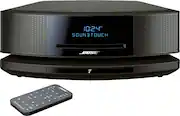
The Bose Wave Sound Touch Music System IV is a great addition to our living room where we like to listen to the radio or favorite CDs we've collected over the years. It is attractive and just the right size. Love being able to control the system from across the room with the remote control! Recommend this product. Worth the money!
Posted by Hank
- Rated 5 out of 5 stars
BOSE WAVE IV
GOT MY BOSE WAVE IN A DAY. FAST. THE WAVE IV IS EYE APPEALING WITH GREAT SOUND. THIS IS MY SECOND BOSE. HAD MY FIRST ONE FOR OVER FIFTEEN YEARS,WAS USED EVERYDAY,FINALLY GAVE UP OPERATING.BOSE HAVE A DIFFERENT SETUP. DIFFERENT PEDESTAL WITH BLUETOOTH/WIFI. GREAT BUY.
Posted by GANZ1